
September 2024 Mastodon Posts
Instructions
Desktop: Hover or click to play videos and GIFs
Mobile: Tap missing videos and GIFs to preview. Tap post to view and play media
Instructions
Desktop: Hover or click to play videos and GIFs
Mobile: Tap missing videos and GIFs to preview. Tap post to view and play media
You may already be familiar with Skip as a tool for bringing your Swift iOS apps to Android. Skip takes a novel transpilation approach, where we integrate with the Xcode build system to convert your Swift code into Kotlin ↗. This allows us to create an Android library for every build of your Swift package, or to launch an Android version of your SwiftUI app on every Xcode Run.
We’ve discussed the advantages of a transpilation-based strategy in the past. But despite the fact that Android is a Java/Kotlin-oriented platform, there are also significant benefits to compiled code. Skip has featured support for integrating with C code on both Android and iOS for a long time. It only makes sense that our transpiled Swift code should also integrate with compiled Swift code.
 {: style=“text-align: center; width: 200px; margin: auto;”}
And so we are excited to announce the first technology preview of a native Swift toolchain and driver for Android! This toolset enables developers to build and run Swift executables and test cases on a connected Android device or emulator.
On a macOS development machine with Xcode ↗ and Homebrew ↗ installed, you can install the Swift 6.0 Android toolchain by opening a terminal and running:
brew install skiptools/skip/swift-android-toolchain@6.0This will download the Swift Android SDK, along with all the dependencies it needs to build, run, and test Swift packages on Android.
If you’re an existing Skip user, make sure to also update your skip copy to version 1.1.1+:
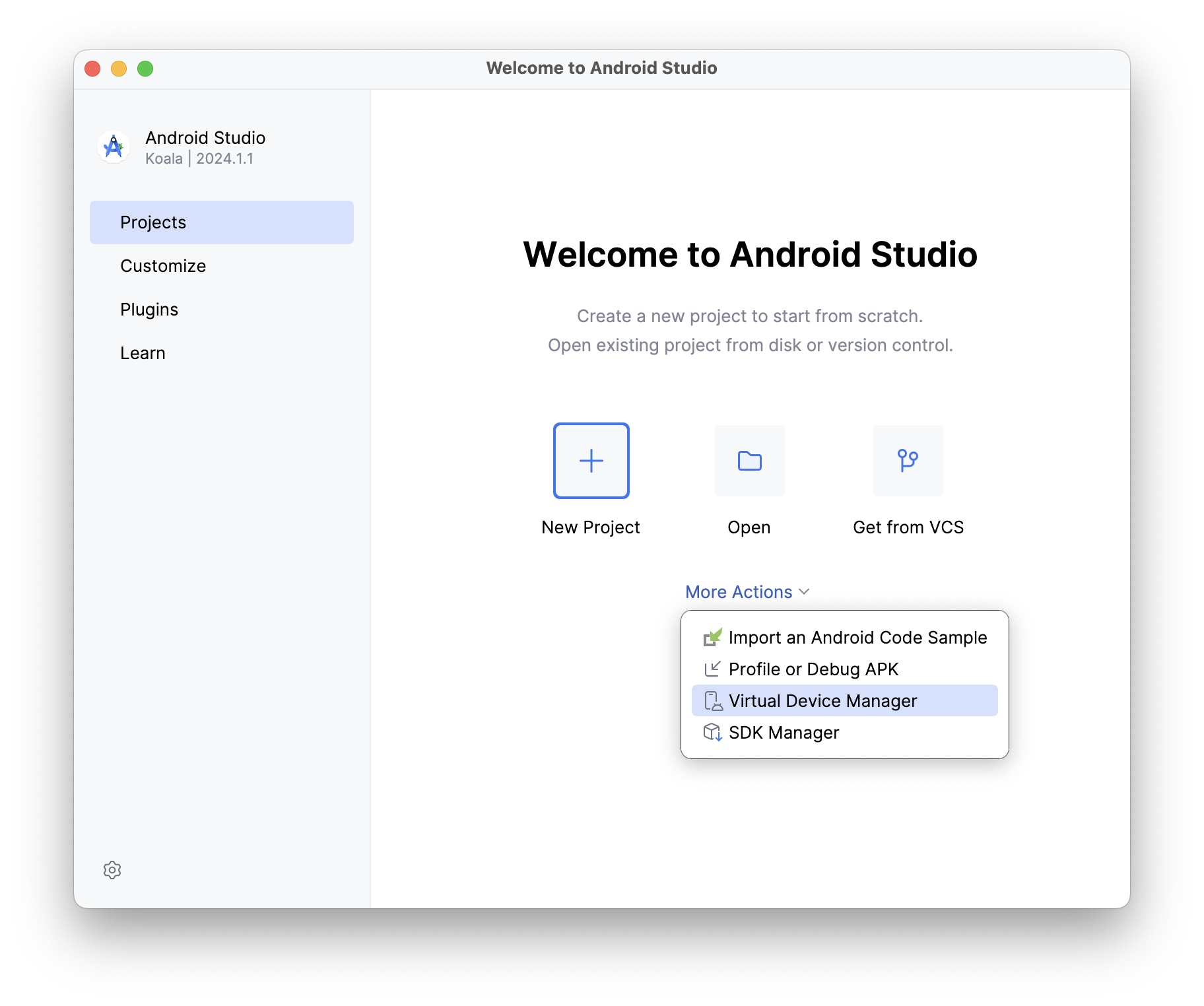
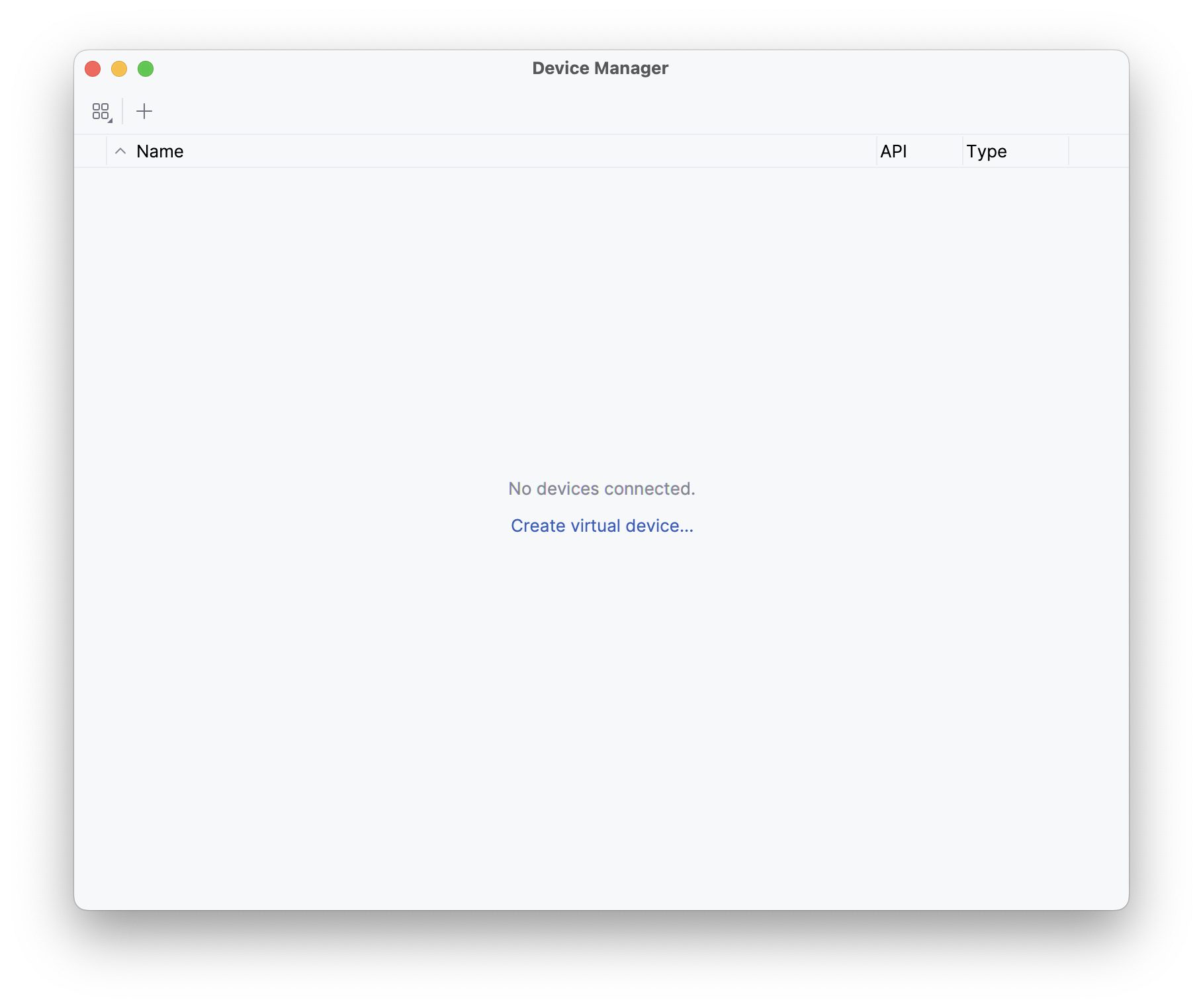
skip upgradeUnless you have an Android device handy, you will need to install the Android emulator in order to run executables and test cases in a simulated Android environment. The simplest way to do this is to download and install Android Studio ↗, then launch it and open the “Virtual Device Manager” from the “More Actions” (or ellipsis menu) of the “Welcome to Android Studio” dialog. On the resulting “Device Manager” screen, select “Create virtual device”.
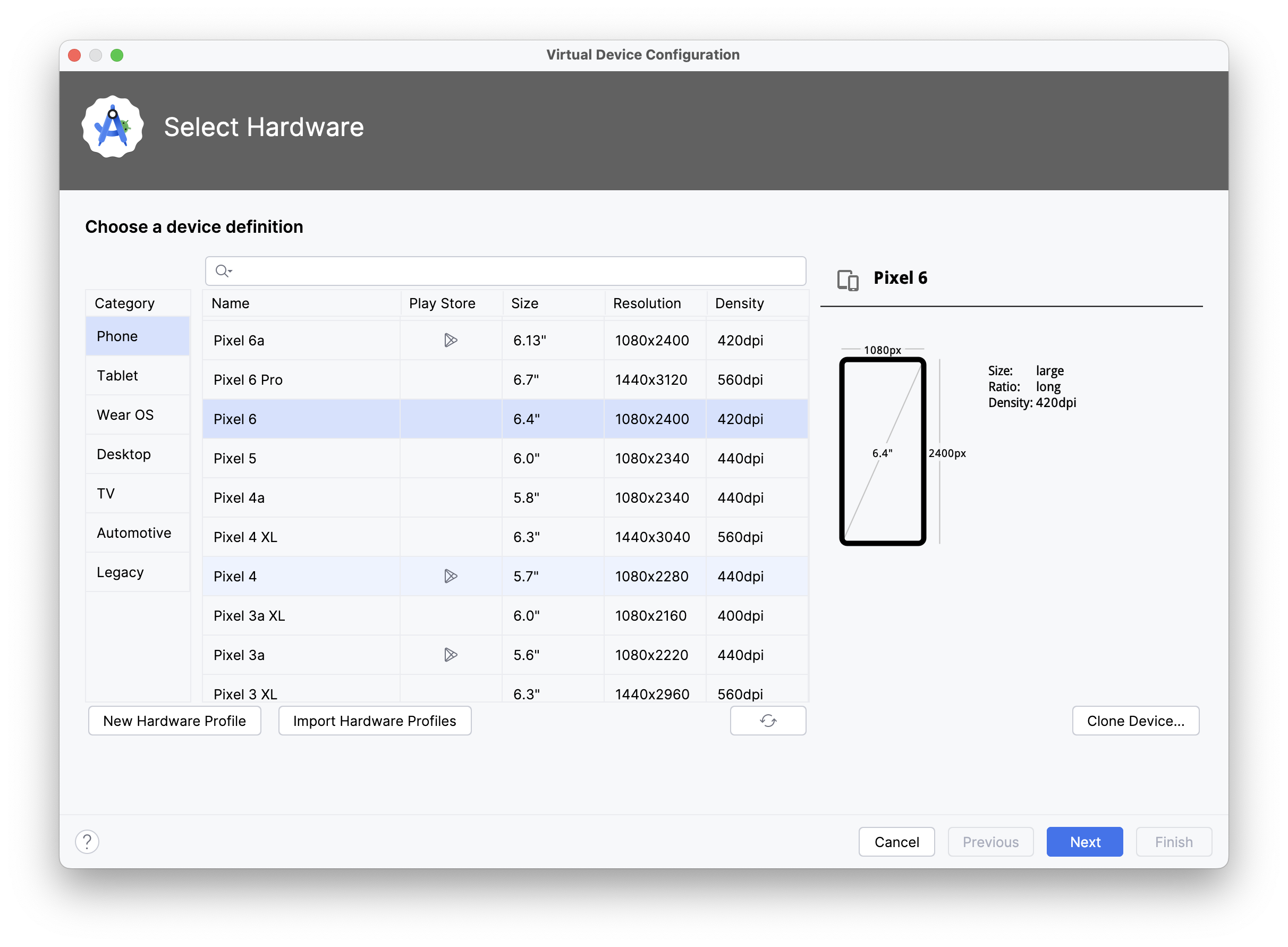
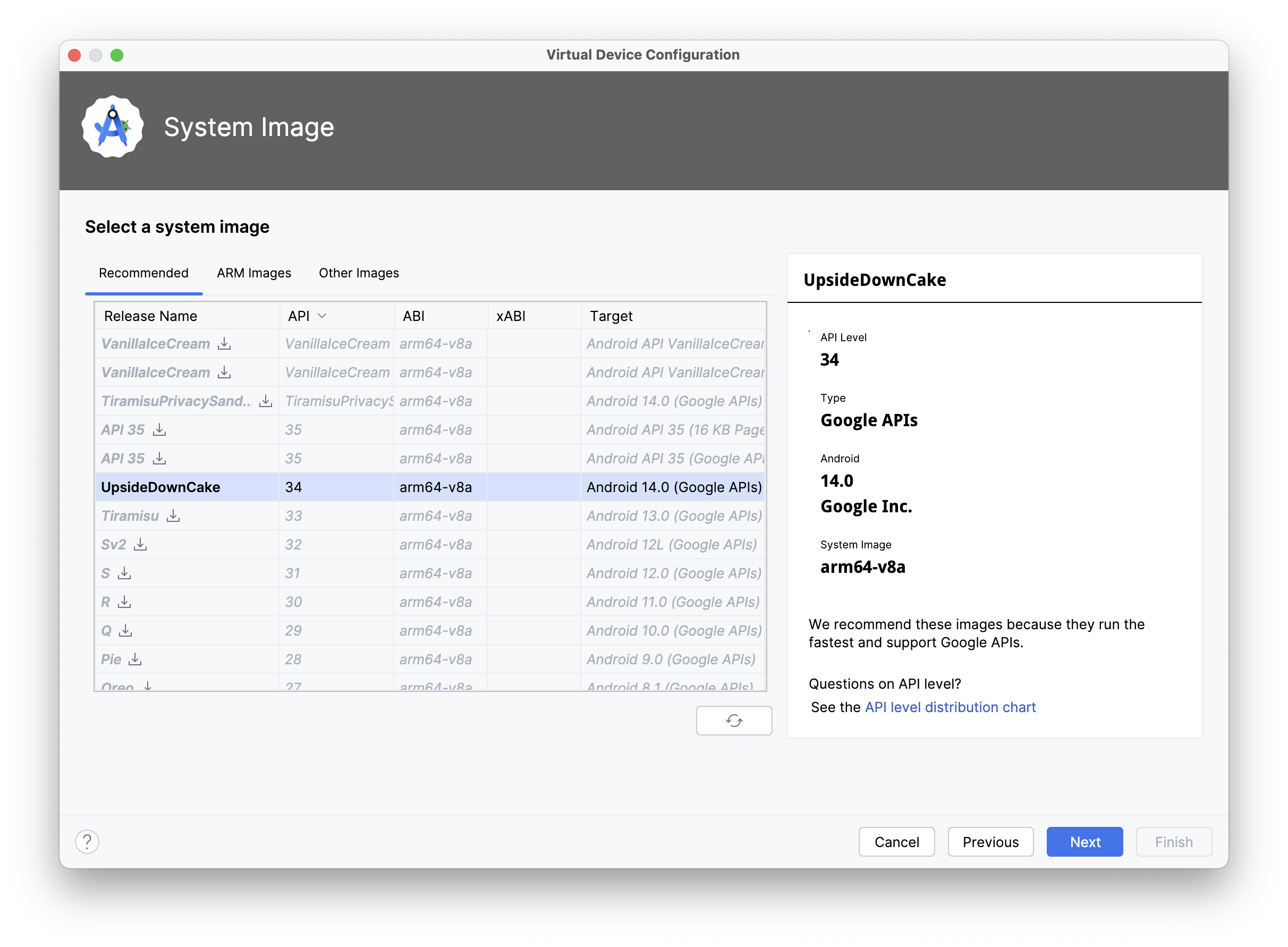
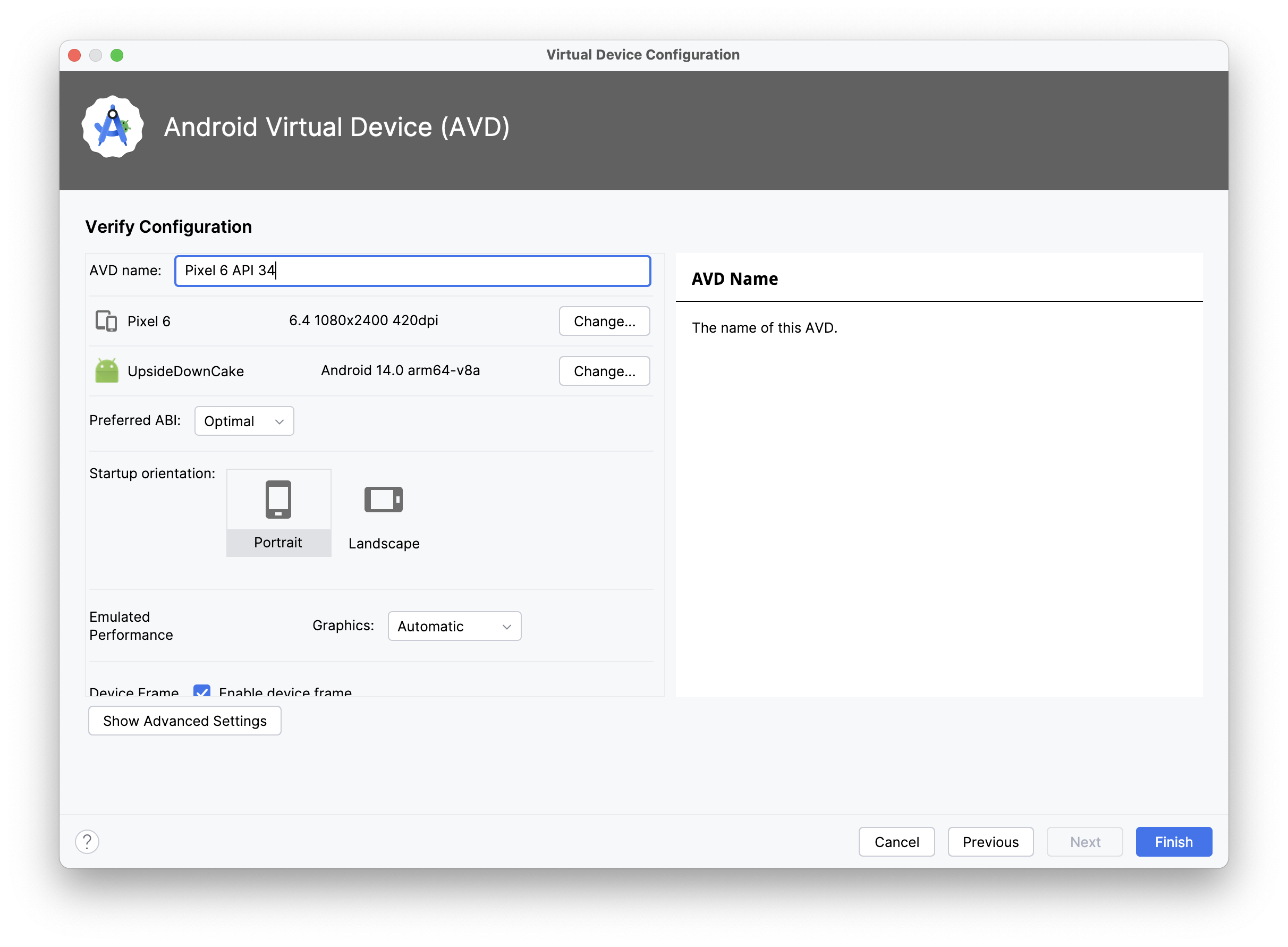
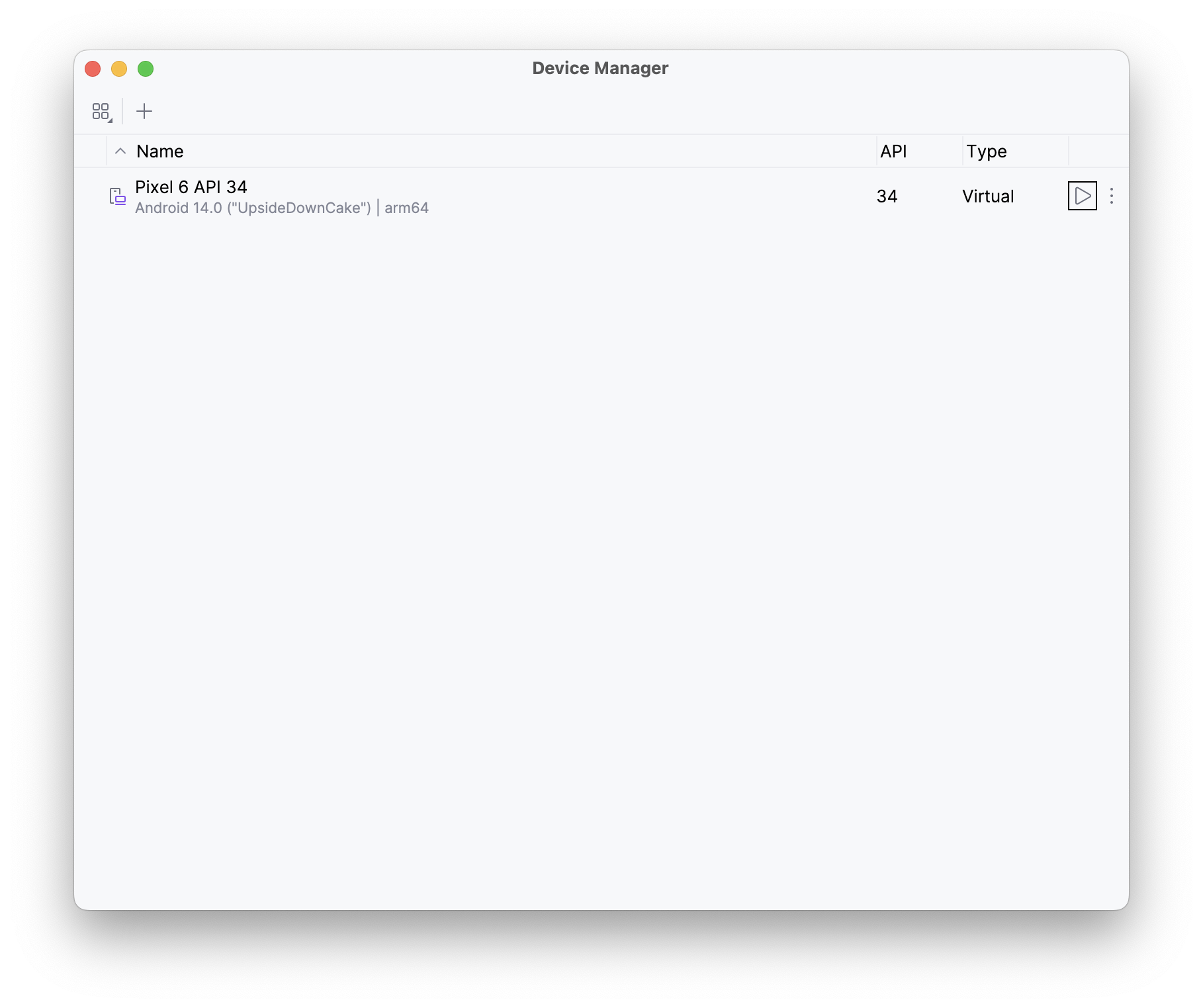
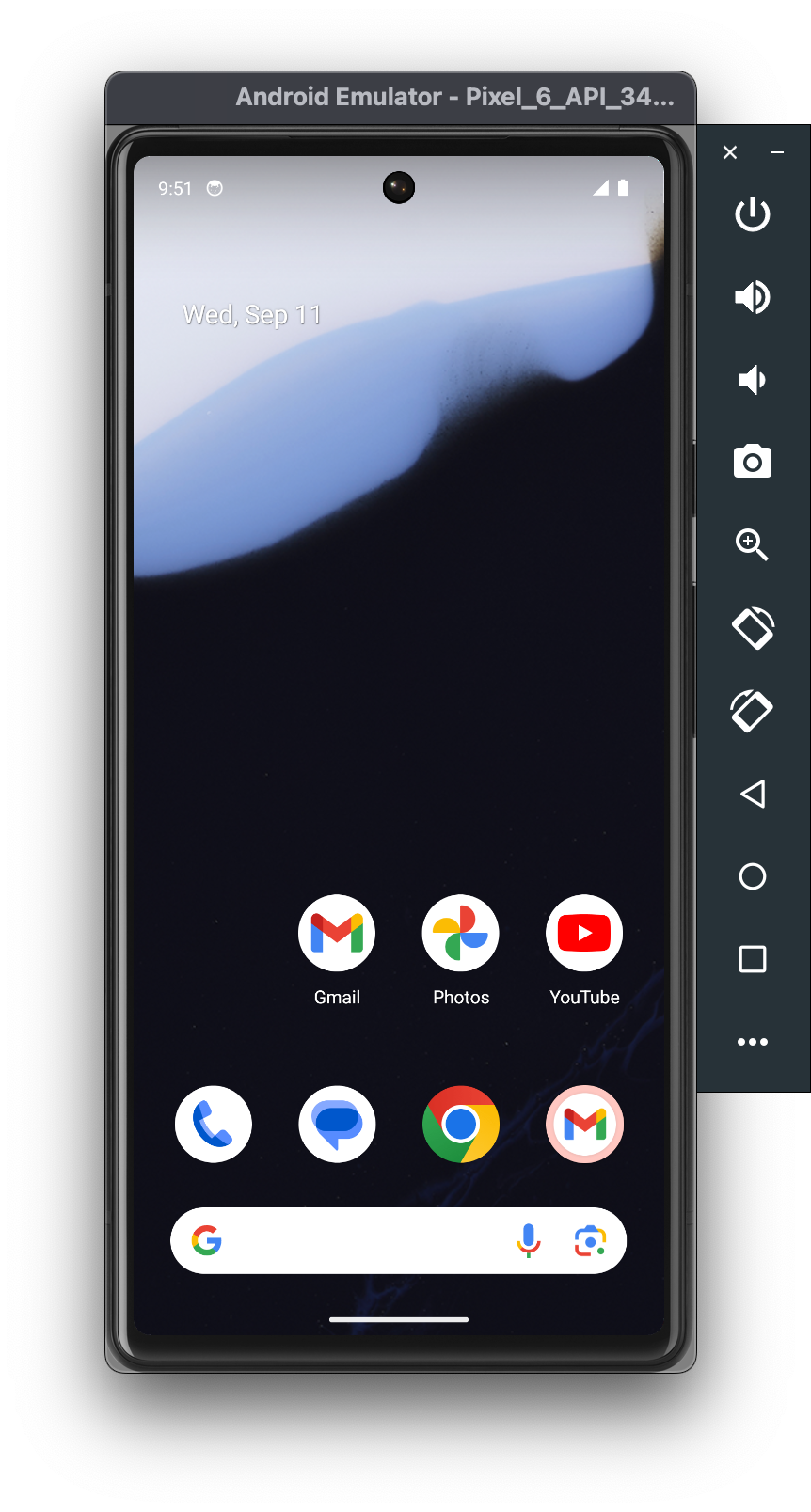
On the “Select Hardware” screen, select a device (e.g., “Pixel 6”) and then on the “Select a system image” screen select one of the recommended images (e.g., “UpsideDownCake”, a.k.a. API 34), and then on the next screen name the device and select “Finish”. When you return to the “Device Manager” screen, you will see a new device (like “Pixel 6 API 34”), which you can then launch with the triangular play button. A little window titled “Android Emulator” will appear and the operating system will boot.
Now that you have everything set up and have launched an Android emulator (or connected a physical Android device with developer mode enabled ↗), it’s time to run some Swift!
Open a terminal and create a new Swift command-line executable called “HelloSwift”:
% mkdir HelloSwift% cd HelloSwift% swift package init --type=executable
Creating executable package: HelloSwiftCreating Package.swiftCreating Sources/main.swift
Just to make sure it works on macOS, run the program with the standard swift run command:
% swift run HelloSwift
Building for debugging...Build of product 'HelloSwift' complete! (1.80s)
Hello, world!
And now, we will build and run it on the Android emulator (or device) using the Swift Android driver, which we include as part of the skip tool that was installed along with the toolchain:
% skip android run HelloSwift
Building for debugging...Build complete! (10.90s)
[✓] Check Swift Package (0.68s)[✓] Connecting to Android (0.05s)[✓] Copying executable files (0.25s)
Hello, world!Viola! There’s Swift running on Android. And just to prove to that we are really running on a different host, edit the Sources/main.swift file with your favorite editor (or run xed Sources/main.swift to edit it in Xcode), and add a platform check:
#if os(Android)print("Hello, Android!")#elseif os(macOS)print("Hello, macOS!")#elseprint("Hello, someone other platform…")#endifThen run it on both macOS and Android:
% swift run HelloSwift
Building for debugging...Build of product 'HelloSwift' complete! (0.47s)
Hello, macOS!
% skip android run HelloSwift
Building for debugging...Build complete! (0.89s)
[✓] Check Swift Package (0.23s)[✓] Connecting to Android (0.04s)[✓] Copying executable files (0.23s)
Hello, Android!Command-line tools are fun, but to really exercise Swift on Android, we want to be able to run test suites. This is how developers interested in creating cross-platform frameworks will be able to check for – and resolve – issues with their Swift code arising from platform differences.
Fortunately the skip android driver includes not just the run command,
but also the test command, which will connect to the Android emulator/device
and run through an XCTest ↗ test suite
in the same way as swift test does for macOS.
To demonstrate, we can run the test suite for Apple’s swift-algorithms ↗ package, to make sure it runs correctly on Android:
% git clone https://github.com/apple/swift-algorithms.gitCloning into 'swift-algorithms'...…Resolving deltas: 100% (1054/1054), done.
% cd swift-algorithms% skip android test
Fetching https://github.com/apple/swift-numerics.git from cacheFetched https://github.com/apple/swift-numerics.git from cache (0.87s)Computing version for https://github.com/apple/swift-numerics.gitComputed https://github.com/apple/swift-numerics.git at 1.0.2 (0.57s)Creating working copy for https://github.com/apple/swift-numerics.gitWorking copy of https://github.com/apple/swift-numerics.git resolved at 1.0.2
Building for debugging...…[92/93] Linking swift-algorithmsPackageTests.xctestBuild complete! (25.91s)
[✓] Check Swift Package (0.74s)[✓] Connecting to Android (0.06s)[✓] Copying test files (0.27s)
Test Suite 'All tests' started at 2024-09-10 20:24:17.770Test Suite 'swift-algorithms-C7A0585A-0DC2-4937-869A-8FD5E482398C.xctest' started at 2024-09-10 20:24:17.776Test Suite 'AdjacentPairsTests' started at 2024-09-10 20:24:17.776Test Case 'AdjacentPairsTests.testEmptySequence' started at 2024-09-10 20:24:17.776Test Case 'AdjacentPairsTests.testEmptySequence' passed (0.001 seconds)…Test Case 'WindowsTests.testWindowsSecondAndLast' started at 2024-09-10 20:24:20.480Test Case 'WindowsTests.testWindowsSecondAndLast' passed (0.0 seconds)Test Suite 'WindowsTests' passed at 2024-09-10 20:24:20.480     Executed 8 tests, with 0 failures (0 unexpected) in 0.004 (0.004) secondsTest Suite 'swift-algorithms-C7A0585A-0DC2-4937-869A-8FD5E482398C.xctest' passed at 2024-09-10 20:24:20.480     Executed 212 tests, with 0 failures (0 unexpected) in 2.702 (2.702) secondsTest Suite 'All tests' passed at 2024-09-10 20:24:20.480     Executed 212 tests, with 0 failures (0 unexpected) in 2.702 (2.702) seconds
Everything passes. Hooray!
Not every package’s tests will pass so easily: Android is based on Linux – unlike the Darwin/BSD heritage of macOS and iOS – so there may be assumptions your code makes for Darwin that don’t hold true on Linux. Running through a comprehensive test suite is the best way to begin isolating, and then addressing, these platform differences.
Command line executables and unit tests are all well and good, but “Hello World” is not an app. To create an actual Android app, with access to device capabilities and a graphical user interface, you need to work with the Android SDK, which is written in Java and Kotlin. And you need to package and distribute the app in Android’s own idiomatic way, with self-contained libraries embedded in the application’s assembly.
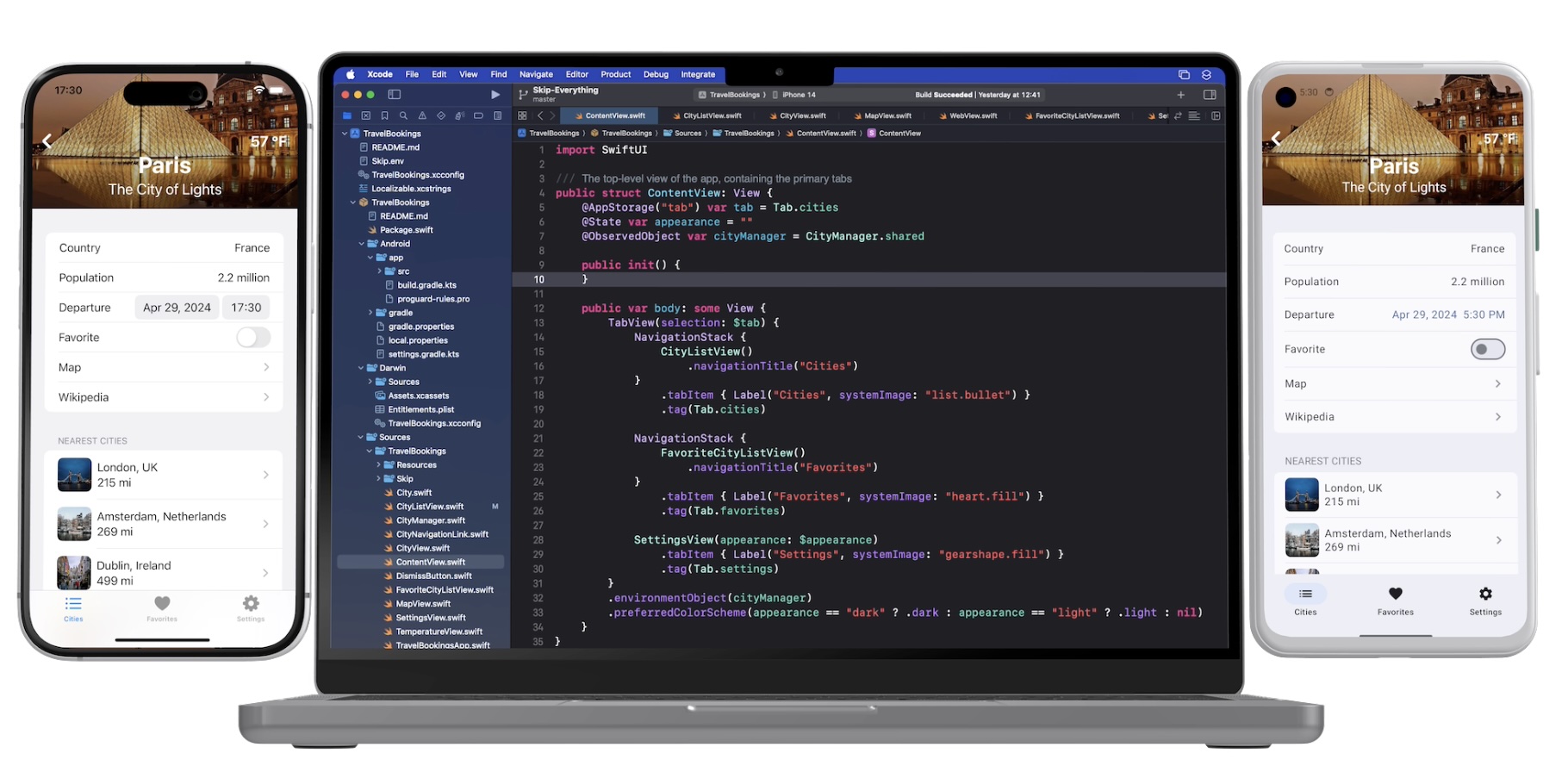
This is where integration with Skip’s broader ecosystem comes into play. Additional installments of this series explore Skip’s system for transparently bridging compiled Swift to Java, Kotlin, and transpiled Swift - including Skip’s existing SwiftUI support for Android. This allows the best of all worlds: transpiled Swift to talk to Android libraries, SwiftUI on top of Jetpack Compose ↗, and business logic and algorithms implemented in compiled Swift!
Additional posts in the native Swift on Android series:
The Swift toolchain for Android is the culmination of many years of community effort, in which we (the Skip team) have played only a very small part.
Even before Swift was made open-source, people have been tinkering with getting it running on Android, starting with Romain Goyet’s “Running Swift code on Android” ↗ attempts in 2015, which got some basic Swift compiling and running on an Android device. A more practical example came with Geordie J’s “How we put an app in the Android Play Store using Swift” ↗ in 2016, where Swift was used in an actual shipping Android app. Then in 2018, Readdle published “Swift for Android: Our Experience and Tools” ↗ on integrating Swift into their Spark app for Android. These articles provide valuable technical insight into the mechanics and complexities involved with cross-compiling Swift for a new platform.
In more recent years, the Swift community has had various collaborative and independent endeavors to develop a usable Swift-on-Android toolchain. Some of the most prominent contributors on GitHub are @finagolfin ↗, @vgorloff ↗, @andriydruk ↗, @compnerd ↗, and @hyp ↗. Our work merely builds atop of their tireless efforts, and we expect to continue collaborating with them in the hopes that Android eventually becomes a fully-supported platform ↗ for the Swift language.
Looking towards the future, we are eager for the final release of Swift 6.0, which will enable us to publish a toolchain that supports all the great new concurrency features, as well as the Swift Foundation ↗ reimplementation of the Foundation C/Objective-C libraries, which will give us the the ability to provide better integration between Foundation idioms (bundles, resources, user defaults, notifications, logging, etc.) and the standard Android patterns. A toolchain is only the first step in making native Swift a viable tool for building high-quality Android apps, but it is an essential component that we are very excited to be adding to the Skip ecosystem.
Welcome to the August edition of the Skip.tools newsletter! This month we will showcase some of the improvements and advancements we've made to the Skip platform, along with some current events and a peek at our upcoming roadmap.
Skip 1.0
The big news this month was the launch of Skip 1.0! After over a year in development, Skip is finally ready for general production use. The launch has made a big splash, even being featured on the front page of Hacker News. There has never been a better time to start a new project with Skip and bring your app to the entire mobile marketplace!
New FREE Indie Pricing Tier
As part of the general availability of Skip, we are also delighted to announce the new Skip Indie tier, which enables solo developers to use Skip to build their dual-platform projects for free.
Markdown Support
On a technical front, a long-requested feature for SkipUI has been to support SwiftUI's automatic markdown support for Text elements. Well, now it's here! Styling text with simple markdown elements has never been simpler.
Reminder: Skip Showcase on the Stores
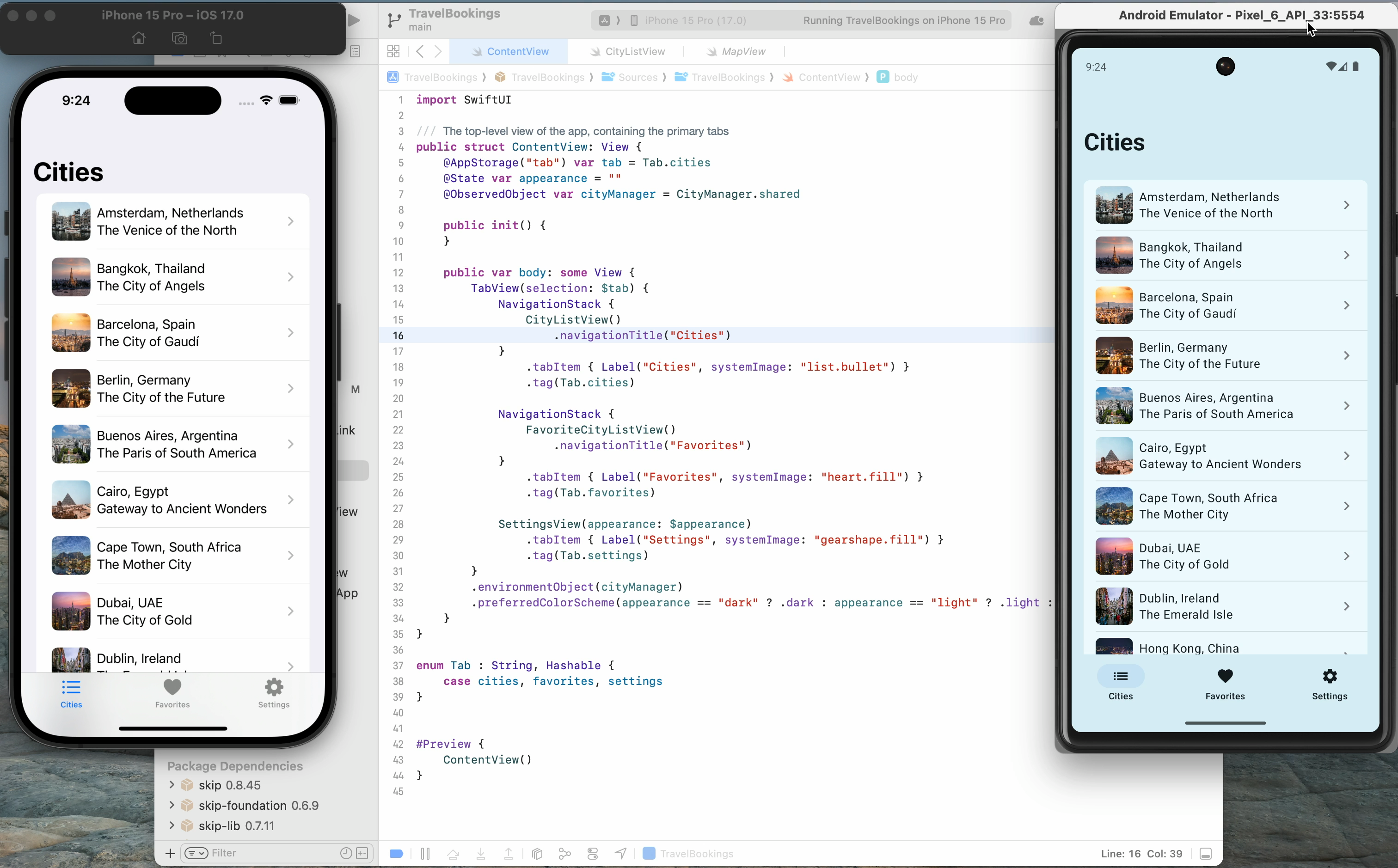
The Skip Showcase app (/docs/samples/skipapp-showcase/) has long been our go-to for providing a side-by-side comparison of SwiftUI components with the Jetpack Compose equivalents that SkipUI provides. Browsing thought these components simultaneously on an iPhone and Android device gives a good sense Skip's capabilities and power, and is a great way to demonstrate Skip's benefits to project managers and stakeholders before breaking ground on a new project.
In order to make it even easier to get this handy app on your devices, we've published the Skip Showcase app to both the Apple App Store (https://apps.apple.com/us/app/skip-showcase/id6474885022) as well as the Google Play Store (https://play.google.com/store/apps/details?id=org.appfair.app.Showcase). This enables you to quickly grab a demo app that highlights Skip's power, and feel for yourself the benefit of using a genuinely native app on both platforms. Download it today and see for yourself what Skip can do!
New Skip Showreel Video
We've published a new 3-minute video summarizing Skip's capabilities. This is a great video to share with your colleagues and management to highlight some of the benefits of using Skip to bring your app to the entire matketplace. Check it out at /tour/skip-showreel/
That's all for now!
You can follow us on Mastodon at https://mas.to/@skiptools, and join in the Skip discussions at http://forums.skip.dev/. The Skip FAQ at /docs/faq/ is there to answer any questions, and be sure to check out the video tours at /tour/. And, as always, you can reach out directly to us on our Slack channel at /slack/.
Happy Skipping!
We’re thrilled to announce the release of Skip 1.0!
Skip brings Swift app development to Android. Share Swift business logic, or write entire cross-platform apps in SwiftUI.
Skip is the only tool that enables you to develop genuinely native apps for both major mobile platforms with a single codebase. Under the hood, it uses the vendor-recommended technologies on each OS: Swift and SwiftUI on iOS, Kotlin and Compose on Android. So your apps don’t just “look native”, they are native, with no additional resource-hogging runtime and no uncanny-valley UI replicas.
Skip also gives you complete access to platform libraries. Directly call any Swift or Objective C API on iOS, and any Kotlin or Java API on Android - no complex bridging required!
Skip has been in development for over a year. It has an enthusiastic community of users developing a wide range of apps and continually improving Skip’s ecosystem of cross-platform open source libraries.
Welcome to the July edition of the Skip.tools newsletter! This month we will showcase some of the improvements and advancements we've made to the Skip platform, along with some current events and a peek at our upcoming roadmap.
Swift 6 and Kotlin 2 Support
The past couple of months saw two important major releases that affect anyone writing modern iOS and Android apps. Kotlin 2 was released at the end of May, and a preview of Swift 6 was added to the Xcode 16 beta in June. Both of these language releases are evolutionary, but they did include some important changes and enhancements.
Skip has kept pace: we now generate Kotlin 2 Android projects by default, and you can use Swift 6 language features like typed throws. Some minor Android build file tweaks may be necessary to modernize pre-existing Skip projects, but overall we are delighted how smooth the transition has been. Skip is designed to enable your apps to keep up with the constant evolution of the primary development languages for both iOS and Android.
From Scrumdinger to Scrumskipper
Honed and updated over the years, Apple’s Scrumdinger tutorial is an hours-long step-by-step guide to building a complete, modern SwiftUI app. It exercises both built-in UI components and custom drawing, and it takes advantage of Swift language features like Codable for persistence. As its rather unique name implies, the Scrumdinger app allows users to create and manage agile programming scrums on their phones.
In our blog post, we show how we took the Scrumdinger app and brought it to Android through the power of Skip. This new "Scrumskipper" app demonstrates how an existing iOS-only app can be incrementally turned into a dual-platform iOS+Android app.
Refreshable lists, GeometryReader, and ScrollViewReader
The pull-to-refresh gesture has been a standard affordance in mobile apps for updating list contents for some time now, and SwiftUI has had built-in support for the operation since last year. We've brought this great feature over to Android by bridging SwiftUI’s .refreshable() modifier to an experimental Compose API for supporting the pull-to-refresh operation, enabling you to add in support for list refreshability with one line of code.
In addition, we've added some more advanced SwiftUI API support, including the ability to exactly identify locations in SwiftUI views using GeometryReader and the ability to jump to individual list elements using ScrollViewReader.
User Contributions: SkipAV and SkipFirebase
All the Skip runtime frameworks are free and open-source software, from the low-level SkipFoundation to the high level SkipUI. In addition, we have a whole constellation of optional frameworks that enable additional functionality, from SQLite database support (SkipSQL) to Lottie animations (SkipMotion).
One of our frameworks – SkipAV – enables bridging a subset of the AVKit framework for audio and video support. The initial release included only very basic support for playing videos, but recently a user who was interested in the project added support for recording from the microphone, along with some audio playback improvements.
Another of our frameworks, SkipFirebase, provides support for Google Firebase, a very popular backend-as-a-service platform used in many mobile applications. And while our original release mostly just supported Firestore – the database layer of Firebase – another interested user recently contributed support for the Auth component, which greatly improves the utility of the framework for all Skip users.
These are just two examples of recent community contributions to the Skip ecosystem. If you would like to learn more about how to help improve Skip's support for various Android features, check out our contribution guide.
That's all for now
You can follow us on Mastodon at https://mas.to/@skiptools, and join in the Skip discussions at http://forums.skip.dev/. The Skip FAQ at /docs/faq/ is there to answer any questions, and be sure to check out the video tours at /tour/. And, as always, you can reach out directly to us on our Slack channel at /slack/.
Happy Skipping!