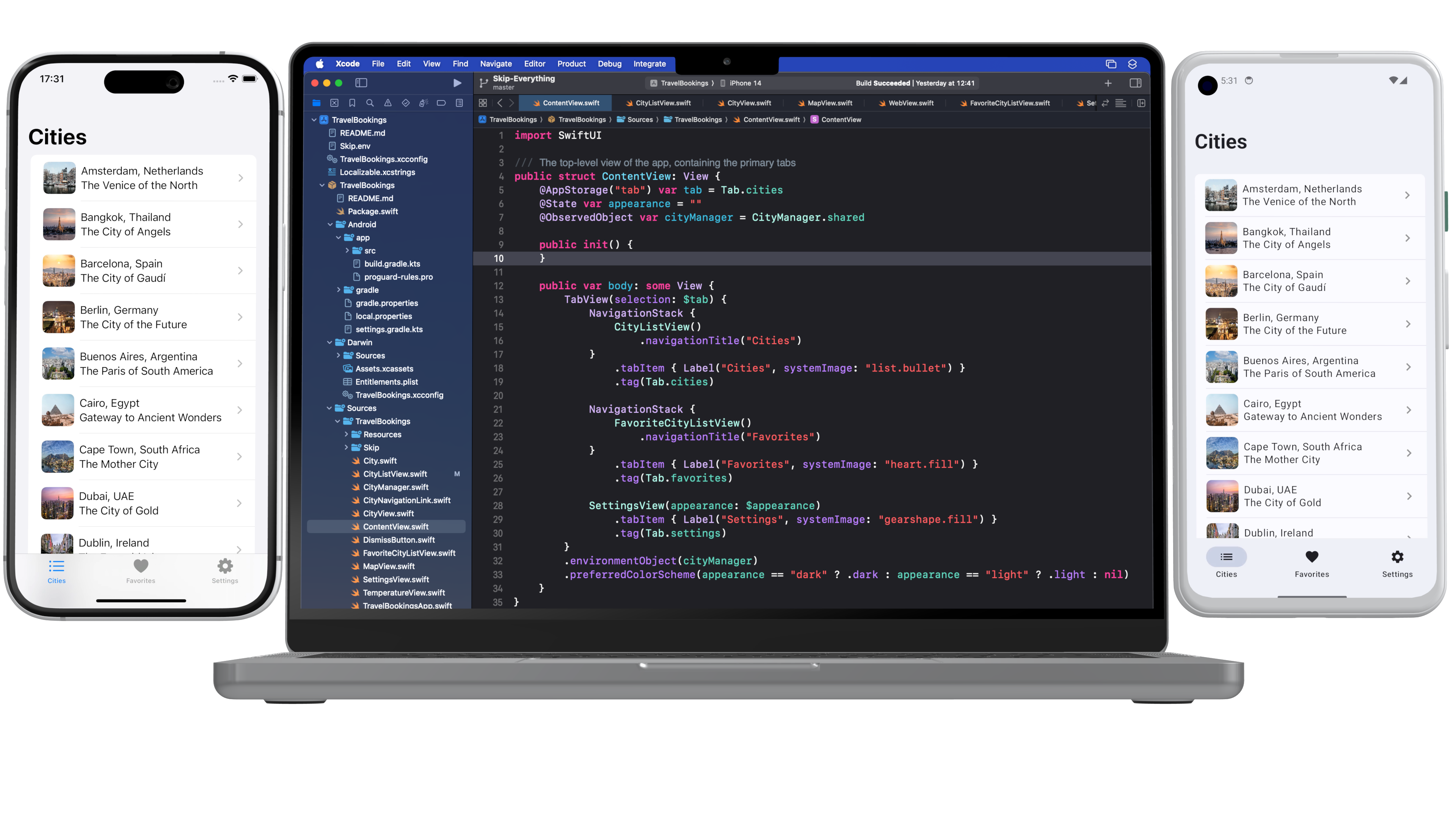
Skip’s open-source SkipUI library ↗ implements the SwiftUI API for Android. To do so, SkipUI leverages Compose ↗, Android’s own modern, declarative UI framework.
The parallels between SwiftUI and Compose are striking, especially when it comes to layout. SwiftUI uses HStack, VStack, and ZStack for basic layout, with modifiers like offset and padding to shift or pad the resulting placement. Compose uses Row, Column, and Box for basic layout, and it too has offset and padding modifiers. Compose has one odd omission, however: it doesn’t support negative padding! Supplying a negative value will throw an IllegalArgumentException.
SkipUI must support whatever SwiftUI supports, so internally we’ve replaced the standard Compose padding modifier with our own custom layout that works for both positive and negative values. We present that layout below, in case you find it useful in your own Compose work.
Notes:
SkipUI’s implementation is tied to SwiftUI internals, so this is an untested and simplified port of the actual code.
Important: If you plan to use this in pure Compose code, expose it as a custom modifier ↗ for a more fluent API.
News recently broke ↗ that Google is laying off members of the Dart and Flutter teams. At the same time that Microsoft is ending Xamarin support ↗, many Flutter users are left wondering about the future of the technology stack on which they’ve built their apps.
For what it’s worth, we don’t buy into the speculation that Flutter is about the be killed off. While we believe that Skip has the correct approach to cross-platform mobile development, Flutter is an excellent product with a devoted community. A recent post ↗ by an insider notes that the Google layoffs were broad and didn’t single out the Flutter and Dart teams. Nevertheless, this episode emphasizes the need to always consider the ejectability of the core technologies you use.
“And every one who hears these sayings of Mine and does not do them will be likened to a foolish man who built his house on the sand.”
A software framework is said to be ejectable if you can remove it without completely breaking your app. Ejectability is not binary: having to remove a given framework might only require you to excise certain features, and some frameworks are easier to replace in our apps than others.
Unfortunately, most cross-platform development tools are not ejectable to any degree. If official Flutter support were end-of-lifed, there would not be any path for Flutter codebases to migrate to another technology stack. Dart ↗ is a nice language and Widgets ↗ are cool, but Apple is not about to transition from Swift ↗ and SwiftUI ↗, nor Android from Kotlin ↗ and Jetpack Compose ↗. Languages like Dart and Javascript will forever be
“alien” on both iOS and Android, just as Swift and Kotlin will be the primary, supported, and vendor-recommended languages for the foreseeable future.
Flutter apps would continue to work, and the community would likely maintain the Flutter engine and libraries for quite some time. But the pace of integration with the latest Android and iOS features would slow, and businesses who care about the long-term prospects for their apps would look to move on. Unfortunately, their only option would be something seasoned developers avoid for good reason ↗: a complete re-write.
To be clear, we do not believe that Flutter support is going to end any time soon, and the same goes for other popular cross-platform solutions like React Native. But you should also not take the decision to use these frameworks lightly, because they are not ejectable. If support unexpectedly ends - or if a new Apple or Android platform or feature arrives that these non-native frameworks are not able to integrate with - you have no off-ramp.
Skip’s approach to cross-platform development is fundamentally different. You work in a single codebase, but Skip creates fully native apps for each platform: Swift and SwiftUI on iOS, and Kotlin and Compose on Android. This is in keeping with the plainly-stated, unambiguous advice from the platform vendors themselves:
SwiftUI is the preferred app-builder technology -Apple ↗
Jetpack Compose is Android’s recommended modern toolkit -Google ↗
A cross-platform Skip app is a modern iOS app. Your shared code is written in Xcode using Swift and SwiftUI. For example, here is a simple weather model:
At build time, the Skip tool integrates with Xcode to transpile your iOS codebase into a native Android app written in Kotlin.
As you can see in the sample above, your Swift code does not require any dependencies on Skip. Even integrating Android customization into your app is accomplished without Skip libraries. If you remove all traces of Skip, your iOS app will continue to build and run in Xcode exactly as before.
On the Android side, the Kotlin source code and artifacts that Skip generates are yours, regardless of whether you continue to use Skip. Unlike the iOS app, the translated Android app does rely on Skip libraries to mirror the Foundation, SwiftUI and other Apple APIs that your iOS code likely uses. These libraries, however, are free and open source ↗. Critically, they are not a “runtime” or “engine”. You can continue to use them - or not - without hampering your ability to expand the app and integrate new Android features.
Here is the Kotlin that Skip generates from the sample weather model above. It is not significantly different than Kotlin you’d write by hand. It is longer than the source Swift only because Kotlin does not have built-in JSON decoding, so Skip must add it. (SwiftUI code translated to Skip’s Compose-based UI library for Android is much less idiomatic. If you stopped using Skip you’d likely want to migrate to pure Compose over time, but there would be no immediate need to do so.)
(Skip is not a cloud-based tool, but there is an online playground where you can experiment with Swift-to-Kotlin transpilation.)
Skip is fully ejectable. When you eject Skip, you are left with a native iOS app and a native Android app, both using their respective platform vendor-recommended technologies. You can immediately continue to iterate on these apps, with no rewrites and no pause in your ability to integrate new platform features.
We believe that Flutter’s future is secure, despite what some commentary has speculated. You should, however, carefully consider ejectability alongside the many other factors that go into choosing the cross-platform framework that’s right for your business needs.
Back in 2008 when Abe and I were working on our first iPhone app Stanza, there was a very influential blog post by Loren Brichter, the developer of a popular Twitter client app (back when such things were not only permitted, but encouraged), titled: ”Fast Scrolling in Tweetie1”, which opened with:
Scrolling is the primary method of interaction on the iPhone. It has to be fast. It has to be fast.
This is as true in 2024 as it was in 2008. Which makes it all the more surprising that people are still shipping apps that exhibit scrolling issues. Animation jank, muddy inertia, and dropped frames are among the most common issues that plague applications that were built with frameworks that eschew the platform-native list controls and decide to re-invent the wheel. Scrolling is one of the most commonly cited examples of these apps feeling to users like they are in the “uncanny valley” – that oft-indescribable sense that an app feels not quite right.
Back in 2008, making a high-performance list control for iOS could be quite an involved chore. Anyone who recalls fighting with UIKit’s UITableView and all its warts will remember with a shudder just how persnickety the control could be, and how painful coordinating the mess of Objective-C data sources and delegates would invariably become.
Thankfully, the emergence of SwiftUI in 2019 meant that creating a buttery-smooth list control with thousands of elements is as simple as 5 lines:
List {
ForEach(1..<1_000) { i in
NavigationLink("Item \(i)", value: i)
}
}
This example is lifted directly out of the project generated by skip init, as shown in the getting started guide. Run this on your iPhone and fling-scroll the list to your heart's content: never a stutter or pause to be found, and the physics of the interaction feel perfectly correct for the device. This is because SwiftUI's List doesn't re-invent the underlying UIKit list components, but rather it manages them for you. All the complexity and error-prone bookkeeping of the underlying UIKit controls are automatically taken care of.
On the Android side, the equivalent Jetpack Compose list control is a LazyColumn. Compose names are different from SwiftUI, but the effect is the same – you can create a silky-smooth list control with just this 5-line snippet:
LazyColumn {
items(List(1000) { it }) { item ->
Text(text ="Item ${item}")
}
}
And in the same way as SwiftUI’s List wraps and manages the underlying UIKit family of Objective-C classes, Compose’s Kotlin LazyColumn sidesteps having to use the Java RecyclerView and LinearLayoutManager classes from the older Android SDK and manages all the complexity of displaying a high-performance list of items. When coming from the old-school imperative APIs, creating user interfaces with the modern declarative style is a breath of fresh air.
The fact that these vendor-supported toolkits – SwiftUI and Compose – are built atop the platform-native scrolling mechanics stands in contrast with some of the other cross-platform frameworks created in “alien” languages like Dart and JavaScript, that instead attempt to implement all this complexity on their own.
Back in 2012, Benjamin Sandofsky wrote about “The Framework Tax2”:
For native apps, performance is critical to a great user experience. Users notice jerky scrolling, and performance can make or break a feature
Back then, the popular solutions purporting to simplify cross-platform app development were simple WebView-based wrappers designed to make JavaScript and HTML look and feel like a real app. These particular attempts have fallen out of fashion and have been replaced by newer offerings like Flutter, React Native, and Xamarin that use Dart, JavaScript, and C# (respectively) to attempt to abstract away the platform-native frameworks and provide their own homogeneous API for developers to create their apps with.
But what hasn’t changed is that each of these attempts still adds a layer of indirection and overhead to the app, as has been analyzed and confirmed by academic research3. They all require writing your app in a separate language and IDE, and then bundling the distributed app with a separate garbage-collected runtime layer, as well as often including a graphics engine that performs the low-level drawing. All of these frameworks introduce overhead: battery-killing inefficiencies4, pauses from garbage-collection, animation jank from the graphics technology5, or friction resulting from bridging between an alien language and the platform’s native language. For an overview of these issues, see our Skip comparison page.
And that’s the difference with Skip: when you create your app using Skip, you are coding directly to Apple’s SwiftUI – in Swift – on iOS, and transpiling directly Google’s Jetpack Compose – in Kotlin – on Android. These are the official, vendor-recommended languages and toolkits for creating modern apps. They are as fast as they can conceivably be, and they will continue to be supported by the platform vendors in perpetuity. By transpiling your Swift into Kotlin, Skip avoids the overhead of abstracting the platform from an alien language, but instead embraces each platforms’s strengths and performance potential.
That’s why we are convinced that Skip is the right approach for creating mobile apps while still retaining the benefit of a single codebase. Quite simply, it enables your app to be the uncompromisingly best experience it can possibly be. So go ahead: scroll like it’s 2008, when the mobile world was new, apps were fast, and Tweetie was all the rage!
After writing this, Abe informed me that not only did he, while at Twitter, architect the transition from Loren Brichter’s CoreGraphics-based drawing to UIKit Views in the Twitter app, but he also happened to be working with Benjamin Sandofsky at the time as well. I had no idea. Small world!
{: style=“font-size: 0.8em;”}
Damian Białkowski and Jakub Smołka. “Evaluation of Flutter framework time efficiency in context of user interface tasks.” In: Journal of Computer Sciences Institute 25 https://ph.pollub.pl/index.php/jcsi/article/view/3007 ↗↩
Welcome to the April edition of the
Skip.Tools
Developer Program newsletter!
Skip is the first tool that enables you to build a genuinely native app for both iPhone and Android with a single Swift codebase. This month we have some exciting news, new features and frameworks, and some brand new content for app developers. Let's dive right in!
Early Adopter Discount
First off, we are pleased to announce that the Skip Early Adopter program, which we unveiled last month, is in full swing. For a limited time, the Skip Professional developer program is 50% off, and the Skip Small Business program is 100% off! That's right, if you are a qualifying small business or non-profit, Skip is completely
free
for the first year.
Take our Developer Survey
We're looking for feedback on the technologies that people are using to build their apps and what features are most important to them. The survey is quick and fun, and lets you have a direct influence over the Skip roadmap during our Early Adopter phase:
https://skip.tools/survey
Skip on the Compile Swift Podcast
Abe and Marc were delighted to be invited back to Peter Witham's excellent Compile Swift podcast, where they discussed the present and future directions for Skip, and dove into some interesting technical details of Skip's inner workings, including the secrets to the unbeatable performance of apps that are built using Skip. Check it out at:
https://skip.tools/blog/skip-on-compile-swift-podcast
Updated Comparison Table
We truly believe Skip is the best way to build mobile applications that reach the
entire
marketplace. No other solution offers the same level of user interface polish, raw performance, and seamless integration with the native platform interfaces. We've updated our comparison table to highlight some of the benefits of Skip over alternatives like Flutter, React, and other legacy solutions:
https://skip.tools/compare
Skip Module Updates
Skip is more than just a transpiler – it is also an ecosystem of modular frameworks that work identically on both iOS and Android. The open-source frameworks that are maintained by the Skip team are all located at
https://github.com/skiptools
. Here's a small sample of some of the recent updates to some of our core frameworks:
Lottie animations
The updated SkipMotion packages enables you to include Lottie animations directly in both your iOS and Android apps. With its impeccably smooth rendering, Lottie has become the de-facto solution for adding whimsy and delight to mobile apps. Discover more about the module at
https://skip.tools/docs/modules/skip-motion
and see the sample application at
https://skip.tools/docs/samples/skipapp-lottiedemo
Firebase Firestore
Firebase is one of the most popular solutions for storing and synchronizing your data between your devices and the cloud. Our SkipFirestore module is the first part of a comprehensive SkipFirebase package, and sits atop the official Kotlin and Swift Firebase libraries maintained by Google. Read more about the package at
https://skip.tools/docs/modules/skip-firebase
and take a look at the "FireSide" sample app at
https://skip.tools/docs/samples/skipapp-fireside
Native SQL
The SkipSQL package was recently updated to facilitate using either the vendor-provided sqlite libraries (thereby keeping your app size low), or embedding a full native SQLPlus build, which enables many of the great sqlite extensions that the community has provided over the years: full-text search, encryption, and advanced JSON functions. Read the full documentation at
https://skip.tools/docs/modules/skip-sql
and check out the "Data Bake" sample app at
https://skip.tools/docs/samples/skipapp-databake
Get Your Project Featured
We are assembling a list of Skip projects to feature on our web site. If you have built – or are currently building – an interesting app using Skip, send us an email at
support@skip.tools
and we may promote it on our customer stories page! And, as always, we are seeking testimonials from happy Skip users that we can share with the rest of the community.
Evaluation Period Extended
For those of you who have signed up for the Skip eval over the past 12 months, we have great news: you can now extend your evaluation period for one additional 30-day trial period. No action is required on your part, you can simply return to
https://skip.tools/eval
and request a new key for your host ID, and you will have another 30 days to try out Skip on your project.
Swift and SwiftUI are Apple’s recommended technologies for app development, and with good reason. Their emphasis on safety, efficiency, and expressiveness have made it easier than ever to build fast, polished, and robust apps for the Apple ecosystem.
Recent stories about Swift on Windows ↗, Swift on the Playdate ↗, and a SwiftUI-like library for Gnome ↗ highlight developers’ desire to take advantage of Swift and SwiftUI in other environments too, and advances in Swift tooling have facilitated the porting process. We’re excited to share how Skip combines several Swift platform technologies to bring Swift and SwiftUI development to Android.
There are multiple paths to supporting Swift on Android, and - like everything in engineering - each comes with its own set of tradeoffs. We chose transpilation as our primary mechanism. Transpiling your Swift source to Android’s native Kotlin ↗ language maximizes interoperability, allowing you to call Kotlin and Java APIs directly from Swift - a key concern when you want to take advantage of Android-specific features in your apps.
The result is a workflow in which you work in Xcode, writing standard Swift and SwiftUI. Our build plugin leaves your source code untouched, but generates, packages, and builds the equivalent Kotlin and Jetpack Compose alongside it. One Swift and SwiftUI codebase, two fully native apps.
Let’s take a closer look at the Swift platform technologies that make this possible.
SwiftSyntax ↗ is an open source Swift library by Apple that provides powerful tools for parsing and transforming Swift source code. SwiftSyntax has existed for some time, but it has only recently risen to prominence as the library powering Swift macros ↗.
Our transpiler uses SwiftSyntax to parse your Swift code into a highly detailed syntax tree. Once we have this tree, we’re able to analyze it and translate it into an equivalent syntax tree for Kotlin ↗, the modern JVM-based language used in Android development. The fidelity that SwiftSyntax provides not only allows us to perfectly capture the semantics of the Swift source, but even to preserve your comments and formatting. The Kotlin we output is often indistinguishable from hand-written code.
Example Swift:
protocol Action {
associatedtypeR
var name: String { get }
funcperform()throws-> R
}
/// Action to add two integers
struct AddAction: Action, Equatable {
let lhs: Int// Left hand side
let rhs: Int// Right hand side
var name: String {
return"Add"
}
funcperform()->Int {
return lhs + rhs
}
}
Transpiles to:
internalinterface Action<R> {
val name: String
funperform(): R
}
/// Action to add two integers
internalclass AddAction: Action<Int> {
internalval lhs: Int // Left hand side
internalval rhs: Int // Right hand side
overrideval name: String
get() ="Add"
overridefunperform(): Int = lhs + rhs
constructor(lhs: Int, rhs: Int) {
this.lhs = lhs
this.rhs = rhs
}
overridefunequals(other: Any?): Boolean {
if (other !is AddAction) returnfalse
return lhs == other.lhs && rhs == other.rhs
}
}
ViewBuilders ↗ - a special case of Swift’s ResultBuilders ↗ - lie at the heart of SwiftUI’s easy-to-use syntax. SwiftSyntax is able to perfectly parse these as well, but this is one area where our output does not look hand-written. Kotlin doesn’t support the expressive ViewBuilder syntax, and Jetpack Compose ↗ - Android’s modern UI framework - is based on nested function calls instead. The transpilation from ViewBuilders to function calls is effective, but it results in mechanical-looking code.
You can see all of this in action using our online Swift-to-Kotlin transpiler playground. While it doesn’t replicate the integrated Xcode experience of the real thing, it is fun to experiment with, and it demonstrates the speed and sophistication of SwiftSyntax.
Translating Swift into Kotlin is interesting, but a complete cross-platform solution must also integrate with your development workflow, support the Swift and SwiftUI APIs you’re accustomed to using, and scale to multi-module projects. For these needs, we leverage Swift Package Manager ↗.
Swift Package Manager (SwiftPM) is the standard dependency management tool for Swift projects, and it has become an integral part of the Swift ecosystem. We use SwiftPM’s plugin support, dependency resolution, and module system.
Swift Package Manager Plugins ↗ are a way to extend the functionality of SwiftPM. They allow developers to securely add custom commands or behaviors to the package manager. Parts of the plugin API are specifically designed for reading source code and generating additional source code, and we utilizes these capabilities to invoke our transpiler. Thanks to Xcode’s seamless SwiftPM integration, this happens transparently on every build, and any transpilation errors are surfaced right inline.
We maintain a suite of open source libraries to mirror standard frameworks like Foundation, Observation, and SwiftUI for Android. SwiftPM allows you to easily integrate these libraries into your project, keep them up to date, and manage their transitive dependencies. Because SwiftPM’s Package.swift files have all the capabilities of Swift, we can add logic allowing you to exclude these Android libraries when performing Apple platform release builds, keeping your Apple releases free from any dependencies on Skip.
As the size of a project grows, so does the importance of modularization. SwiftPM makes it as easy as possible to break up your code into modules that you can test and iterate on independently. Compartmentalizing your codebase can also significantly improve compilation speeds, as modules that haven’t changed don’t need to be recompiled. We’re able to use this optimization as well, avoiding re-transpiling and recompiling for Android when a module hasn’t been modified.
Unit testing is critical for verifying functionality and ensuring that what worked yesterday will still work tomorrow. This is doubly important for code that runs on multiple platforms.
XCTest ↗ is Apple’s native framework for writing and running unit tests in Swift. Through our open source SkipUnit library, we support the XCTest API on top of JUnit ↗, the venerable Java unit testing framework.
Being able to run a unified set of Swift unit tests across your Apple and Android targets is a critical aspect of any Swift-on-Android solution. In fact the Skip modules themselves rely heavily on this testing support: we use GitHub actions to run our suite of Swift unit tests across both iOS and Android on every commit to prevent regressions.
While Swift and SwiftUI are often associated with development for Apple devices, their principles and paradigms are universal, and their use across platforms is spreading. Advances in the Swift ecosystem have unlocked powerful integration possibilities. We leverage these advances to bring Swift and SwiftUI to Android with Skip, allowing you to create fully native cross-platform libraries and apps from a single Swift and SwiftUI codebase.