
Testing
Skip provides several ways to test your code on Android, depending on whether you are working with Skip Lite (transpiled Swift-to-Kotlin) or Skip Fuse (natively compiled Swift). Each approach involves different tradeoffs around speed, API access, and fidelity.

Skip Lite Testing
Section titled “Skip Lite Testing”Skip Lite transpiles your Swift source into Kotlin, and your XCTest test cases into JUnit tests. This means your tests run as standard JUnit on the Android side, which plugs into the well-established Gradle testing infrastructure.
When you create a Skip Lite package with skip init, an XCSkipTests.swift file is automatically added to your test target:
#if os(macOS) // Skip transpiled tests only run on macOS targetsimport SkipTest
@available(macOS 13, *)final class XCSkipTests: XCTestCase, XCGradleHarness {    public func testSkipModule() async throws {        try await runGradleTests()    }}#endif
This test harness is what connects Xcode to the Gradle test pipeline. When you run tests against the macOS destination in Xcode (or via swift test on the command line), testSkipModule() triggers the full transpilation and Gradle build, runs the JUnit tests, and reports the results back as XCTest outcomes. The net effect is that you get parity testing across both platforms from a single test run.
The limitation is that only XCTest-style tests are supported. Your Swift tests are transpiled into Kotlin JUnit, so they are subject to the same transpilation constraints as the rest of your Skip Lite code. Swift Testing (@Test) is not available in this mode.
Local Testing with Robolectric
Section titled “Local Testing with Robolectric”By default, Skip Lite runs your transpiled JUnit tests locally on your Mac using Robolectric ↗. This is the fastest way to test because no emulator or device is involved: Gradle runs the JUnit tests on the host JVM with Robolectric providing a simulated Android environment.
Robolectric gives you access to many Android framework APIs (Context, SharedPreferences, resources, etc.) without needing a real Android runtime. This is enough for the vast majority of unit tests, and it keeps the test cycle tight.
That said, Robolectric is not Android. Some APIs are missing or behave differently than on a real device. One important detail: #if os(Android) evaluates to false under Robolectric, because the code is running on the host JVM. Skip defines the ROBOLECTRIC symbol in Robolectric builds, so if you need your code to take the Android path in all Android-like environments, use:
#if os(Android) || ROBOLECTRIC// Android-specific code that also runs under Robolectric#endifInstrumented Testing on Emulator/Device
Section titled “Instrumented Testing on Emulator/Device”For higher fidelity, you can run your transpiled tests as Android instrumented tests ↗ on a real emulator or device. Set the ANDROID_SERIAL environment variable to the device ID (e.g., emulator-5554) and Skip will use connectedDebugAndroidTest instead of the local testDebug Gradle task:
ANDROID_SERIAL=emulator-5554 swift testYou can also set ANDROID_SERIAL in your Xcode scheme’s Run action environment variables. To find available device IDs, run adb devices.
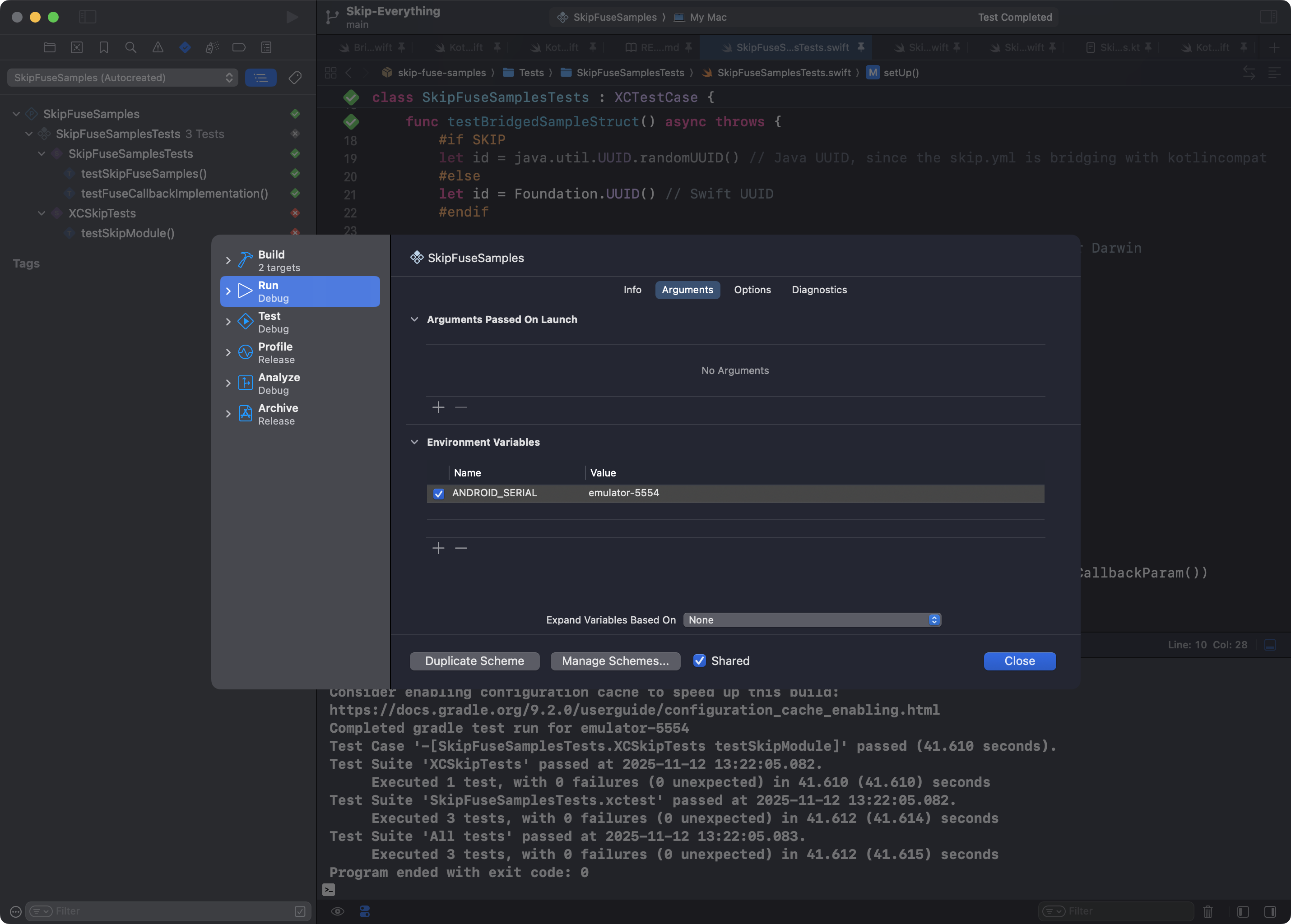
Instrumented tests run on a real Android runtime with the full framework available, so they are the most accurate representation of how your code will behave in production. The tradeoff is speed: deploying to an emulator or device and running the test APK takes significantly longer than a local Robolectric run.
Skip Fuse Testing
Section titled “Skip Fuse Testing”Skip Fuse compiles your Swift natively for Android using the Swift Android SDK. Testing in Fuse mode works differently from Lite: instead of transpiling tests into JUnit, you cross-compile your Swift test target for Android and execute it on a device or emulator. This is done with the skip android test command, which has two distinct modes.
Command-Line Mode (default)
Section titled “Command-Line Mode (default)”skip android testThis is the simpler path. It cross-compiles your package’s test target as a standard executable (PackageTests.xctest), then uses adb push to copy the binary, its shared library dependencies, and any .resources sidecar directories to a staging folder on the device. The tests run directly via adb shell, just like running a command-line program on Linux. If the binary links Swift Testing, it automatically runs a second pass with --testing-library swift-testing to pick up @Test functions in addition to XCTest cases.
Because the executable runs from a flat directory on the filesystem, Bundle.module and resource lookup work as expected: the .resources bundles are sitting right alongside the binary. This makes command-line mode the right choice for tests that load JSON fixtures, images, or other bundled resources.
The downside is that the test process is a bare Linux executable. There is no Android application context, no JVM, and no JNI environment. If your tests need to call Android framework APIs (Context, AssetManager, content providers, etc.), they will not work in this mode.
APK Mode (--apk)
Section titled “APK Mode (--apk)”skip android test --apkAPK mode packages the tests into a real Android application. It builds the test target as a shared library (rather than an executable), then bundles it into an APK alongside a small native test harness. The harness uses Android’s NativeActivity to bootstrap execution: C code handles the activity lifecycle, stdio-to-logcat redirection, and library loading, while a minimal Swift layer bridges into async to call the Swift Testing entry point (swt_abiv0_getEntryPoint, per the ST-0002 ABI). The APK is assembled using the standard Android build tools (aapt2, zipalign, apksigner), installed via adb install, and launched as a real Android activity.
Test output streams back to the host through logcat. You can also pass --event-stream-output-path <file> to capture the raw JSON event records locally.
Because the tests run inside a real Android app process, they get a full JNI environment with access to the entire Android framework. This is necessary for any code that interacts with Android-specific functionality.
The tradeoff is that resource bundles do not work. The test shared library is loaded from inside the APK’s lib/ directory by the Android runtime, and there is no Foundation support for resolving Bundle.module resources from an APK’s native library path. Tests that rely on loading bundled resources at runtime will fail to find them.
Choosing a Mode
Section titled “Choosing a Mode”If your tests don’t need Android APIs, the default command-line mode is simpler and supports resource loading. If your tests need the Android framework (JNI, Context, system services), use --apk. You can use both modes in a project by gating Android-dependent tests:
#if os(Android)func testAndroidSpecificFeature() { // Only meaningful when run inside an Android app process}#endifComparison
Section titled “Comparison”| Skip Lite (Robolectric) | Skip Lite (Instrumented) | Skip Fuse (CLI) | Skip Fuse (APK) | |
|---|---|---|---|---|
| Command | swift test | ANDROID_SERIAL=… swift test | skip android test | skip android test --apk |
| Test framework | XCTest only (transpiled to JUnit) | XCTest only (transpiled to JUnit) | XCTest + Swift Testing | Swift Testing only |
| Runs on | Host JVM (macOS/Linux) | Android emulator/device | Android emulator/device via adb shell | Android emulator/device as installed APK |
| Android APIs | Simulated via Robolectric | Full | Not available (no JVM/JNI) | Full (real app process with JNI) |
| Resource bundles | Managed by Gradle | Managed by Gradle | Yes (sidecar .resources dirs) | No (no Foundation APK bundle support) |
| Xcode integration | Yes (via XCSkipTests) | Yes (via XCSkipTests) | No (CLI only) | No (CLI only) |
| Speed | Fastest | Slowest | Fast | Moderate |
| Fidelity | Lowest (simulated Android) | Highest | Good (real device, no app context) | High (real device, real app process) |
For most day-to-day development, Skip Lite with Robolectric is the fastest feedback loop. When you need to verify behavior on real Android, use instrumented testing (Lite) or APK mode (Fuse). For Fuse projects that don’t need Android APIs, the default command-line mode gives you fast on-device testing with full resource support.
For an example of a repository that uses Skip Fuse bridge testing with GitHub CI actions running against an Android emulator, see skip-fuse-samples ↗.
Non-Skip Packages
Section titled “Non-Skip Packages”Testing of native Swift packages that compile for both iOS and Android and do not have a skip.yml (such as the thousands of third-party packages tracked by swiftpackageindex.com ↗’s Android compatibility testing) is discussed in the Porting Guide.
Performance Testing
Section titled “Performance Testing”There is often a significant difference between Debug and Release build performance on Android devices. Always run on a device using a Release build when testing real-world performance.