
App Development
Skip allows you to share as much or as little code as you want between the iOS and Android versions of your app. The Cross-Platform Topics chapter details how to integrate Android-specific or iOS-specific code. This chapter focuses on shared dual-platform development.
The following sections do not attempt to teach you iOS development. There are other available resources for that. Rather, we focus on where dual-platform Skip development differs from standard iOS development, including how to use Skip’s tools and what to do when things go wrong.
Philosophy
Section titled “Philosophy”We designed Skip from the ground up knowing that all multi-platform tools have limitations, and Skip is no exception. That is why we concentrated on making it trivial to exclude unsupported iOS code from your Android build. You can truly use any iOS features, right inline, without compromise and without re-architecting your app.
Of course, using an iOS feature without Android support means you’ll need to provide an Android fallback or alternative. You may be able to find a solution among the thousands of cross-platform modules ↗ Skip already supports, or to port a Swift package that doesn’t yet compile for Android.
Skip also makes it easy to integrate Android-specific solutions, whether to work around limitations or to differentiate your Android experience.
So remember: build errors show you what may not yet be supported out of the box on Android. They might require extra work to overcome, but they are not blockers!
Building and Running
Section titled “Building and Running”In order to run and test your app on Android, you will need either an Android emulator or a
paired Android device with developer mode enabled. You can set up an emulator by running
skip android emulator create and then skip android emulator launch, as described in
the command line reference.
Alternatively, you can install and launch Android Studio.app,
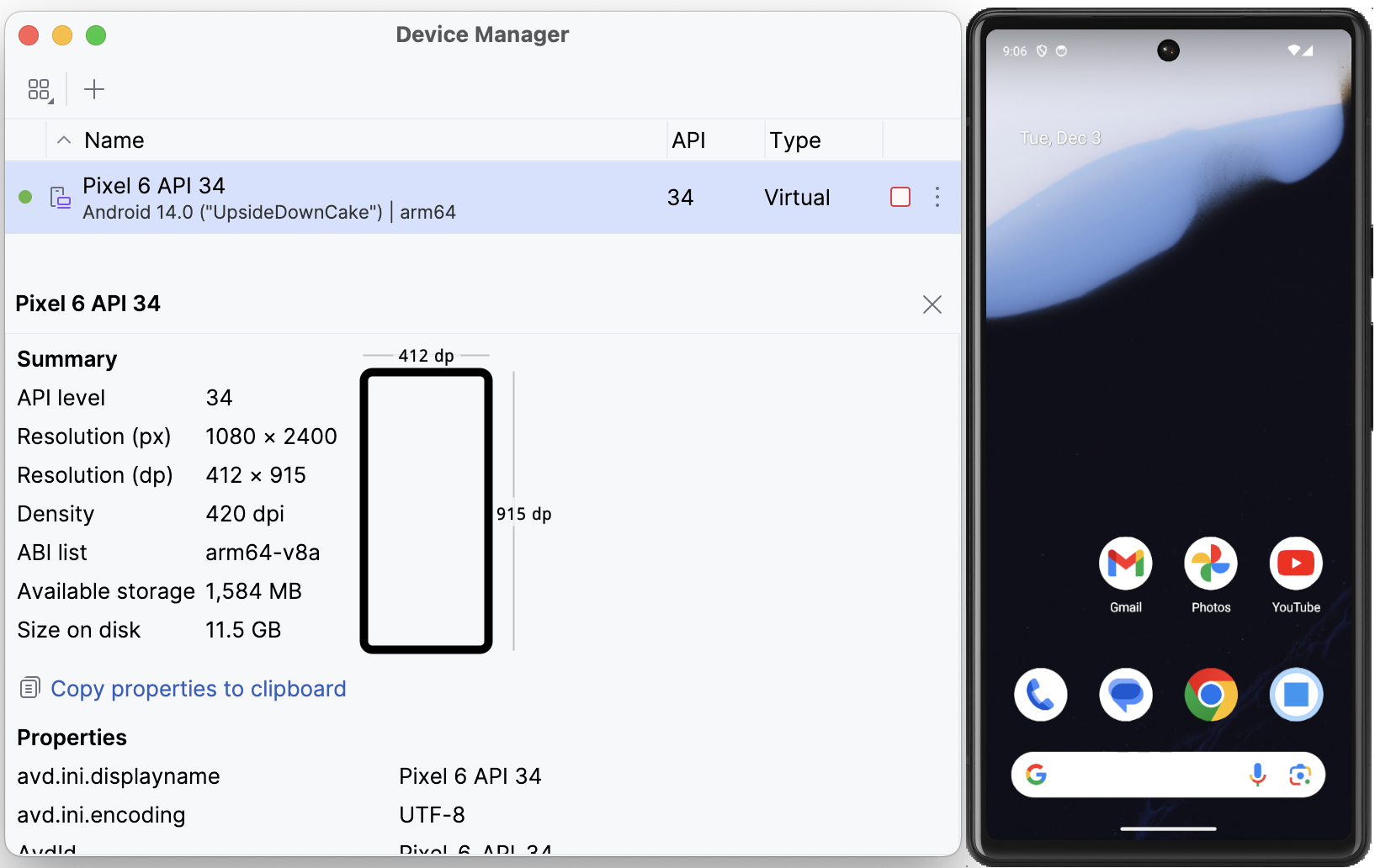
and then open the Device Manager from the ellipsis menu of the Welcome dialog
to create an emulator of your choice.
You can then use the Device Manager to launch the emulator, or you can run it from the terminal with a command like ~/Library/Android/sdk/emulator/emulator @Pixel_6_API_33.
Running on an Android Device
Section titled “Running on an Android Device”In order to install and run an app on a connected Android device, you must enable USB debugging on the device, as per the ADB documentation ↗. Then pair the Android device with your development machine.
Make sure only one device or emulator is running at a time. Otherwise Skip cannot know where to launch your app. Alternatively, set the ANDROID_SERIAL variable in your project’s .xcconfig file to the desired device or emulator’s identifier. Running the /opt/homebrew/bin/adb devices command will show the available paired identifiers.
Dual-Platform Apps
Section titled “Dual-Platform Apps”Assuming you followed the app creation instructions using skip create, each successful build of your Skip app will automatically attempt to launch it on the running Android emulator or device. Exactly one emulator or device must be running in order for the Skip project’s Launch APK script phase to install and run the app successfully.
If you are having trouble with Skip’s Xcode plugin, check the Troubleshooting section for help.
Building and Running iOS-Only
Section titled “Building and Running iOS-Only”By default, whenever you run your iOS app from Xcode, Skip will also create and run the Android app. Building and running the app side-by-side is very useful for ensuring that both sides of the app look and behave the same while iterating on the app.
However, you may sometimes want to run only the iOS side of the app for certain time periods, such as when debugging an iOS-specific issue. To do this, you can edit the AppName.xcconfig file, and change the SKIP_ACTION = launch to SKIP_ACTION = build. This will cause the Android side of the app to be built, but not run.
If you want to skip over the entire Android build process, you can instead set SKIP_ACTION = none property in the AppName.xcconfig file. This can increase development velocity considerably.
Separate iOS and Android Apps
Section titled “Separate iOS and Android Apps”If you’ve chosen to create separate iOS and Android apps that share dual-platform Swift frameworks, then you will build and run each app in its respective IDE. The Project Types guide contains tips for integrating dual-platform frameworks into your development workflow.
Frameworks
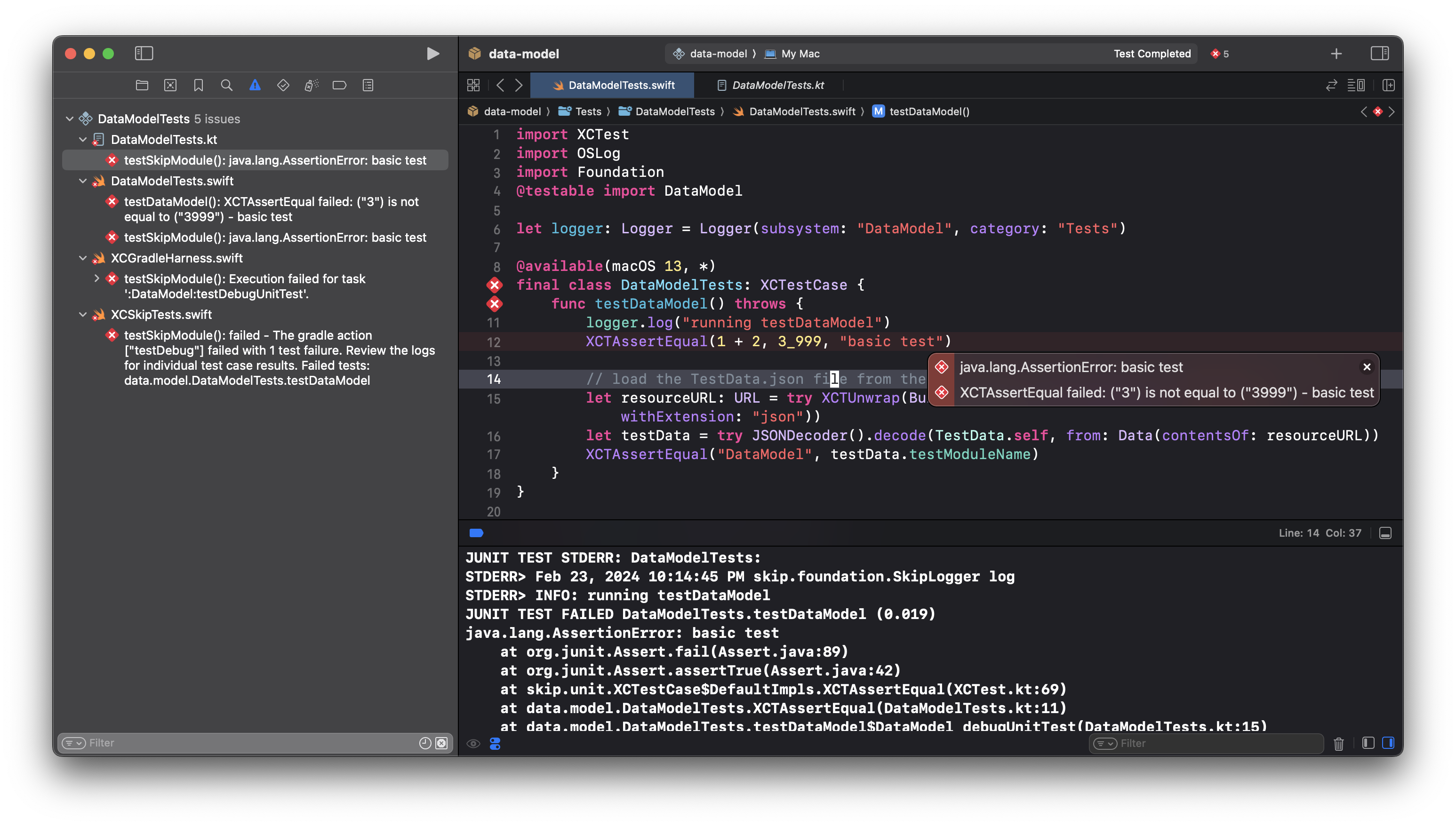
Section titled “Frameworks”Building a dual-platform framework in Xcode builds your iOS code and runs the SkipStone build plugin. It does not, however, perform an Android build. Due to limitations on Xcode plugins, the only way to invoke the Android compiler is to run the module’s unit test suite against the macOS destination, or to export the framework’s build artifacts. For more information, see the testing and deployment documentation.
Coding
Section titled “Coding”Writing dual-platform code with Skip resembles coding a standard iOS app, and it can feel magical to see your Swift and SwiftUI run on Android. But in the end Skip is a tool that you work with, and writing for two platforms does introduce complications not found in pure iOS development:
- At some point, you will likely find yourself wanting to use an iOS API, framework, or feature that is not yet supported on Android. Don’t give up! This section discusses your options when you encounter a limitation in dual-platform coverage.
- Our porting guide covers some of the common issues you’ll run into when compiling cross-platform Swift. Additionally, compiled Swift must use bridging to interact with Android’s Kotlin and Java APIs.
- Writing a dual-platform apps means using dual-platform libraries. Our documentation on dependencies discusses how to use other dual-platform libraries as well as iOS and Android-specific libraries.
Build Errors
Section titled “Build Errors”Skip tries to warn you as quickly as possible when you’re going down the wrong path. For example, the Skip build plugin may report warnings and errors even before Skip attempts to compile your project for Android. Skip also attempts to map all errors back to the offending Swift source code and surface them in Xcode, whether they come from bridging, transpilation, Kotlin compilation, or native compilation. Each error message therefore typically appears in two places: once inline in your Swift source code, and once in Xcode’s sidebar issue navigator. Clicking an entry will jump you to the offending code.
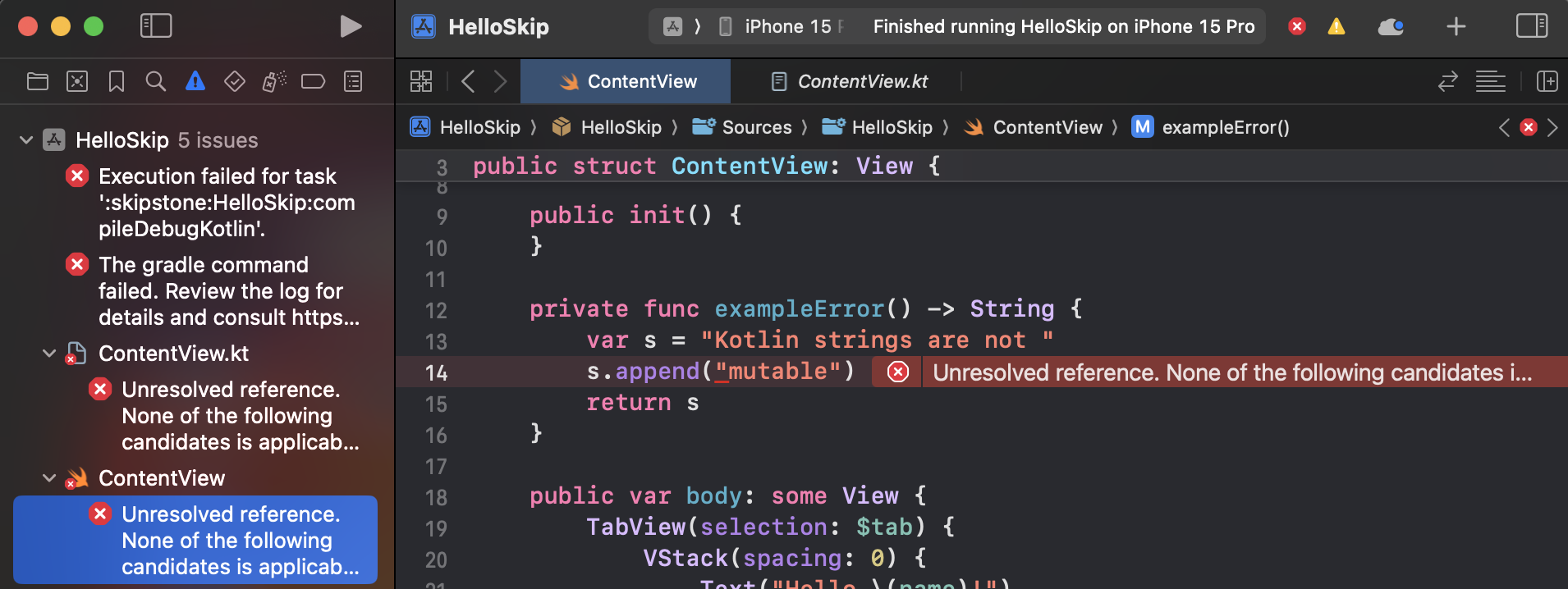
The most common build errors are:
- Using an API without Android support. We discuss your options when an API you want to use has not yet been ported to Android below.
- Needing to modify your
importsfor cross-platform Swift. Consult the porting guide for details.
Runtime Errors and Debugging
Section titled “Runtime Errors and Debugging”Dealing with errors is an integral part of development. Be sure to read the Debugging chapter to learn how to access generated code, view your log statements, and debug the Android side of your Skip framework or application.
UI and View Model Coding
Section titled “UI and View Model Coding”Google recommends Jetpack Compose ↗ for Android user interface development. Skip can translate a large subset of SwiftUI into Compose, allowing you to build cross-platform iOS and Android UI in SwiftUI. Or you can write a separate Android UI in pure Compose using your Android IDE of choice. Skip even allows you to move fluidly between SwiftUI and Compose, as described in our Cross-Platform Topics documentation. In the end, the choice between using SwiftUI, Jetpack Compose, or a combination of the two is up to you.
@Observables
Section titled “@Observables”Regardless of whether you use Skip’s translated SwiftUI or write to the Compose API in Kotlin, Skip ensures that your @Observable model types participate in Compose state tracking. This allows them to seamlessly power your Android user interface just as they power your iOS one.
@Observable integration is transparent, but some caveats apply when you use a Swift model to power a bespoke Compose UI:
- You must
import SkipFusein your@Observable'sSwift file in order to fuse it to the Android runtime. The SkipStone build plugin will warn you if this import is missing. - In order to use an
@Observablefrom a Kotlin UI, ensure that your@Observableis bridged. - Finally, if you are writing a bespoke Compose UI, you must add a SwiftPM dependency on
SkipModelfor your@Observablesto work properly on Android, as in the following example. This is not necessary when you use a SwiftUI interface, becauseSkipModelwill be included in your dependency onSkipFuseUI.
...let package = Package( name: "travel-posters-model", ... dependencies: [ .package(url: "https://source.skip.tools/skip.git", from: "1.2.0"), .package(url: "https://source.skip.tools/skip-model.git", from: "1.0.0"), // <-- Insert .package(url: "https://source.skip.tools/skip-fuse.git", from: "1.0.0") ], targets: [ .target(name: "TravelPostersModel", dependencies: [ .product(name: "SkipFuse", package: "skip-fuse"), .product(name: "SkipModel", package: "skip-model") // <-- Insert ], plugins: [.plugin(name: "skipstone", package: "skip")]), ... ])The CityManager ↗ type in the TravelPosters ↗ sample is an example of an @Observable that is shared between separate iOS and Android apps.
SwiftUI
Section titled “SwiftUI”Writing cross-platform SwiftUI and watching it appear on both the iOS simulator and Android emulator can feel magical. It is a wonderful way to share all or parts of your user interface. And because Skip translates your SwiftUI calls to Jetpack Compose on Android, the result is a fully native user interface on both platforms, not an uncanny-valley replica.
On Android, import SwiftUI vends an implementation of the SwiftUI API called SkipFuseUI that is bridged to Jetpack Compose. Make sure you also use default or public visibility for Views and their SwiftUI properties. Skip cannot access private SwiftUI components on Android. Here is an example of a valid cross-platform SwiftUI view:
import SwiftUI
struct MyView : View {    @State var counter = 1 // Use internal or public access for all SwiftUI types and members    private let title = "..." // OK to use private for non-SwiftUI members    ...
var body: some View { ... }}Under the hood, SkipFuseUI uses the SkipUI user interface library. Its documentation includes a list of supported SwiftUI. We highly recommend that you browse this list and the associated documentation on various SkipUI topics. It will help you avoid many common errors when writing cross-platform SwiftUI.
iOS Features without Android Support
Section titled “iOS Features without Android Support”Skip is continually adding functionality, but there are still many iOS APIs, frameworks, and features that are not yet available for Android.
Using an iOS API that is not yet supported on Android will result in either an unavailable API error or build error from the Android Swift compiler. If you encounter an error, check the porting guide to see if the API is actually available, but requires different imports for Android. If you are writing SwiftUI code, consult the SkipUI module to learn what is supported.
When you encounter missing API on Android, you have options! You may be able to use alternate, supported APIs to accomplish the task. The Swift Package Index ↗ site lists many cross-platform Swift packages that are known to build for Android. If you can’t find an existing solution, you can use Skip’s iOS and Android integration techniques to implement separate iOS and Android code paths, taking advantage of each platforms’ respective native solutions. And if the API you want to use is in a framework already mirrored for Android - either as a Skip open source library ↗ or a community library - you may be able to easily add the missing API to the existing library. If you augment an existing library, please consider contributing your improvements back to the Skip community. Follow the instructions here to configure Xcode for local Skip library development.
Frameworks
Section titled “Frameworks”Skip Fuse supports thousands of third-party modules ↗. If these do not meet your needs and there are no Skip or community libraries available for the desired functionality, you might consider creating your own dual-platform library or shared API. Again, please consider contributing your work as a community library.
Features
Section titled “Features”Some iOS app extensions and features are not yet implemented for Android, or have no direct Android counterpart. Use the techniques in Cross-Platform Topics to implement iOS-only or Android-only solutions. For example, you might use a compiler directive to exclude your iOS widget from your Android build, and include a Kotlin file implementing a native widget for Android instead.
Common Topics
Section titled “Common Topics”For instructions on how to handle common development tasks like localization, resource and image loading, and JSON coding across platforms with Skip, see Common Topics.