Skip to content

skipui

7 posts with the tag “skipui”

December Skip Newsletter

Skip December Newsletter

Welcome to the December edition of the Skip.tools newsletter! This month we will showcase some of the improvements and advancements we've made to the Skip platform, along with some current events and a peek at our upcoming roadmap.

Skip and Compiled Swift on Android

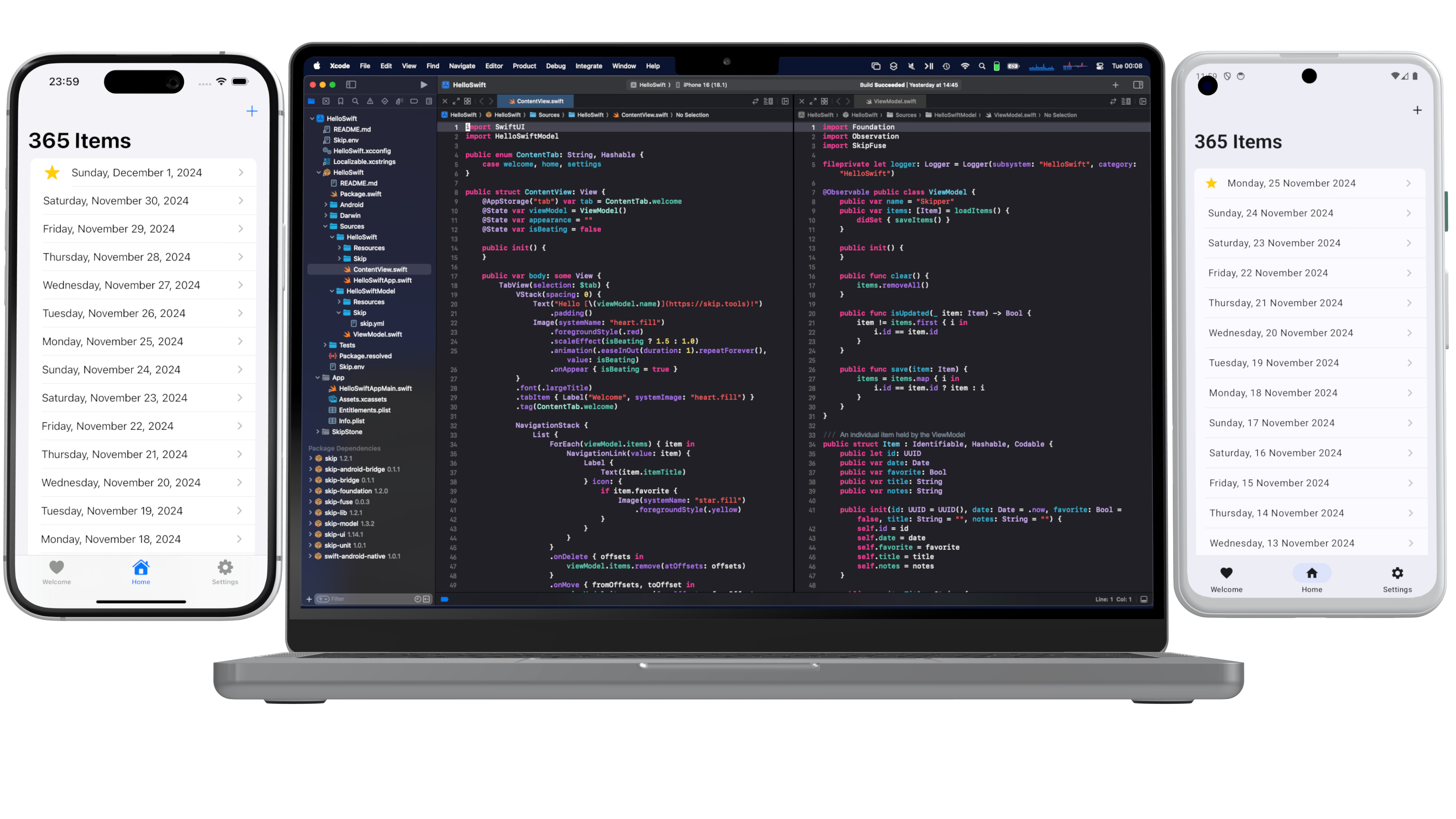
The big news this month is the release of the Skip's native compiled Swift technology preview! Now you are not limited to just using transpiled packages in Skip apps: you can also embed fully native Swift using our Android toolchain and transparent bridge generation. The SkipFuse framework enables you to move seamlessly between native Swift and your transpiled Jetpack Compose user interface. This unlocks the entire universe of pure-Swift packages for use in your Android app! Read the introductory blog post at https://skip.tools/blog/skip-native-tech-preview/ and then browse the full documentation at https://skip.tools/docs/native/.

Screenshot of native toochain development

New SkipUI Features

SkipUI is the framework that turns your SwiftUI into Jetpack Compose for Android. It enables you to write a single user-interface for both platforms using their platform-native toolkits. SkipUI supports converting nearly all SwiftUI constructs into Compose, but there are sometimes minor deficiencies and quirks that need to be implemented separately for Android. Over the past weeks, we've improved SkipUI with:

  • Support for custom SVG images in asset catalogs
  • Enabling .alert() sheets to containTextField and SecureField views
  • Support for .rotation3DEffect for all views
  • Implementing .interactiveDismissDisabled to conditionally prevent interactive dismissal of sheets

You can always get the latest Skip features and fixes from right within Xcode, by simply clicking File > Packages > Update to Latest Versions. And if you are building from the command-line, swift package update  will do the same thing.

Tip: Customizing with Android-only SwiftUI modifiers

SkipUI supports Android-specific SwiftUI modifiers to customize Material colors, components, and effects. Check out the "Material" section of our SkipUI documentation to see how: https://skip.tools/docs/modules/skip-ui/#material

Skip on Talking Kotlin

We were thrilled to join hosts Sebastian and Márton on the JetBrains Talking Kotlin podcast! The episode was just released, and you can listen to it at https://talkingkotlin.com/going-from-swift-to-kotlin-with-skip/ or watch it at https://www.youtube.com/watch?v=mig81rSWVqM. “Going from Swift to Kotlin with Skip: In a slightly unconventional episode, Sebastian and Márton talk to the founders of Skip, an iOS-to-Android, Swift-to-Kotlin transpiler solution. Marc and Abe have a background working on both Apple platforms and the JVM, and their latest project is a bridge across these two ecosystems.”

Android Police Interview

Another instance of Skip in the press was an interview with the popular Android Police publication, titled: “How the development wall between Android and iOS may soon come down”. You can read the whole thing at: https://www.androidpolice.com/skip-interview

That's all for now

You can follow us on Mastodon at https://mas.to/@skiptools, and join in the Skip discussions at http://community.skip.tools/. The Skip FAQ at https://skip.tools/docs/faq/ is there to answer any questions, and be sure to check out the video tours at https://skip.tools/tour/. And, as always, you can reach out directly to us on our Slack channel at https://skip.tools/slack/.

Happy Skipping!

July Skip Newsletter

Welcome to the July edition of the Skip.tools newsletter! This month we will showcase some of the improvements and advancements we've made to the Skip platform, along with some current events and a peek at our upcoming roadmap.

Swift 6 and Kotlin 2 Support

The past couple of months saw two important major releases that affect anyone writing modern iOS and Android apps. Kotlin 2 was released at the end of May, and a preview of Swift 6 was added to the Xcode 16 beta in June. Both of these language releases are evolutionary, but they did include some important changes and enhancements.

Skip has kept pace: we now generate Kotlin 2 Android projects by default, and you can use Swift 6 language features like typed throws. Some minor Android build file tweaks may be necessary to modernize pre-existing Skip projects, but overall we are delighted how smooth the transition has been. Skip is designed to enable your apps to keep up with the constant evolution of the primary development languages for both iOS and Android.

From Scrumdinger to Scrumskipper

Honed and updated over the years, Apple’s Scrumdinger tutorial is an hours-long step-by-step guide to building a complete, modern SwiftUI app. It exercises both built-in UI components and custom drawing, and it takes advantage of Swift language features like Codable for persistence. As its rather unique name implies, the Scrumdinger app allows users to create and manage agile programming scrums on their phones.

In our blog post, we show how we took the Scrumdinger app and brought it to Android through the power of Skip. This new "Scrumskipper" app demonstrates how an existing iOS-only app can be incrementally turned into a dual-platform iOS+Android app.

Refreshable lists, GeometryReader, and ScrollViewReader

The pull-to-refresh gesture has been a standard affordance in mobile apps for updating list contents for some time now, and SwiftUI has had built-in support for the operation since last year. We've brought this great feature over to Android by bridging SwiftUI’s .refreshable() modifier to an experimental Compose API for supporting the pull-to-refresh operation, enabling you to add in support for list refreshability with one line of code.

In addition, we've added some more advanced SwiftUI API support, including the ability to exactly identify locations in SwiftUI views using GeometryReader and the ability to jump to individual list elements using ScrollViewReader.

User Contributions: SkipAV and SkipFirebase

All the Skip runtime frameworks are free and open-source software, from the low-level SkipFoundation to the high level SkipUI. In addition, we have a whole constellation of optional frameworks that enable additional functionality, from SQLite database support (SkipSQL) to Lottie animations (SkipMotion).

One of our frameworks – SkipAV – enables bridging a subset of the AVKit framework for audio and video support. The initial release included only very basic support for playing videos, but recently a user who was interested in the project added support for recording from the microphone, along with some audio playback improvements.

Another of our frameworks, SkipFirebase, provides support for Google Firebase, a very popular backend-as-a-service platform used in many mobile applications. And while our original release mostly just supported Firestore – the database layer of Firebase – another interested user recently contributed support for the Auth component, which greatly improves the utility of the framework for all Skip users.

These are just two examples of recent community contributions to the Skip ecosystem. If you would like to learn more about how to help improve Skip's support for various Android features, check out our contribution guide.

That's all for now

You can follow us on Mastodon at https://mas.to/@skiptools, and join in the Skip discussions at http://community.skip.tools/. The Skip FAQ at https://skip.tools/docs/faq/ is there to answer any questions, and be sure to check out the video tours at https://skip.tools/tour/. And, as always, you can reach out directly to us on our Slack channel at https://skip.tools/slack/.

Happy Skipping!

May Skip Newsletter

Welcome to the May edition of the Skip.tools newsletter! This month we will showcase some of the notable improvements to the Skip transpiler and the ecosystem of free and open-source frameworks that power the dual-platform apps that Skip enables.

Early Adopter Pricing Ending Soon

Skip 1.0 is on the horizon, which means that we will be winding down our Early Adopter Program at the end of the month. So now is the time to take advantage of the massive early adopter discount from https://skip.tools/pricing , as Skip will be switching to full pricing next month.

New Sample App: Travel Bookings

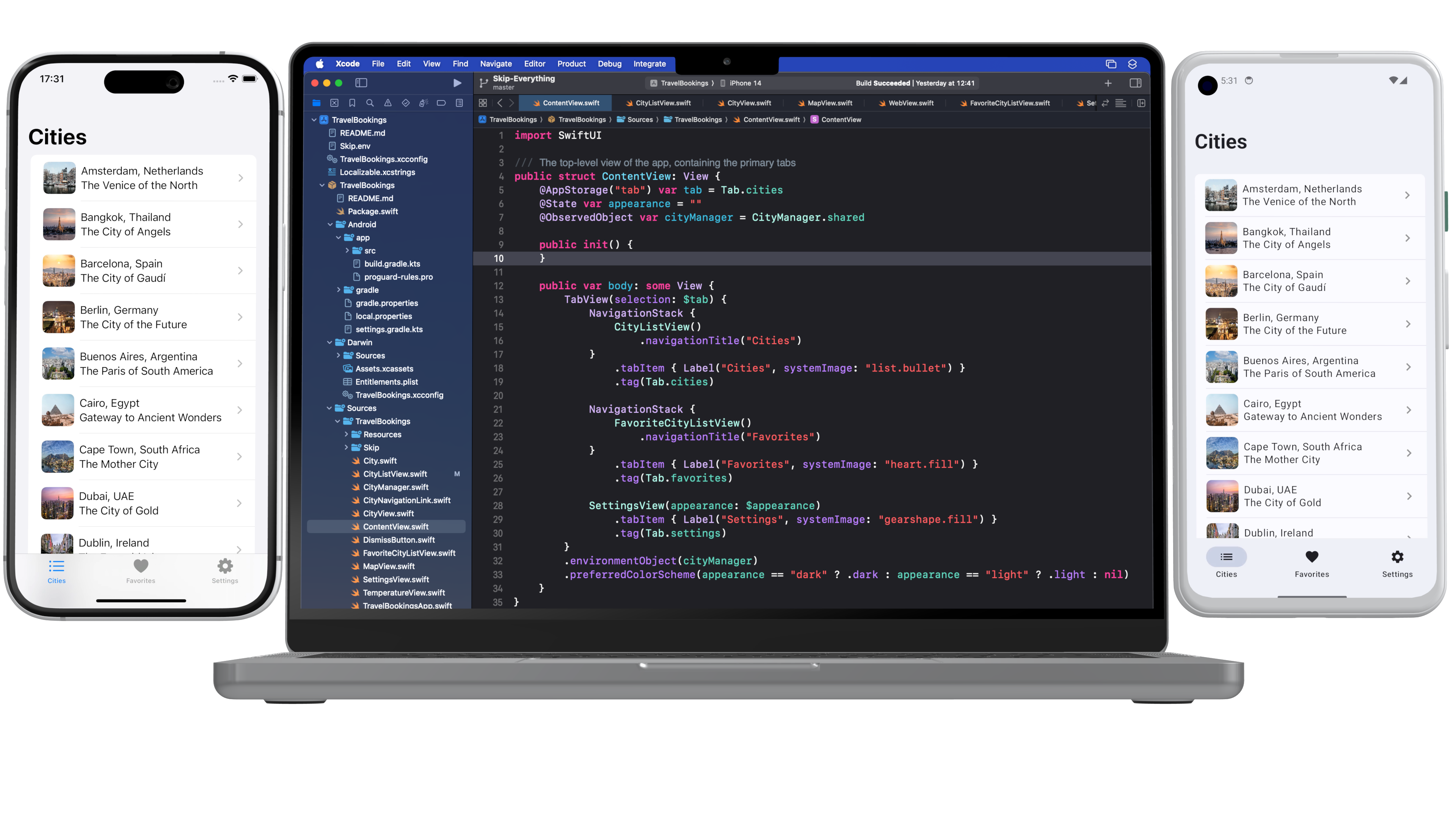
We've released a whole new sample application that shows off how Skip can make gorgeous apps for both iOS and Android. The Travel Bookings app demonstrates navigation, tabs, images, persistence, maps, weather, networking, and a whole lot more. Check it out at /docs/samples/skipapp-bookings .

skip-splash-poster.png

Symbols and Images in Asset Catalogs

Images and icons are an essential part of any modern application. Skip has had good support for SwiftUI's AsyncImage for a while now, but we recently also added support for asset catalogs, enabling you to bundle static images and exported symbols directly in your app. And we support many of the common variants for assets, such as light and dark variants for images, as well as different weights for symbols. Read more about the new asset catalog support at /docs/modules/skip-ui/#images .

Major Performance Enhancements

We are delighted to report that we’ve reduced the number of re-compositions SkipUI performs on Android, resulting in a huge performance boost to some common operations like navigation. If your tabs or navigation bar was feeling a bit sluggish, run File / Packages / Update to Latest Package Versions on your project to grab skip-ui 0.9.1 and enjoy the speed boost!

Tip: Embedding Kotlin Calls Directly in Swift

Unlike other cross-platform app development frameworks, custom native integration in Skip is a breeze. Rather than requiring cumbersome bridging infrastructure or platform channels, with Skip you merely add your Kotlin calls in an `#if SKIP` block, and it will be executed directly on the transpiled side. And since Skip does not intrude into the iOS side of your app, you'll continue to be able to integrate with any of the Darwin platform APIs directly, including UIKit and other Objective-C frameworks (as well as C and C++). Read more about the platform customization options at /docs/platformcustomization .

Accessibility Improvements

May 16th was Global Accessibility Awareness Day. Skip celebrated by adding support for many additional SwiftUI accessibility modifiers. Being a truly universal app means not just reaching all the devices that people have, but also making those apps usable by everyone. Skip is proud to enable you to build uncompromisingly excellent apps that can reach the entire world: every device, every language, and every ability.

Take Our Survey!

Our Skip Developer Survey is a great way to provide feedback and help us define Skip's direction in the coming weeks and months. It only takes a few minutes, and will help define Skip's focus and features: https://skip.tools/survey .

Edge-to-edge Mode

In the "Improve the Experience of your Android App" session at Google I/O, the Android team promoted the use of the new edge-to-edge support APIs in Jetpack Compose, saying that “users significantly prefer edge-to-edge screens to non-edge-to-edge screens, and users feel these screens are more satisfying and premium.”

We agree, and so Skip now enables Android edge-to-edge mode by default in all new projects. Use the SwiftUI safe area APIs to control how your content renders under system bars. And you can enable edge-to-edge in existing projects with only a couple lines of code: /docs/modules/skip-ui/#enabling-or-disabling-edge-to-edge .

Skip Webinar Series

Sign up for our Skip webinar to see a hands-on tour of how Skip can help you build apps that reach the entire mobile marketplace. We take questions and answers throughout, so this is a great opportunity to get some direct interaction with the Skip engineers. Sign up at https://skip.tools/webinar/ or watch a past webinar at /tour/ .

Get Your Project Featured

We are assembling a list of Skip projects to feature on our web site. If you have built – or are currently building – an interesting app using Skip, send us an email at support@skip.tools and we may promote it on our customers page! And, as always, we are seeking testimonials from happy Skip users that we can share with the rest of the community.

That's All Folks!

You can follow us on Mastodon at https://mas.to/@skiptools , and join in the Skip discussions at http://community.skip.tools/ . The Skip FAQ at /docs/faq/ is there to answer any questions, and be sure to check out the video tours at /tour/ .

Happy Skipping!

Negative Padding in Compose

Skip’s open-source SkipUI library implements the SwiftUI API for Android. To do so, SkipUI leverages Compose, Android’s own modern, declarative UI framework.

The parallels between SwiftUI and Compose are striking, especially when it comes to layout. SwiftUI uses HStack, VStack, and ZStack for basic layout, with modifiers like offset and padding to shift or pad the resulting placement. Compose uses Row, Column, and Box for basic layout, and it too has offset and padding modifiers. Compose has one odd omission, however: it doesn’t support negative padding! Supplying a negative value will throw an IllegalArgumentException.

SkipUI must support whatever SwiftUI supports, so internally we’ve replaced the standard Compose padding modifier with our own custom layout that works for both positive and negative values. We present that layout below, in case you find it useful in your own Compose work.

Notes:

  1. SkipUI’s implementation is tied to SwiftUI internals, so this is an untested and simplified port of the actual code.
  2. Important: If you plan to use this in pure Compose code, expose it as a custom modifier for a more fluent API.
@Composable fun PaddingLayout(modifier: Modifier, top: Dp = 0.dp, leading: Dp = 0.dp, bottom: Dp = 0.dp, trailing: Dp = 0.dp, content: @Composable () -> Unit) {
val density = LocalDensity.current
val topPx = with(density) { top.roundToPx() }
val bottomPx = with(density) { bottom.roundToPx() }
val leadingPx = with(density) { leading.roundToPx() }
val trailingPx = with(density) { trailing.roundToPx() }
Layout(modifier = modifier, content = {
// Compose content
content()
}) { measurables, constraints ->
if (measurables.isEmpty()) {
return layout(width: 0, height: 0) {}
}
// Subtract the padding from the available size the content can use
val updatedConstraints = constraints.copy(
minWidth = constraint(constraints.minWidth, subtracting = leadingPx + trailingPx),
minHeight = constraint(constraints.minHeight, subtracting = topPx + bottomPx),
maxWidth = constraint(constraints.maxWidth, subtracting = leadingPx + trailingPx),
maxHeight = constraint(constraints.maxHeight, subtracting = topPx + bottomPx)
)
val contentPlaceables = measurables.map { it.measure(updatedConstraints) }
// Layout within the padded size
layout(width = contentPlaceables[0].width + leadingPx + trailingPx, height = contentPlaceables[0].height + topPx + bottomPx) {
// Offset the content position by the leading and top padding
for (contentPlaceable in contentPlaceables) {
contentPlaceable.placeRelative(x = leadingPx, y = topPx)
}
}
}
}
// Subtract the given amount from a size constraint value, honoring Int.MAX_VALUE and preventing illegal negative constraints.
private fun constraint(value: Int, subtracting: Int): Int {
if (value == Int.MAX_VALUE) {
return value
}
return max(0, value - subtracting)
}

We hope that you find this useful! If you have questions or suggestions for improvements, please reach out to us on Mastodon @skiptools@mas.to, via chat skiptools.slack.com, or in our discussion forums.

Add a Custom Shadow to Any Content in Compose

Drop shadow on complex content

Skip’s open-source SkipUI library implements the SwiftUI API for Android. To do so, SkipUI leverages Compose, Android’s own modern, declarative UI framework.

The SwiftUI shadow(color:radius:x:y:) modifier adds a drop shadow with a customizable color, blur radius, and offset to any SwiftUI content. Implementing this in Compose posed a problem, because Compose’s own shadow(elevation:shape:clip:ambientColor:spotColor:) modifier works very differently. The most critical difference is readily apparent from the modifier’s signature: you have to supply the shadow’s shape (or be satisfied with the rectangular default). SwiftUI’s shadow, on the other hand, is more akin to a real shadow, automatically mirroring the outline of its target content.

Luckily, Compose is a powerful UI framework. We were able to create a composable function that adds a drop shadow to any content, without affecting your layout and while mirroring the content’s shape (as defined by its non-transparent pixels) exactly. To do so, we used a combination of techniques:

  • Modifier.drawWithContent to re-render the given content as its own shadow
  • A custom ColorMatrix to paint the content in the specified shadow color
  • Layout to place the shadow behind the content with the specified offset, without affecting your layout

The resulting code is below. Note: SkipUI’s implementation is tied to SwiftUI internals, so this is an untested and simplified port of the actual code.

// Compose the given content with a drop shadow on all
// non-transparent pixels
@Composable fun Shadowed(modifier: Modifier, color: Color, offsetX: Dp, offsetY: Dp, blurRadius: Dp, content: @Composable () -> Unit) {
val density = LocalDensity.current
val offsetXPx = with(density) { offsetX.toPx() }.toInt()
val offsetYPx = with(density) { offsetY.toPx() }.toInt()
val blurRadiusPx = ceil(with(density) {
blurRadius.toPx()
}).toInt()
// Modifier to render the content in the shadow color, then
// blur it by blurRadius
val shadowModifier = Modifier
.drawWithContent {
val matrix = shadowColorMatrix(color)
val filter = ColorFilter.colorMatrix(matrix)
val paint = Paint().apply {
colorFilter = filter
}
drawIntoCanvas { canvas ->
canvas.saveLayer(Rect(0f, 0f, size.width, size.height), paint)
drawContent()
canvas.restore()
}
}
.blur(radius = blurRadius, BlurredEdgeTreatment.Unbounded)
.padding(all = blurRadius) // Pad to prevent clipping blur
// Layout based solely on the content, placing shadow behind it
Layout(modifier = modifier, content = {
// measurables[0] = content, measurables[1] = shadow
content()
Box(modifier = shadowModifier) { content() }
}) { measurables, constraints ->
// Allow shadow to go beyond bounds without affecting layout
val contentPlaceable = measurables[0].measure(constraints)
val shadowPlaceable = measurables[1].measure(Constraints(maxWidth = contentPlaceable.width + blurRadiusPx * 2, maxHeight = contentPlaceable.height + blurRadiusPx * 2))
layout(width = contentPlaceable.width, height = contentPlaceable.height) {
shadowPlaceable.placeRelative(x = offsetXPx - blurRadiusPx, y = offsetYPx - blurRadiusPx)
contentPlaceable.placeRelative(x = 0, y = 0)
}
}
}
// Return a color matrix with which to paint our content
// as a shadow of the given color
private fun shadowColorMatrix(color: Color): ColorMatrix {
return ColorMatrix().apply {
set(0, 0, 0f) // Do not preserve original R
set(1, 1, 0f) // Do not preserve original G
set(2, 2, 0f) // Do not preserve original B
set(0, 4, color.red * 255) // Use given color's R
set(1, 4, color.green * 255) // Use given color's G
set(2, 4, color.blue * 255) // Use given color's B
set(3, 3, color.alpha) // Multiply by given color's alpha
}
}

You can see this in action in the Skip Showcase app’s shadow playground, and in the image at the top of this article.

We hope that you find this useful! If you have questions or suggestions for improvements, please reach out to us on Mastodon @skiptools@mas.to, via chat skiptools.slack.com, or in our discussion forums.

Nested Dropdown Menus in Compose

Skip’s open-source SkipUI library implements the SwiftUI API for Android. To do so, SkipUI leverages Compose, Android’s own modern, declarative UI framework.

While implementing SwiftUI’s Menu, we discovered that Compose doesn’t build in support for nested dropdown menus. Googling revealed that we weren’t the only devs wondering how to present a sub-menu from a Compose menu item, but the answers we found didn’t meet our needs. The code below represents our own simple, general solution to nested dropdown menus in Compose.

Note: SkipUI’s implementation is tied to SwiftUI internals, so this is an untested and simplified port of the actual code.

// Simple menu model. You could expand this for icons, section
// headings, dividers, etc
class MenuModel(title: String, val items: List<MenuItem>): MenuItem(title, {})
open class MenuItem(val title: String, val action: () -> Unit)
// Display a menu model, whose items can include nested menu models
@Composable fun DropdownMenu(menu: MenuModel) {
val isMenuExpanded = remember { mutableStateOf(false) }
val nestedMenu = remember { mutableStateOf<MenuModel?>(null) }
val coroutineScope = rememberCoroutineScope()
// Action to replace the currently-displayed menu with the
// given one on item selection. The hardcoded delays are
// unfortunate but improve the user experience
val replaceMenu: (MenuModel?) -> Unit = { menu ->
coroutineScope.launch {
// Allow selection animation before dismiss
delay(200)
isMenuExpanded.value = false
// Prevent flash of primary menu on nested dismiss
delay(100)
nestedMenu.value = null
if (menu != null) {
nestedMenu.value = menu
isMenuExpanded.value = true
}
}
}
DropdownMenu(expanded = isMenuExpanded.value, onDismissRequest = {
isMenuExpanded.value = false
coroutineScope.launch {
// Prevent flash of primary menu on nested dismiss
delay(100)
nestedMenu.value = null
}
}) {
for (item in menu.items) {
DropdownMenuItem(text = { Text(item.title) }, onClick = {
item.action()
replaceMenu(item as? MenuModel)
})
}
}
}

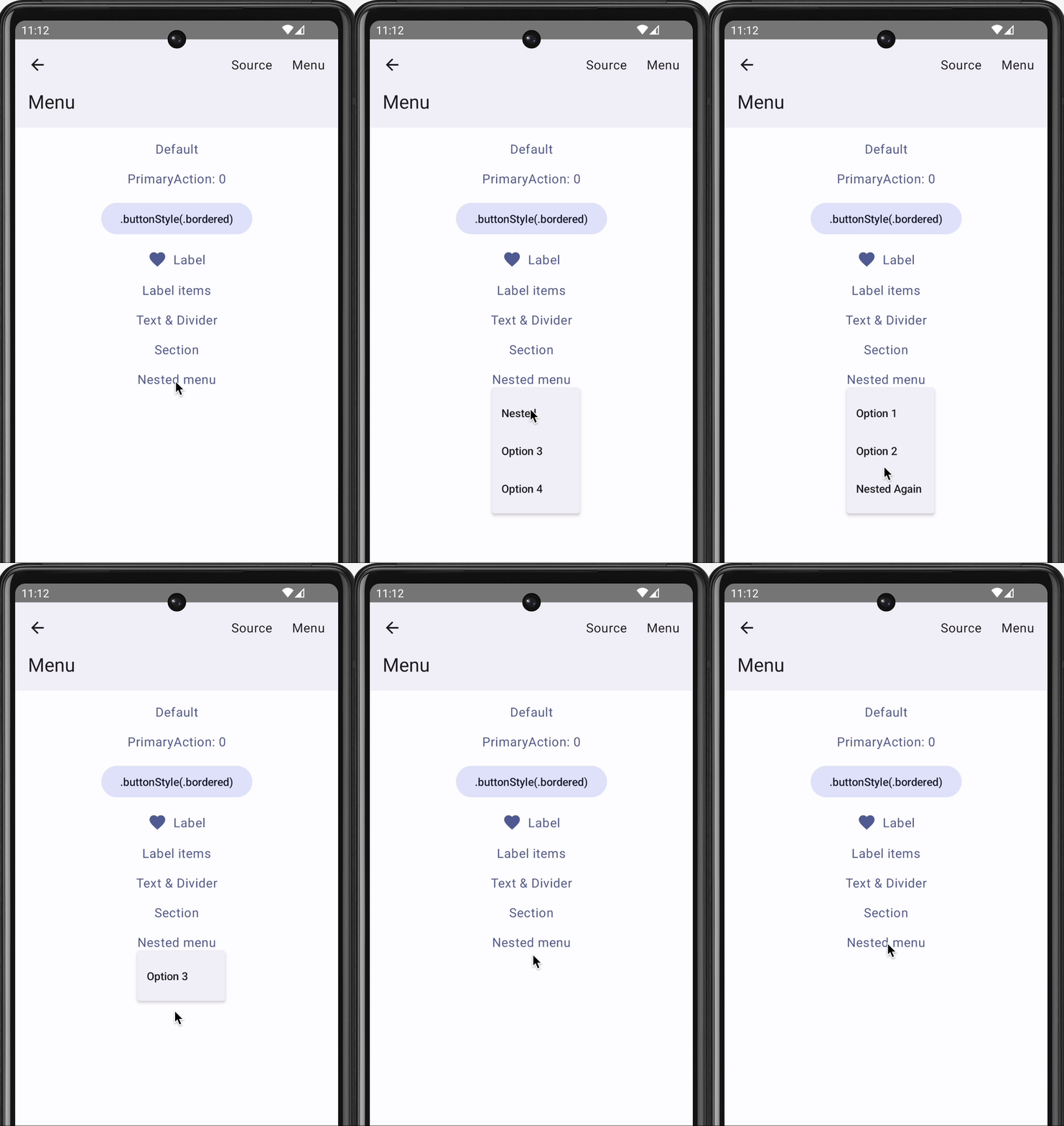
You can see this in action in the Skip Showcase app’s menu playground:

Nested dropdown menus in the Skip Showcase app

We hope that you find this useful! If you have questions or suggestions for improvements, please reach out to us on Mastodon @skiptools@mas.to, via chat skiptools.slack.com, or in our discussion forums.

Skip 2024 Roadmap

Skip enables you to build the best possible apps, for the widest possible audience, using a single codebase. Our goal with Skip is to enable individuals and small teams to create apps for both the iPhone and Android using the native first-party toolkits for those platforms: SwiftUI and Jetpack Compose. We believe this is the best possible experience for users of iPhone and Android devices.

We spent 2023 building the underlying technology to enable this project. The SkipStone transpiler takes your code written in Swift for iOS and converts it into Kotlin for Android. The open-source SkipStack frameworks provide runtime support: they transparently bridge the various Darwin and iOS software layers into their Android equivalents. This includes SkipUI, which takes your SwiftUI interface and turns it into the equivalent Jetpack Compose code, as well as SkipFoundation, which bridges the low-level Foundation framework to the Java APIs used by Android apps. Bringing it all together is the Skip Xcode plugin that automatically runs the transpiler when you build your project and converts your entire Swift package into a buildable Android gradle project.

The end result is a magical development experience: you develop in Xcode and run your SwiftUI app in the iOS Simulator, and Skip seamlessly transpiles and launches your Compose app in the Android emulator. Change some code and re-run, and within seconds both your iOS app and Android app are rebuilt and run side-by-side, ready for testing. The Skip Tour video provides a taste of this process.

In 2024 we will be expanding our ecosystems of Skip frameworks beyond SwiftUI and Foundation. Aside from user interface widgets and operating system integration, a modern mobile app needs a variety of capabilities: graphics and animation, SQL databases, push notifications, media players, cloud storage, payment integrations, parsers for common data formats, cryptography, game technologies, et cetera.

There are many existing libraries, both 1st and 3rd party, for both Android and iOS that fulfill these needs. Our goal is not to re-invent them, but rather to build common abstractions atop them. For example, the new SkipAV framework for playing music and videos is not created from scratch, but is rather implemented on top of iOS’s AVKit and Android’s ExoPlayer. This enables Skip apps to take advantage of each platform’s best-in-class libraries that have matured over the years, while at the same time maintaining a single dual-platform API for developer convenience.

These frameworks are all free and open-source software that Android and iOS app developers can use in their apps. We sell the Skip transpiler itself, but the ecosystem of Skip frameworks can be used – independently of the Skip transpiler – whether or not you are a customer. We choose to make them free software not merely as a value-add for our own customers, but also to grant you, the developer, the confidence that anything you build with Skip will remain under your purview, and that you retain the agency to continue to iterate on your app, with or without the Skip transpiler.

The realization of genuinely native apps for both major mobile platforms, created from a single codebase in a single language, has been a dream for a long time. 2024 will be an exciting year.