Welcome to the June edition of the Skip.tools newsletter! This month we will showcase some of the improvements and advancements we've made to the Skip platform, along with some current events and a peek at our upcoming roadmap.
New Skip Intro Video
We've posted a new Skip "Showreel" video, providing a quick 3-minute overview of Skip and the highlights of using it to build native dual-platform apps. You can find it on YouTube at:
https://www.youtube.com/watch?v=lQjaaAqgxp4. This and other videos are also available from our Tour page at:
/tour/. We will be posting new videos in the coming weeks and months, so consider either following us on YouTube, or subscribing to our RSS feed.
Skip Showcase on the Stores
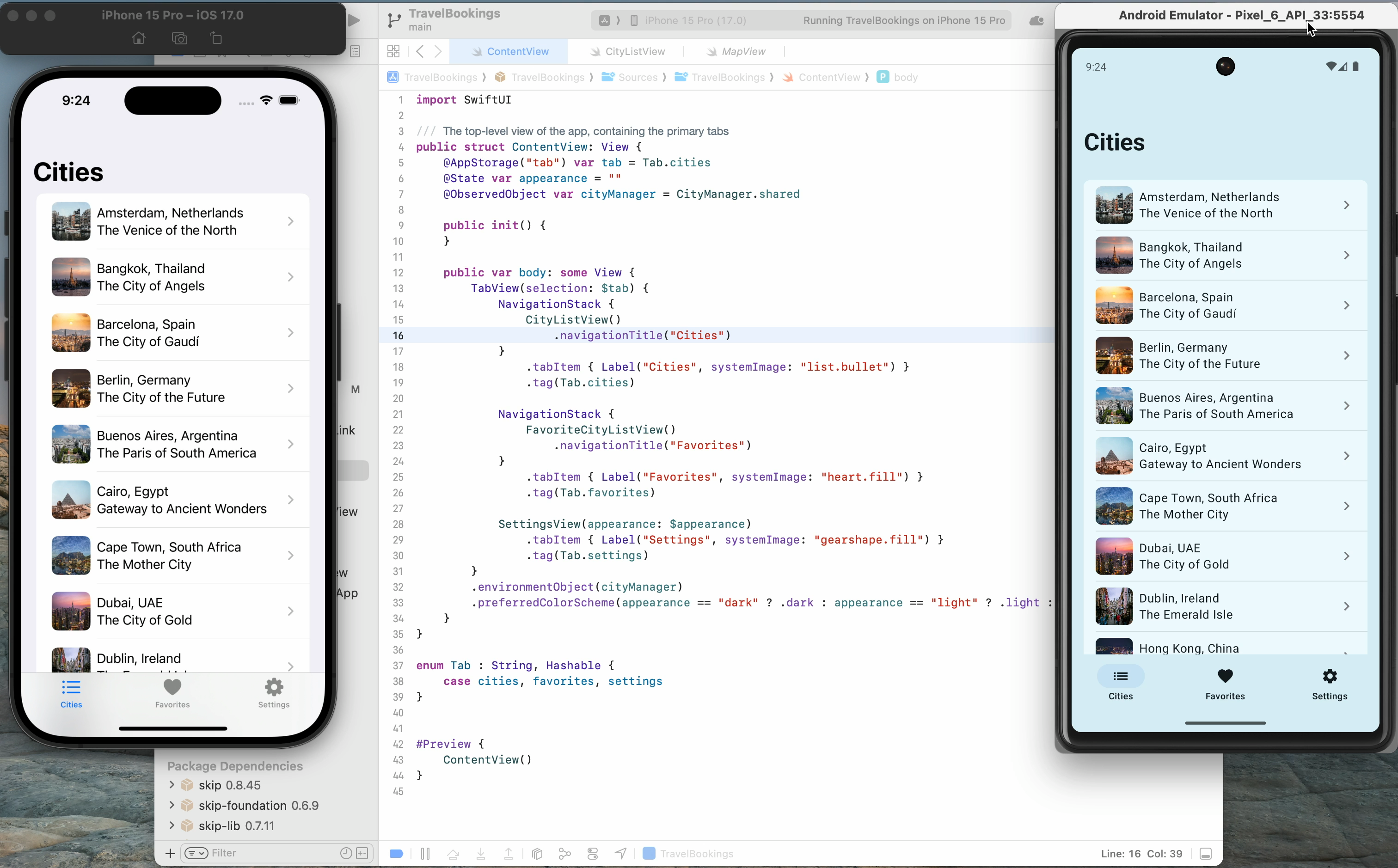
The Skip Showcase app (/docs/samples/skipapp-showcase/) has long been our go-to for providing a side-by-side comparison of SwiftUI components with the Jetpack Compose equivalents that SkipUI provides. Browsing thought these components simultaneously on an iPhone and Android device gives a good sense Skip's capabilities and power, and is a great way to demonstrate Skip's benefits to project managers and stakeholders before breaking ground on a new project.
In order to make it even easier to get this handy app on your devices, we've published the Skip Showcase app to both the
Apple App Store
as well as the
Google Play Store. This enables you to quickly grab a demo app that highlights Skip's power, and feel for yourself the benefit of using a genuinely native app on both platforms. Download it today and see for yourself what Skip can do!
New Framework: SkipKeychain
Using the Keychain has long been the standard way to store bits of sensitive data, such as passwords and notes, on your iOS device. We're happy to announce a brand-new SkipKeychain module that provides an API to read and write sensitive data both on iOS and Android. As with the rest of Skip's library ecosystem, it is free and open-source and available on GitHub at:
https://github.com/skiptools/skip-keychain/. We're only on version 0.0.1 right now, but we expect to be able to iterate quickly to add features and functionality that the community wants to see in this nascent project.
Skip and Kotlin Multiplatform
Skip and Kotlin Multiplatform (KMP) are two sides of the same coin. Skip brings your Swift/iOS codebase to Android, and KMP brings your Kotlin/Android codebase to iOS. Many people have assumed that this diametrical opposition means that the two technologies are incompatible. But this is not the case! KMP modules can be embedded in Skip apps, and they work seamlessly, for the most part, with the Swift-to-Kotlin code transpilation that Skip provides. Check out our deep dive into the integration at
/blog/skip-and-kotlin-multiplatform/
and learn how you can take your business-logic KMP modules and integrate them in both the iOS and Android sides of your Skip app.
Skip Slack Group
By popular demand, we are starting to migrate away from our gitter.im Matrix chat system to a new Skiptools Slack group. Going forward, this will be the preferred medium for live discussions and getting technical help. The Skip team will be standing by to answer questions and help with any issues that members of the community may encounter. You can sign up and join the conversation at:
/slack/.
Skip and Fastlane
The last mile of app development can be the most grueling. Taking your tested and polished 1.0 app and getting it into the hands of your users ought to be quick and simple, but it isn't. Running the gauntlet of the app store submission process is hard enough when you only target one platform, but when you target both iOS and Android, you need to contend with a plethora of hurdles for both the Apple App Store and the Google Play Store.
Fortunately, the popular Fastlane tool (
https://fastlane.tools/
) has evolved over the years to help alleviate some of the drudgery of submitting new apps, as well as updated releases, to these storefronts. And we're happy to report that new projects created with the `skip init` command will now include Fastlane templates that provide everything you need to automate your app distributions. Read more about it on our blog post:
/blog/skip-and-fastlane/.
WWDC, Google I/O, and Skip
Google I/O 2024 and WWDC 2024, the preeminent conferences for Google and Apple developers alike, went back-to-back in June. These exciting events unveiled a lot of new features to the languages and frameworks that are used daily by mobile app developers. We here on the Skip team are working hard to take advantage of many of the new features that were announced.
Language evolution was announced as well: Kotlin 2.0 (final) was released, and Swift 6.0 (beta) was offered up in preview. As we march towards a Skip 1.0 release, we are going to make sure that all the code we process and generate is compatible with both these next-generation language releases, and takes advantages of as many of the new features as possible, while still remaining compatible with prior source and binary releases. Skip 1.0 is right around the corner, and it will be right up to date with the latest and greatest!
Thanks!
You can follow us on Mastodon at
https://mas.to/@skiptools, and join in the Skip discussions at
http://forums.skip.dev/. The Skip FAQ at
/docs/faq/
is there to answer any questions, and be sure to check out the video tours at
/tour/. And, as always, you can reach out directly to us on our Slack channel at
/slack/.
Kotlin Multiplatform (KMP) is a technology that enables Kotlin to be compiled natively and used in non-Java environments. Google recommends using KMP for sharing business logic between Android and iOS platforms1.
In many ways, Skip and KMP are inverses of each other, in that:
Skip brings your Swift/iOS codebase to Android.
KMP brings your Kotlin/Android codebase to iOS.
The mechanics powering these transformations are different – Skip uses source transpilation to convert Swift into idiomatic Kotlin, whereas KMP compiles Kotlin into native code that presents an Objective-C interface – but the high-level benefits are the same: you can maintain a single codebase for both your iOS and Android app.
We think that Skip is the right way to tackle the challenge of creating genuinely native dual-platform apps. Skip gives you an uncompromised iOS-first development approach: your code is used as-is on iOS devices, with zero bridging and no added runtime or garbage collector2. Our SkipUI adaptor framework – which takes your SwiftUI and converts it into Jetpack Compose – allows you to create genuinely native user interfaces for both platforms. And while the Compose Multiplatform3 project adds cross-platform Compose support to KMP, it eschews native components on iOS by default. It utilizes a Flutter-like strategy instead, painting interface elements onto a Skia canvas. This can result in a sub-par experience for iOS users in terms of aesthetics, performance, accessibility, and feel, not to mention limitations on native component integration (something Skip excels at). We believe that a premium, no-compromises user experience requires embracing the platform’s native UI toolkit.
If we put the UI layer aside, however, using KMP for logic and model code does have some great benefits. With KMP, you can target not just Android and iOS, but also the web, desktop, and server-side environments, whereas Skip is focused squarely on mobile app development. You can also write and build KMP code on a variety of platforms: macOS, Windows, and Linux. Finally, some organizations might already be heavily invested in the Kotlin/Java ecosystem.
And so it may be the case that you have business logic in one or more KMP modules that you want to use in a cross-platform Android and iOS app. The trend among organizations that have adopted KMP has been to build separate native apps for each platform – using Jetpack Compose (or Views) on Android and SwiftUI (or UIKit) on iOS – and then import their KMP business logic module into those apps. This is much the same as writing two separate apps, but with the benefit that some of the business logic can use a shared codebase.
This happens to be a perfect fit for Skip. With Skip/KMP integration, you can build the UI of your app from a single Swift codebase, and at the same time use the KMP module from both the Swift and (transpiled) Kotlin sides of the app. You get all the benefits of a genuinely native user interface, and can still leverage any existing investment in a shared Kotlin codebase. The remainder of this post will outline the details of integrating and accessing a KMP module from a Skip app project.
When viewed from the Android side, a KMP module is simply a traditional Kotlin/Gradle project dependency: you add it to your build.gradle.kts and import the Kotlin packages in the same way as you use any other Kotlin package. The KMP module has no knowledge of, or dependency on, any Skip libraries or tools.
The iOS side is a bit more involved: the KMP project must be compiled and exported as a native library4 that can be imported into the iOS project. This is done by compiling the KMP project to native code and then exporting it to an xcframework, which is a multi-platform binary framework bundle that is supported by Xcode and SwiftPM.
The resulting project and dependency layout will look like this:
In the Package.swift file for the skip-kmp-sample ↗ library, we have the Skip-enabled “SkipKMPSample” target with a dependency on a binary target specifying the location and checksum of the compiled xcframework. This enables us to access the Objective-C compiled interface for the KMP library, which is in the separate kmp-library-sample ↗ repository containing the Kotlin and Gradle project that builds the library.
For the transpiled Kotlin side of the Skip framework, we add a Gradle source dependency5 to that same repository. This is accomplished by using the module’s skip.yml file to add the dependency on the same tagged version as the published xcframework:
The result is that the Kotlin side of the Skip project will depend on the Kotlin library, and the Swift side of the Skip project will access the natively-compiled xcframework of the KMP library via its exported Objective-C interface.
Using KMP code from a Skip app is generally the same as using KMP from any other app. As already mentioned, on the Android side, the KMP module is included directly as Kotlin code, and compiled to JVM bytecode along with the rest of your app. On the iOS side, the code is compiled natively to each of the supported architectures (ARM iOS, ARM/X86 iOS Simulator, and ARM/X86 macOS) and bundled into an xcframework. As part of this packaging the KMP compiler generates an Objective-C interface to the native code. This interface can then be used from your Swift through the automatic Objective-C bridging provided by the Swift language.
A simple example can be illustrated using the following Kotlin class:
class SampleClass(var stringField: String, var intField: Int, val doubleField: Double) {
funaddNumbers() : Double {
return intField + doubleField
}
suspendfunasyncFunction(duration: Long) {
delay(duration)
}
@Throws(Exception::class)
funthrowingFunction() {
throwException("This function always throws")
}
}
The Objective-C header created by the Kotlin/Native compiler for this class will look like this:
This Swift interface derived from the generated Objective-C is idiomatic, much in the same way that Skip’s transpiled code is idiomatic Kotlin. This results in code that can be used from both sides of your dual-platform Swift project using the same interface. For example, this Swift code will work on both sides of a Skip project, where the Swift code instantiates the Objective-C class, and the transpiled Kotlin code instantiates the Java class.
funcperformAdd()->Double {
let instance =SampleClass(stringField: "XYZ", intField: Int32(123), doubleField: 12.23)
The type mapping ↗ section of the Interoperability with Swift/Objective-C documentation goes over the automatic conversion of various Kotlin types into their closest Objective-C equivalents. This, in turn, will affect how the Swift types are represented.
These type mappings will typically be the same as the type mappings used by Skip to represent Swift types in Kotlin (such as a Kotlin Short being represented by a Swift Int16), but they don’t always line up exactly. In these cases, there may need to be some manual coercion of types inside an #if SKIP block to get both the Swift and transpiled Kotlin to behave the same.
Kotlin doesn’t have functions that declare that they might throw an exception (like Swift and Java), but if you add the @Throws annotation to a function, the Kotlin/Native compiler will generate Objective-C that accepts a trailing NSError pointer argument, which is, in turn, represented in Swift as a throwing function. For example, the following Kotlin:
In the same way that Skip transforms Swift async functions into Kotlin coroutines, the Kotlin/Native compiler will generate Objective-C with a trailing completionHandler parameter that will be represented in Swift as an async throwing function.
Considering that Skip was not designed with KMP integration in mind – nor vice-versa – it is remarkable how well they work together out of the box. Classes, functions, async, throwable: all work without any special consideration by the Skip transpiler.
That being said, the integration is not perfect. You may encounter some of the following issues:
Primitive Boxing: KMP will box primitives when wrapping in collection types like arrays. For example, a Kotlin function that returns an [Int] will be represented in Objective-C as an NSArray<MPLInt *>, where MPLInt is an NSNumber type. And while the automatic Objective-C bridging will handle converting the NSArray into a Swift Array, it will not know enough about MPLInt to convert it into a Swift Int32, so that sort of conversion will need to be handled manually.
Static Functions: KMP doesn’t map object functions to Objective-C static functions in the way that Skip assumes, but rather handles a Kotlin object as a singleton instance of the type accessible through a shared property.
More can be read about platform-specific behavior in the Kotlin/Native iOS integration ↗ docs.
To experiment with your own Skip/KMP integrations, we recommend starting with our pair of example repositories:
kmp-library-sample ↗: a basic KMP project that presents a source Kotlin dependency, and whose releases ↗ publish a binary xcframework artifact.
skip-kmp-sample ↗: a basic Skip project that depends on the kmp-library-sample’s published xcframework on the Swift side, and has a source dependency on the kmp-library-sample gradle project on the Kotlin side. The test cases in this project utilize Skip’s parity testing to ensure that the tests pass on each supported architecture: macOS and Robolectric for local testing, as well as iOS and Android for connected testing.
These two projects work together to provide a minimal working example of Skip’s KMP integration, and can be used as the basis for further development.
Skip presents an iOS-first, full-stack approach to writing apps for iOS and Android. From the low-level logic layers to the high-level user interface, Skip provides a vertically integrated stack of frameworks that enable the creation of best-in-class apps using the native UI toolkits for both of the dominant mobile platforms.
Kotlin Multiplatform has benefits too: KMP modules can be written and tested on multiple platforms, and they can target platforms beyond mobile. For this reason, KMP can be a compelling option for people who want to share their mobile app code with the web, desktop, or server-side applications.
KMP code fits nicely with Skip projects, because its idiomatic native Objective-C representation means that, for the most part, it can be used seamlessly from both the source Swift and transpiled Kotlin sides of a project. Whether you are creating KMP modules because you are invested in the Kotlin/Java ecosystem, or because you are starting to migrate away from an Android-centric app infrastructure, Skip provides the ideal complement to your existing KMP code. You can have the genuinely native user interface for both platforms that Skip provides, while at the same time utilizing the Kotlin code that you may have built up over time. It is truly the best of both worlds!
“We use Kotlin Multiplatform within Google and recommend using KMP for sharing business logic between Android and iOS platforms.” – https://developer.android.com/kotlin/multiplatform ↗. The mobile-specific form of KMP had been known as KMM, or “Kotlin Multiplatform Mobile”, until they recently deprecated the term ↗. ↩
Details about how a KMP project can be used to create an xcframework can be found at https://kotlinlang.org/docs/apple-framework.html ↗, and you can reference our kmp-library-sample ↗ project for a concrete example. This is another interesting reversal of the normal way of doing things, where the Swift side of an app typically has source dependencies on other SwiftPM packages and the Kotlin side typically has binary dependencies on jar/aar artifacts published to a Maven repository. When depending on a KMP project, this is reversed: the Swift side has a binary dependency on the xcframework built from the KMP project, and the Kotlin side has a source dependency on the KMP project’s Kotlin/Gradle project. ↩
Note that we could have alternatively depended on a compiled .aar published as a pom to a Maven repository, but for expedience we find that using source dependencies are the easiest way to link directly to another git repository. ↩

 {: style=“text-align: center; width: 50%; margin: auto;”}
 {: style=“text-align: center; width: 50%; margin: auto;”}