Skip to content

kotlin

10 posts with the tag “kotlin”

Fully Native Cross-Platform Swift Apps
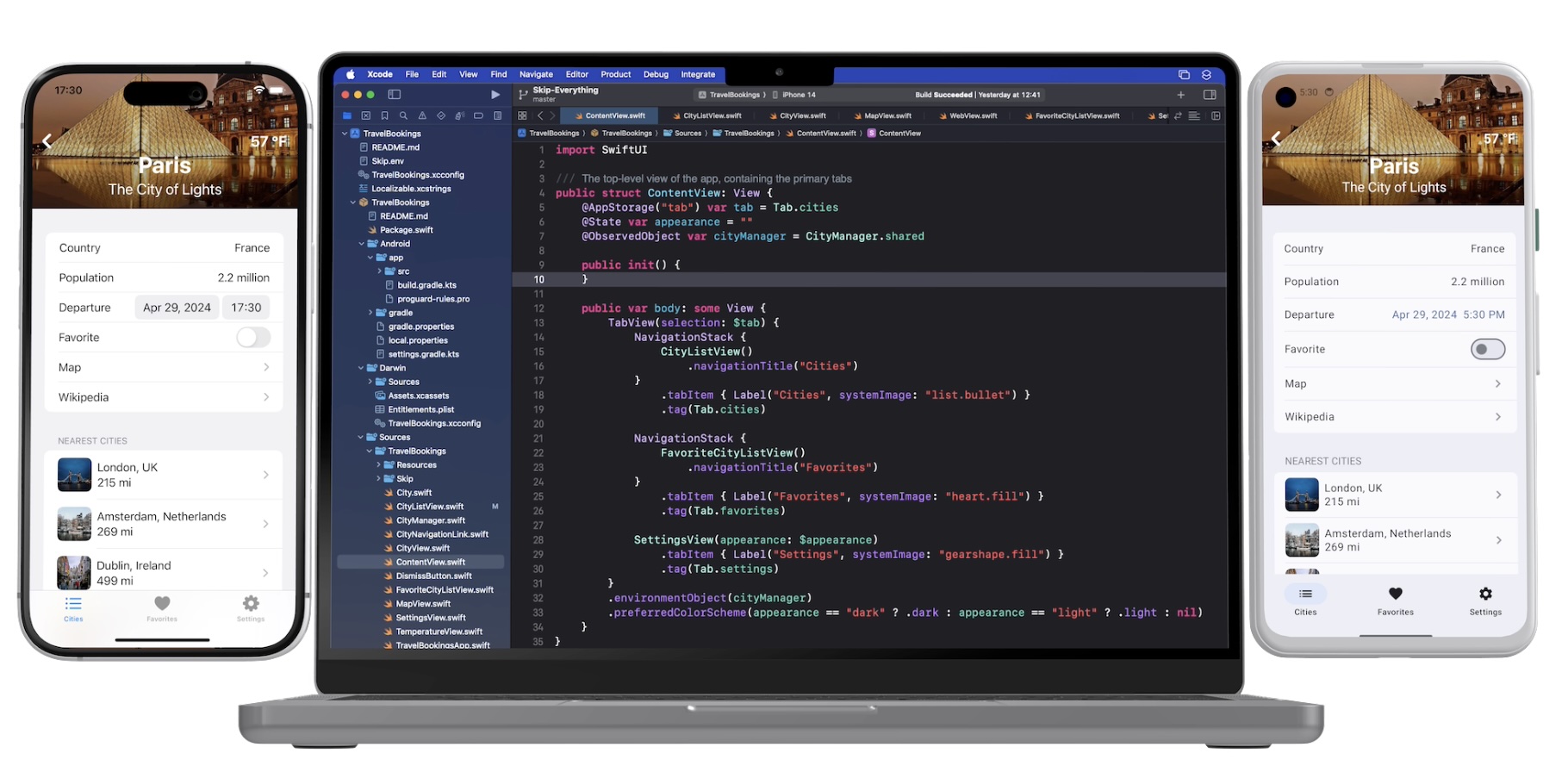
Screenshot

In our series on using native Swift on Android, we have covered the basics of the Swift-Android toolchain in Part 1, bridging between compiled Swift and Kotlin in Part 2, and the creation of a cross-platform app with a shared Swift model layer in Part 3.

We are pleased to unveil the culmination of all of this work: Skip 1.5 now has the ability to create a 100% native Swift and SwiftUI app for both iOS and Android! You can now enjoy the safety, efficiency, and expressiveness of pure Swift throughout your entire cross-platform app, including the ability to tap into the vast ecosystem of Swift packages to support your app development.

This blog post will go over the process of creating and developing a Swift cross-platform app, explore the underlying technologies, and discuss our current status and next steps.

Ensure that you are on a macOS 14+ machine with Xcode 16, Android Studio 2025, and Homebrew installed.

First, create and launch an Android emulator for testing.

Next, open Terminal and type the following commands to install Skip and the native Swift-Android toolchain.

$ brew install skiptools/skip/skip
$ skip upgrade
$ skip android sdk install

Verify that everything is working with an additional Terminal command:

$ skip checkup --native

You’re now ready to create your first fully native cross-platform Swift app:

$ skip init --native-app --open-xcode --appid=bundle.id.HowdySkip howdy-skip HowdySkip

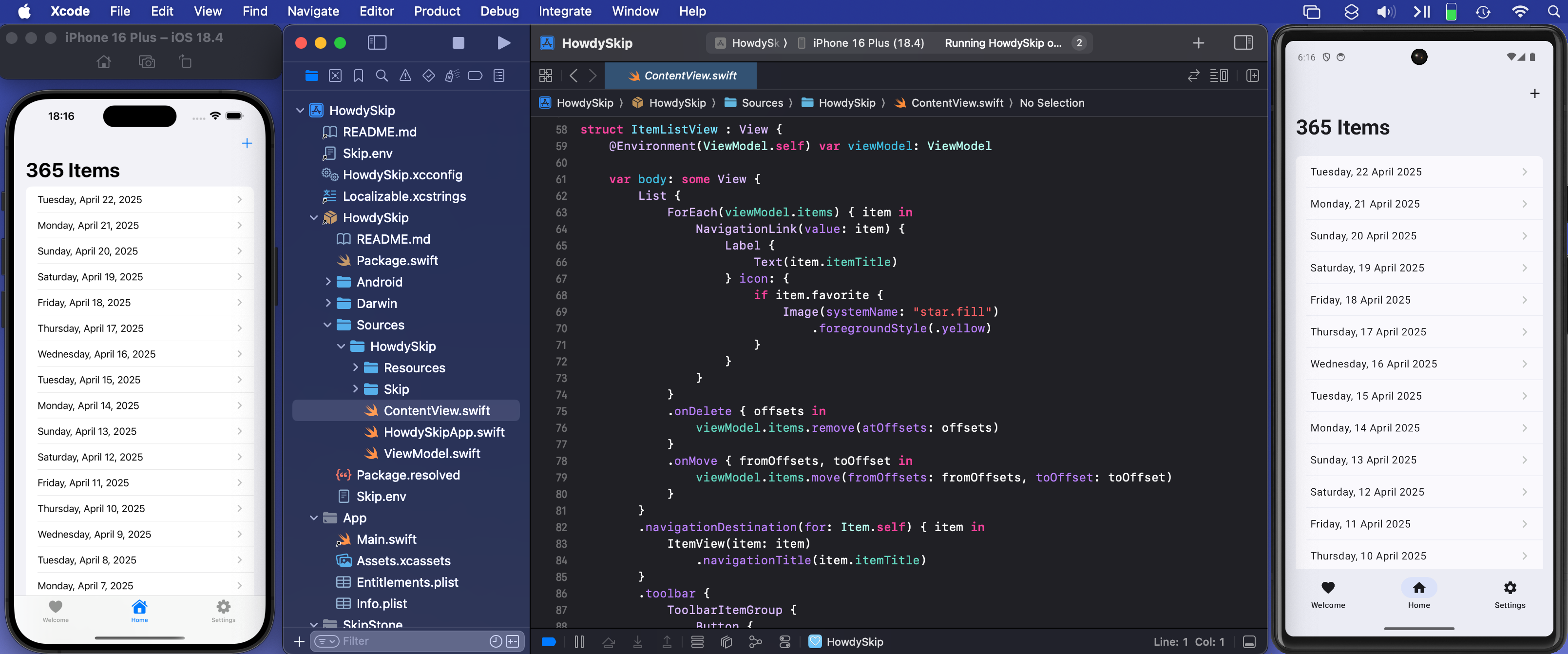
Assuming the app initialized successfully, your project will open in Xcode. Run the app against an iPhone simulator destination (the first build may take some time) and your app will launch on both the iOS simulator and the running Android emulator at the same time!

The skip init command creates a template app to get you started. It is a TabView containing a “Welcome” view, a list of editable and re-orderable “Items”, and a “Settings” view:

Screenshot of the Howdy Swift native app Welcome Tab

Rather than importing SwiftUI, you will notice that the Sources/HowdySkip/ContentView.swift file instead imports SkipFuseUI. When building for iOS, this simply redirects to a SwiftUI import. Skip’s philosophy is to not intrude on the iOS side of the application: on Darwin platforms you are still using direct, non-intermediated SwiftUI, just as if you were building an app without Skip at all.

On Android, however, the SkipFuseUI module bridges the SwiftUI API onto Jetpack Compose, Android’s modern Kotlin UI toolkit. It does this through the intermediate SkipUI module. Bridging to pure Jetpack Compose gives Android users a fully native user experience rather than the uncanny-valley replica generated by many cross-platform frameworks.

Diagram of Skip's Swift-on-Android build process

Consult the SkipUI module’s documentation for a listing of currently-supported SwiftUI constructs on Android. You can also examine the ShowcaseFuse cross-platform sample app, which displays and exercises most supported SwiftUI components:
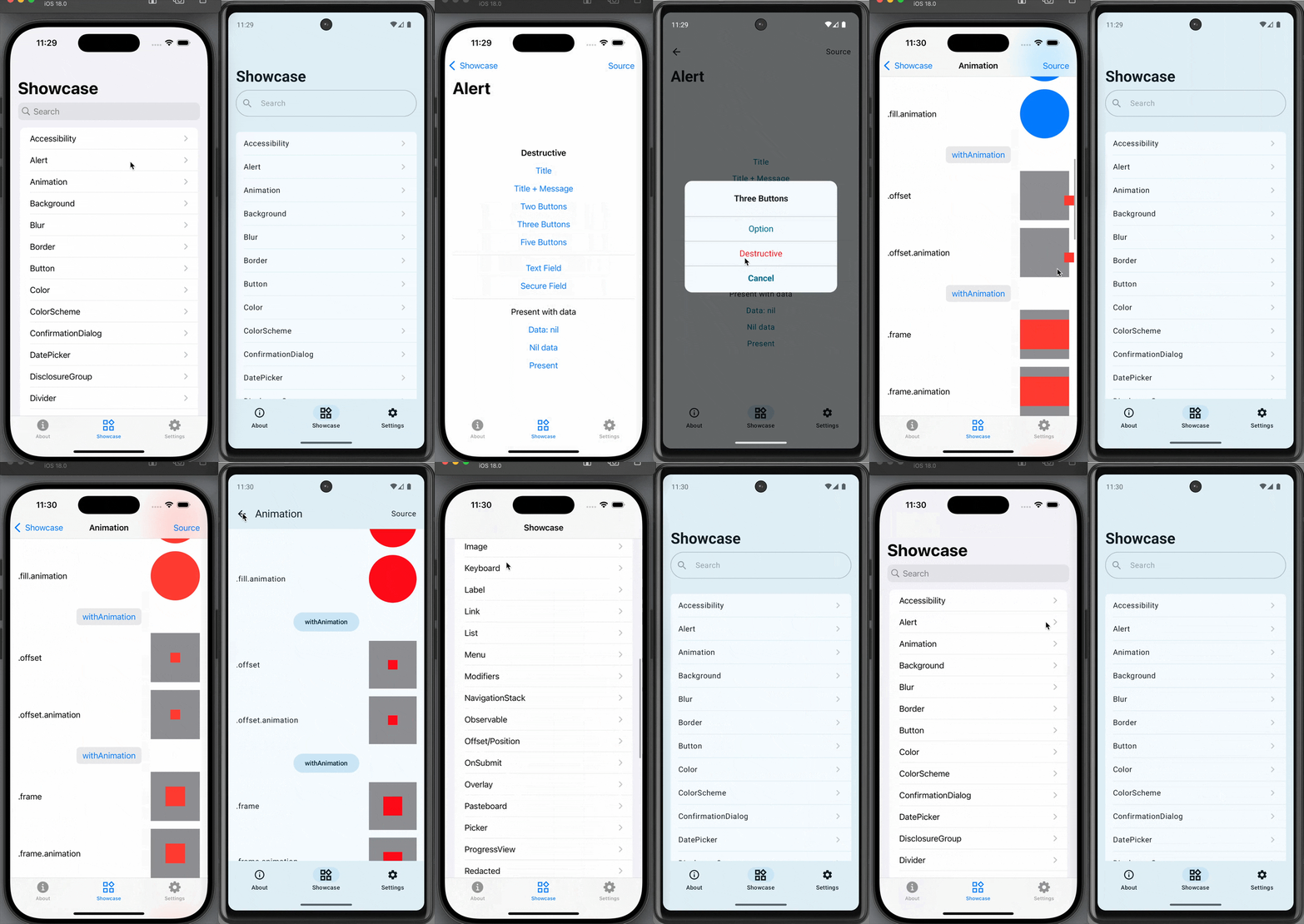
Screen recording

The “Items” tab displays an editable list of items which are managed by Sources/HowdySkip/ViewModel.swift, which handles loading and saving the list of items to a simple JSON file. This code uses standard Foundation types (URL, Data, Date, FileManager, JSONEncoder, JSONDecoder, etc.) to handle the management and persistence of the items. Note that unlike the SwiftUI in ContentView, none of this code is bridged into Kotlin: it is using the Apple swift-foundation types directly, just as on iOS.

Screenshot of the Howdy Swift native app List Tab

Despite only using native Foundation types, you will notice that ViewModel.swift imports SkipFuse. Just as SkipFuseUI bridges your UI to Android, SkipFuse bridges model-layer code. We use it here to enable our @Observable view model to communicate changes to the Jetpack Compose user interface. This is discussed further in Part 2 of the series. You generally don’t need to be concerned with the details other than to remember to import SkipFuse (or SkipFuseUI) any time you implement an @Observable.

The final tab of the sample app is the “Settings” screen. This exposes various settings and displays some information about the app. It also presents a little heart emoji, which is blue on iOS and green on Android.
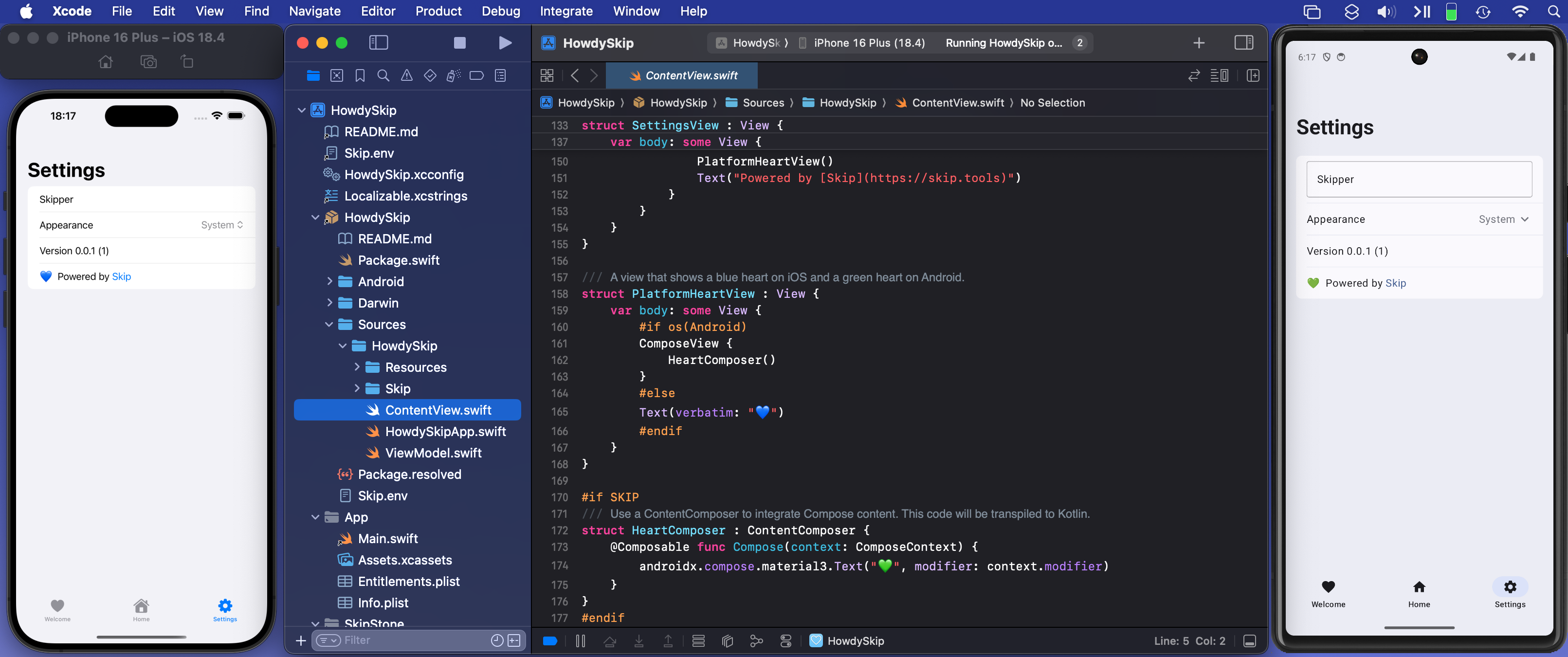
Screenshot of the Howdy Swift native app Settings Tab

We use the green heart emoji to demonstrate a powerful feature of Skip: the ability to embed code that directly calls Kotlin and Jetpack Compose APIs! Examining the SettingsView in ContentView.swift, you will see the inclusion of a PlatformHeartView, whose implementation looks like this:

/// A view that shows a blue heart on iOS and a green heart on Android.
struct PlatformHeartView : View {
var body: some View {
#if !os(Android)
Text(verbatim: "💙")
#else
ComposeView {
HeartComposer()
}
#endif
}
}
#if SKIP
/// Use a ContentComposer to integrate Compose content. This code will be transpiled to Kotlin.
struct HeartComposer : ContentComposer {
@Composable func Compose(context: ComposeContext) {
androidx.compose.material3.Text("💚", modifier: context.modifier)
}
}
#endif

What is going on here? Notice that on Android, we’re rendering the heart with a ComposeView, a special SwiftUI view for including Jetpack Compose content in the form of a ContentComposer.

/// Encapsulation of Composable content.
public protocol ContentComposer {
@Composable func Compose(context: ComposeContext)
}

But how can we define @Composable functions and call Android APIs from within our native Swift code?

The magic lies in Skip’s ability to transpile Swift code into Kotlin, and SkipFuse’s ability to bridge between Kotlin and your compiled Swift. Any code in a #if SKIP block will be transformed into the equivalent Kotlin, so it is free to call other Kotlin and Java APIs directly. The generated #if SKIP Kotlin will also be automatically bridged so that you can call it from your native Swift.

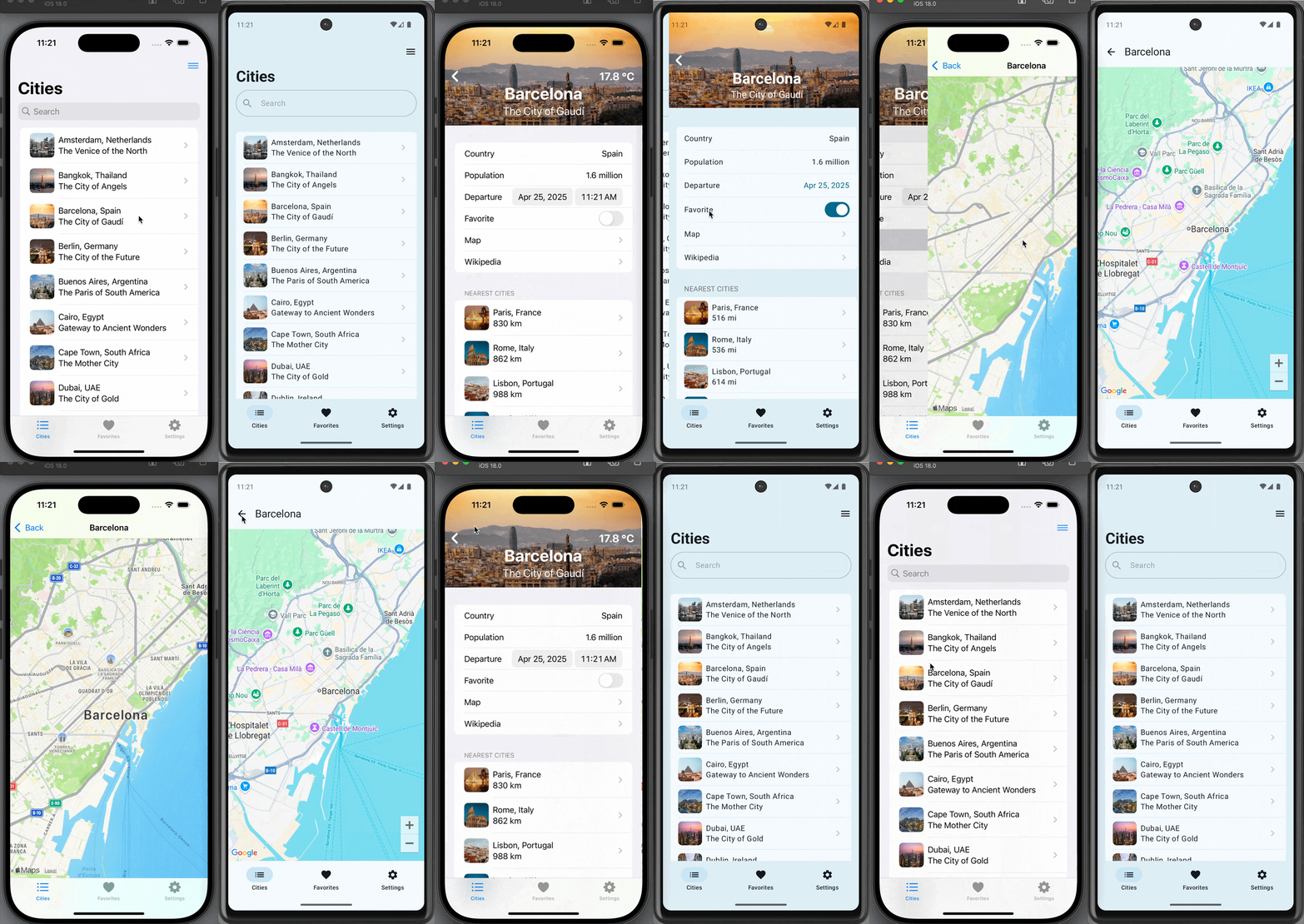
Diagram of Skip's custom Compose view embedding

Screen recording

The ability to effectively embed Kotlin code is immensely powerful. It not only provides direct access Jetpack Compose and the Android SDK, but also enables you to tap into the complete Android ecosystem of libraries through Kotlin and Java dependencies.

Of course, using native Swift allows you to take advantage of the vast and growing ecosystem of available Swift packages as well. In our post on Bringing Swift Packages to Android we introduced the swift-everywhere.org site that tracks packages that are successfully building for Android. Since that post, community members have been implementing Android support, bringing the number of known packages that can be used on Android to 2,240! Popular projects like Alamofire, flatbuffers, SwiftSoup, swift-protobuf, and swift-sqlcipher (just to name a few) can be added directly to your app and used in the same way on both iOS and Android.

Skip’s unique ability to directly call both Swift and Kotlin/Java APIs separates it from most cross-platform development frameworks, where integrating with the host system often requires bespoke adapters and extra layers of indirection.

As a demonstration and validation of this technology, we have published one of our sample apps, Skip Notes, to both the Google Play Store and Apple App Store. This fully native Swift app integrates with the swift-sqlcipher database library to provide persistence for a simple list of notes.

Get it on the Google Play Store Get it on the Apple App Store {: .centered }

Despite being generally available, Skip’s native support is currently a technology preview. We are working on updating our documentation, finding and squashing remaining bugs and limitations, reducing build times, and generating smaller Android binaries. Even as a preview, however, you can build complete, production-ready cross-platform Swift apps, as Skip Notes demonstrates.

Cross-platform Swift and SwiftUI have been a dream of ours for a long time. We are immensely excited about the possibilities this unlocks for creating truly best-in-class apps for both iOS and Android from a single codebase!
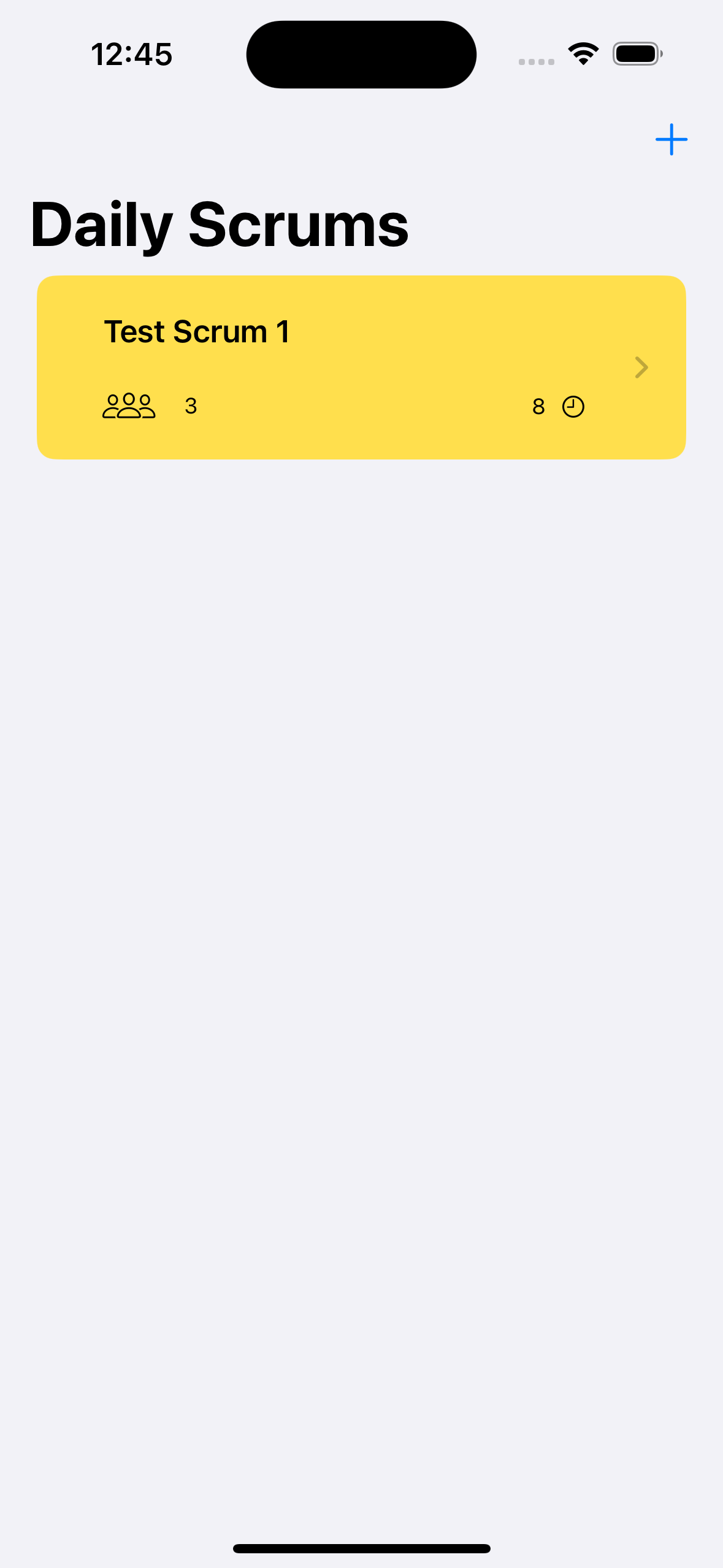
Skip 1.0 Release

Screenshot

We’re thrilled to announce the release of Skip 1.0!

Skip brings Swift app development to Android. Share Swift business logic, or write entire cross-platform apps in SwiftUI.

Skip is the only tool that enables you to develop genuinely native apps for both major mobile platforms with a single codebase. Under the hood, it uses the vendor-recommended technologies on each OS: Swift and SwiftUI on iOS, Kotlin and Compose on Android. So your apps don’t just “look native”, they are native, with no additional resource-hogging runtime and no uncanny-valley UI replicas.

Skip also gives you complete access to platform libraries. Directly call any Swift or Objective C API on iOS, and any Kotlin or Java API on Android - no complex bridging required!

Skip has been in development for over a year. It has an enthusiastic community of users developing a wide range of apps and continually improving Skip’s ecosystem of cross-platform open source libraries.

Scrumskipper: Running Apple's SwiftUI sample app on Android

Scrumdinger is Apple’s canonical SwiftUI iPhone app. In this post, we’ll use Skip to run Scrumdinger as a native Android app as well!

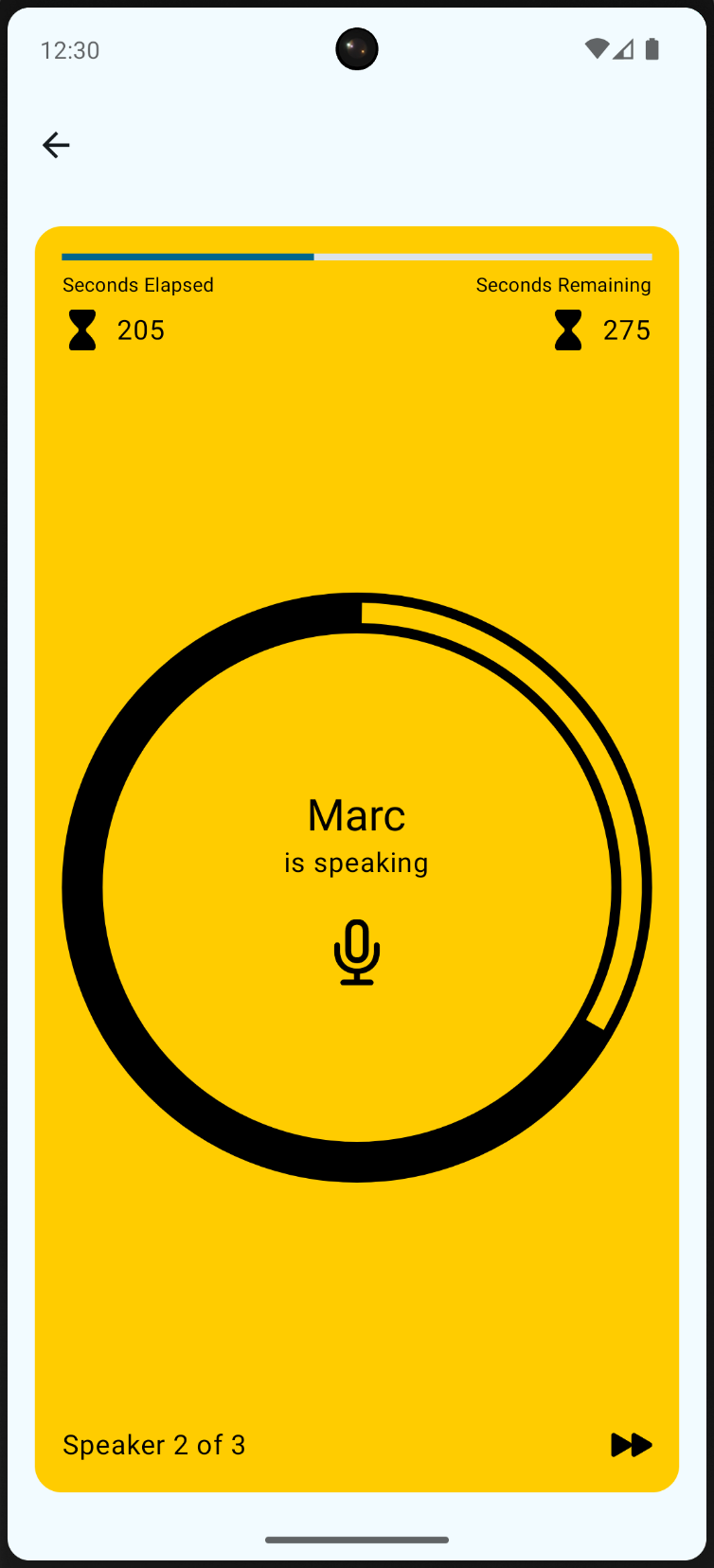
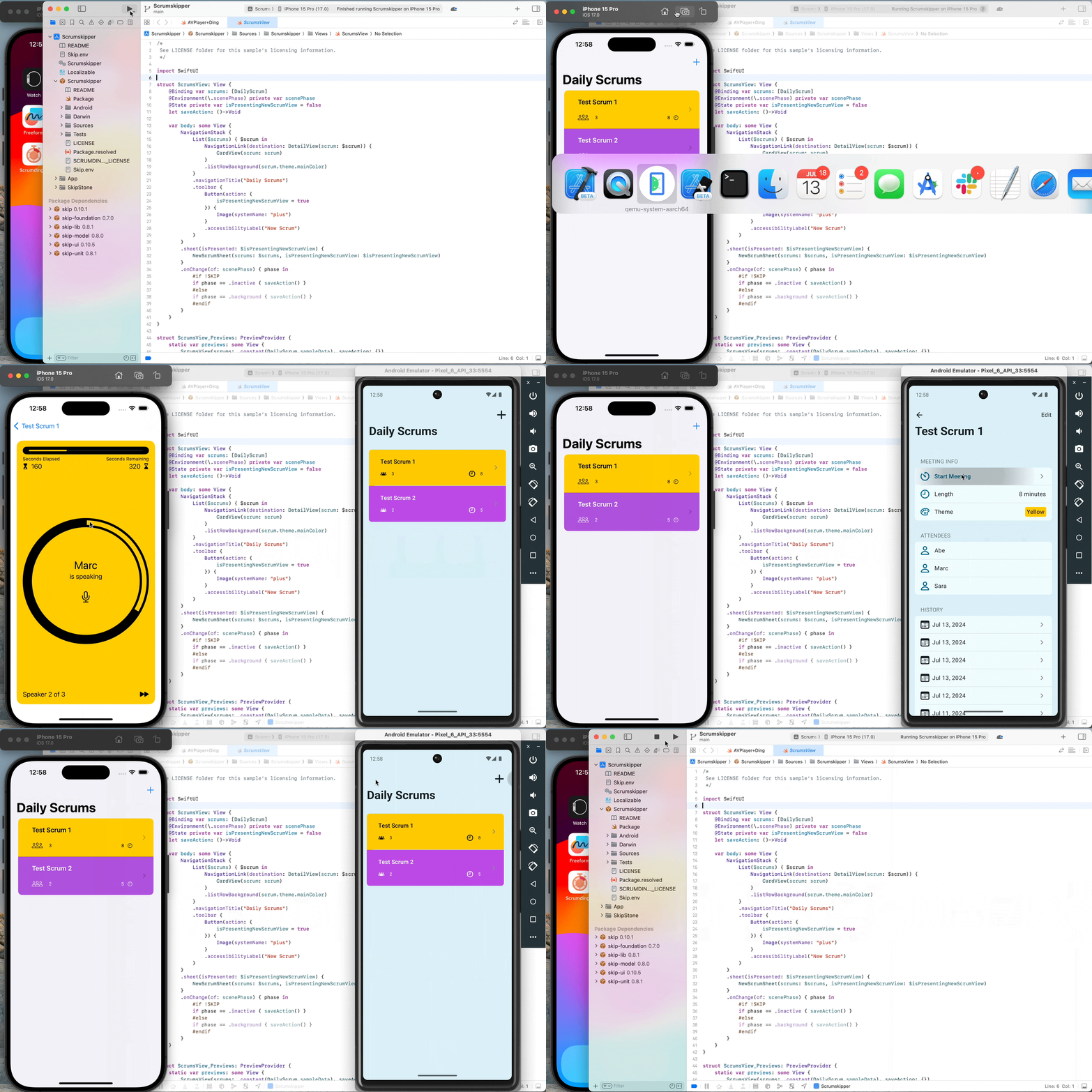
Recording of Scrumdinger app operating on iOS and Android simultaneously

Honed and updated over the years, Apple’s Scrumdinger tutorial is an hours-long step-by-step guide to building a complete, modern SwiftUI app. It exercises both built-in UI components and custom drawing, and it takes advantage of Swift language features like Codable for persistence. As its rather unique name implies, the Scrumdinger app allows users to create and manage agile programming scrums on their phones.

This blog post begins where Apple’s tutorial ends. We’ll start with the final Scrumdinger source code and walk you through the process of bringing the full app to Android using Skip. You’ll learn the general steps involved in bringing an existing app to Android, and you’ll become familiar with the types of issues you may encounter and how to overcome them. Let’s get started!

You can get the full Scrumdinger source code from the last page of Apple’s SwiftUI tutorial. Here’s a direct link to the zipped Xcode project:

https://docs-assets.developer.apple.com/published/9d1c4a1d2dcd046ee8e30ad15f20f6f3/TranscribingSpeechToText.zip

Download and expand the zip file. Assuming you have the latest Xcode installed, you can run the iPhone app by opening TranscribingSpeechToText/Complete/Scrumdinger.xcodeproj. The first time you attempt to open it, you may need to confirm that you trust the download. Once Xcode has loaded the project, select the iOS Simulator you’d like to use and hit the Run button!

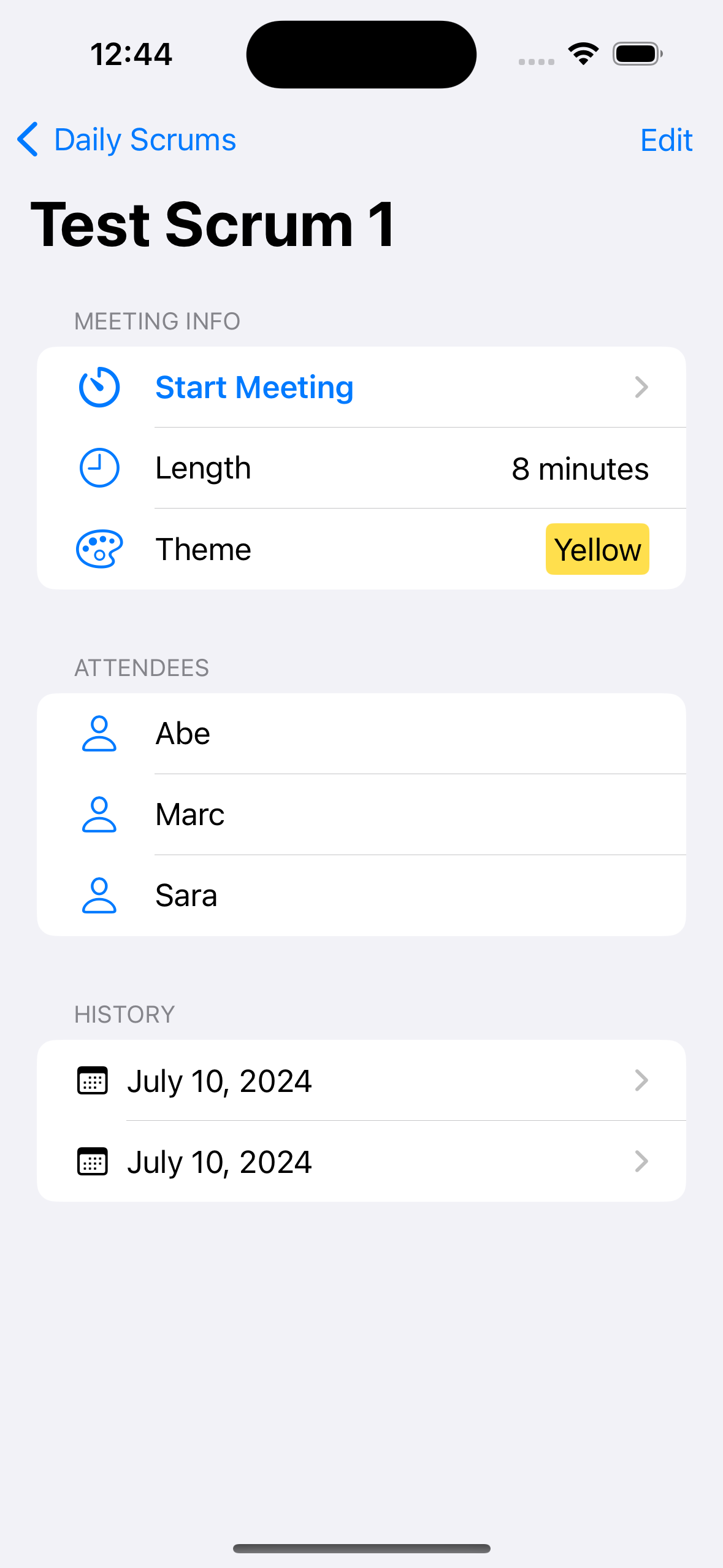
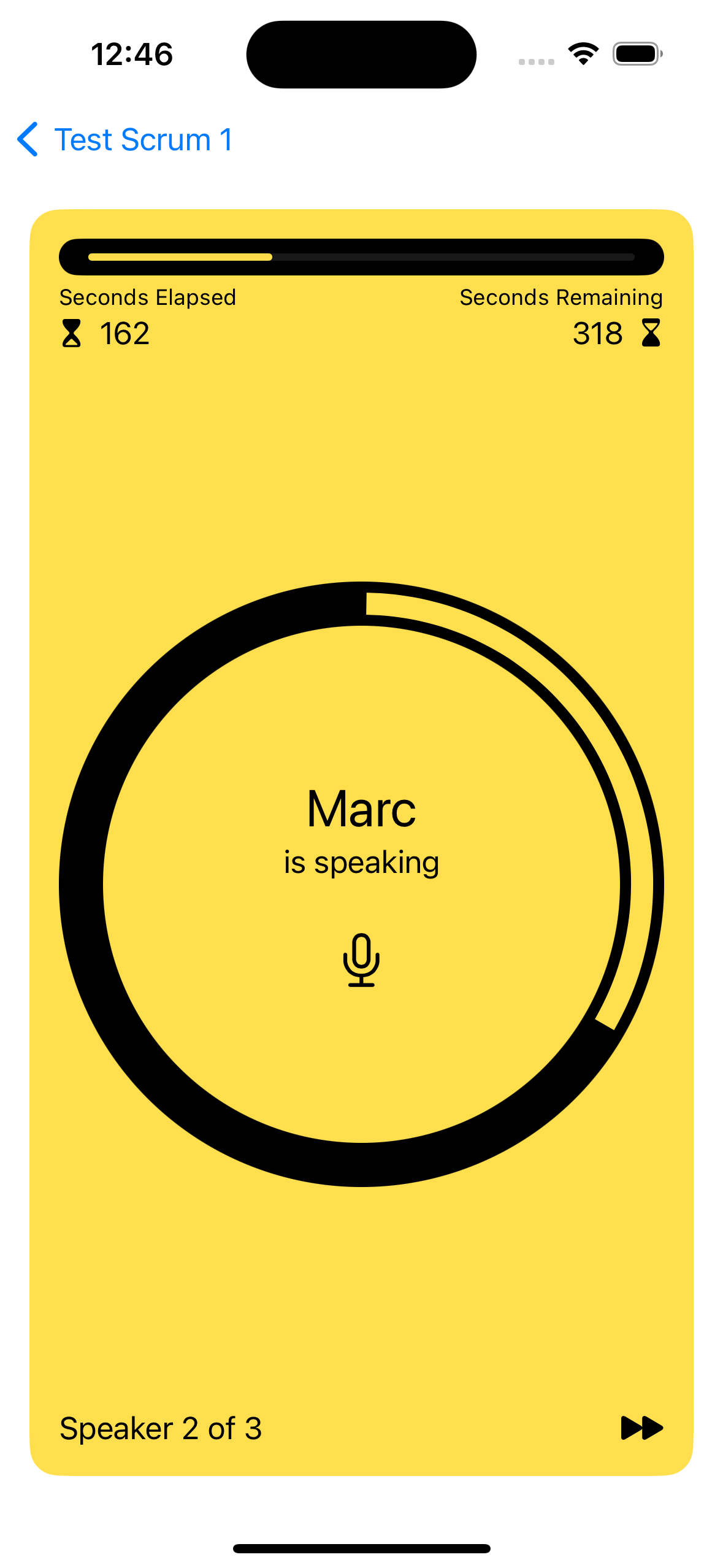
Screenshot of the iOS app's scrum list Screenshot of the iOS app's scrum detail Screenshot of the iOS app's meeting view

Play around with the app - this is what we’re going to bring to Android. First, however, we need to install Skip.

Skip is a tool for building fully native iOS and Android apps from a single Swift and SwiftUI codebase. It works by transpiling your Swift into Android’s Kotlin development language and adapting your SwiftUI to Android’s native Jetpack Compose UI framework.

Skip’s Android version of Scrumdinger won’t be pixel-identical to the iOS version, and it shouldn’t be. Rather, we believe in using the native UI framework and controls on each platform. This gives the best possible user experience, avoiding the uncanny-valley feel of non-native solutions.

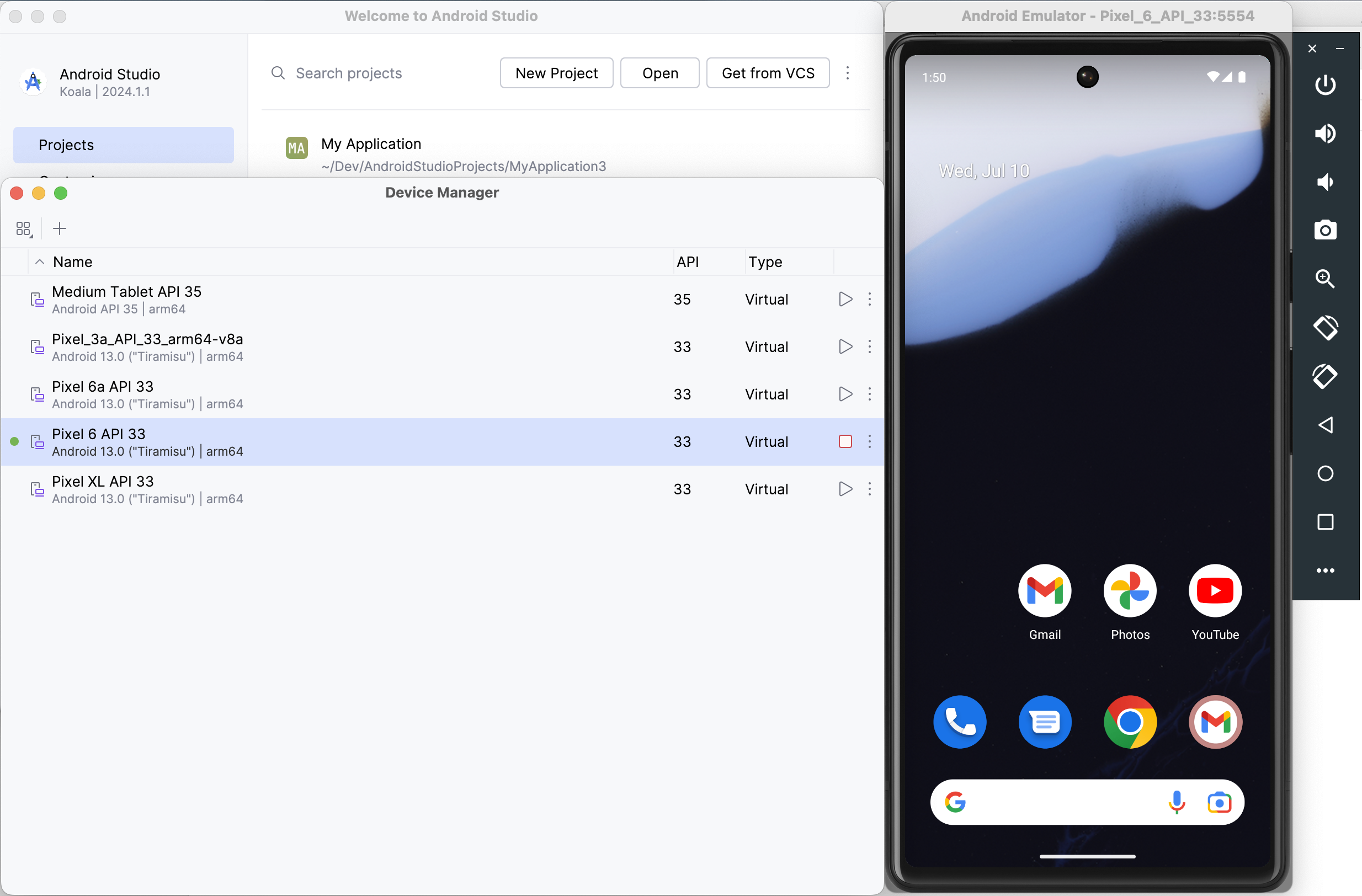
Follow the Getting Started guide to install Skip and your Android environment, including Android Studio. Next, launch Android Studio and open the Virtual Device Manager from the ellipsis menu of the Welcome dialog. From there, Create Device (e.g., “Pixel 6”) and then start the Emulator. Skip needs a connected Android device or Emulator to run the Android version of your app.

Screenshot of Android Studio Device Manager

Now we’re ready to turn Scrumdinger into a dual-platform Skip app.

It isn’t too hard to update an existing Swift Package Manager package to use Skip. Updating an existing app, however, is a different story. Building for Android requires a specific folder structure and xcodeproj configuration. We recommend creating a new Skip Xcode project, then importing the old project’s code and resources.

Enter the following command in Terminal to initialize Scrumskipper, your dual-platform version of the Scrumdinger app.

Terminal window
skip init --open-xcode --appid=com.xyz.Scrumskipper scrum-skipper Scrumskipper

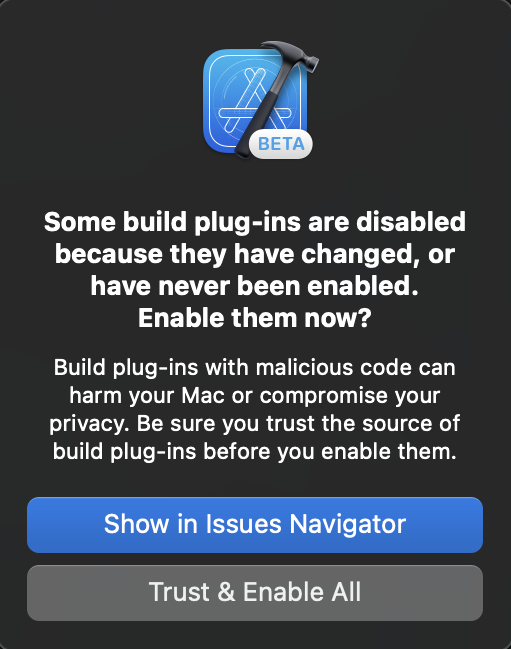
This will create a template SwiftUI app and open it in Xcode. Let’s run the template as-is to make sure it’s working: select your desired iOS Simulator in Xcode, and hit the Run button. If you just installed or updated Skip, you may have to trust the Skip plugin:

Xcode's Trust Plugin dialog

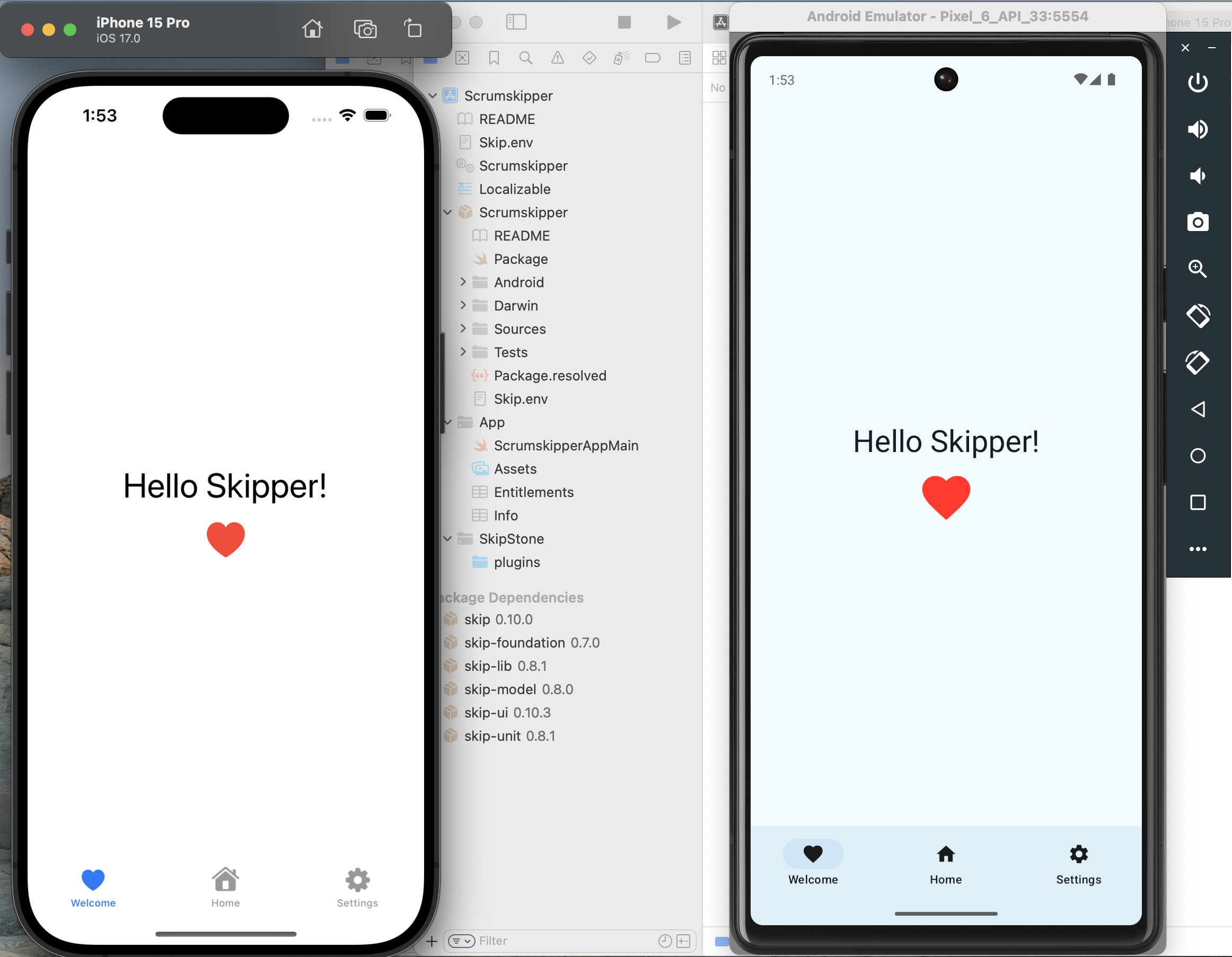
If all goes well, you should see something like the following:

Screenshot of template app running in iOS Simulator and Android Emulator

Great! Next, copy Scrumdinger’s source code to Scrumskipper:

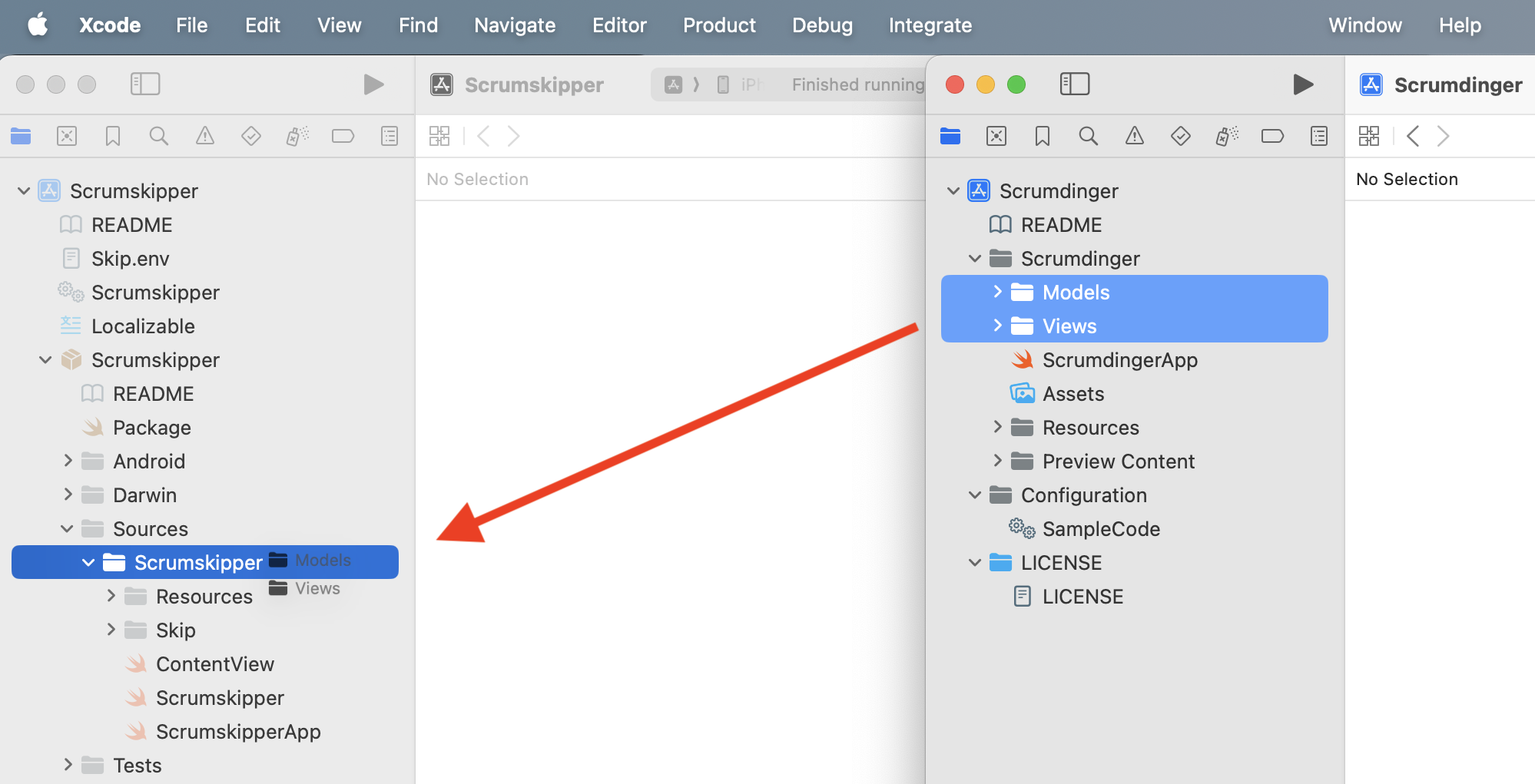
  1. Drag the Scrumdinger/Models and Scrumdinger/Views folders from Scrumdinger’s Xcode window into the Scrumskipper/Sources/Scrumskipper/ folder in Scrumskipper’s window.

    Copy source folders from Scrumdinger to Scrumskipper
  2. Replace Scrumskipper’s ContentView body with the content of Scrumdinger’s primary WindowGroup. Scrumskipper’s ContentView should now look like this:

import SwiftUI
public struct ContentView: View {
@StateObject private var store = ScrumStore()
@State private var errorWrapper: ErrorWrapper?
public init() {
}
public var body: some View {
ScrumsView(scrums: $store.scrums) {
Task {
do {
try await store.save(scrums: store.scrums)
} catch {
errorWrapper = ErrorWrapper(error: error,
guidance: "Try again later.")
}
}
}
.task {
do {
try await store.load()
} catch {
errorWrapper = ErrorWrapper(error: error,
guidance: "Scrumdinger will load sample data and continue.")
}
}
.sheet(item: $errorWrapper) {
store.scrums = DailyScrum.sampleData
} content: { wrapper in
ErrorView(errorWrapper: wrapper)
}
}
}
#Preview {
ContentView()
}

That’s it! You’ve now created Scrumskipper, a dual-platform app with all of Scrumdinger’s source code.

It’s the moment of truth: hit that Xcode Run button!

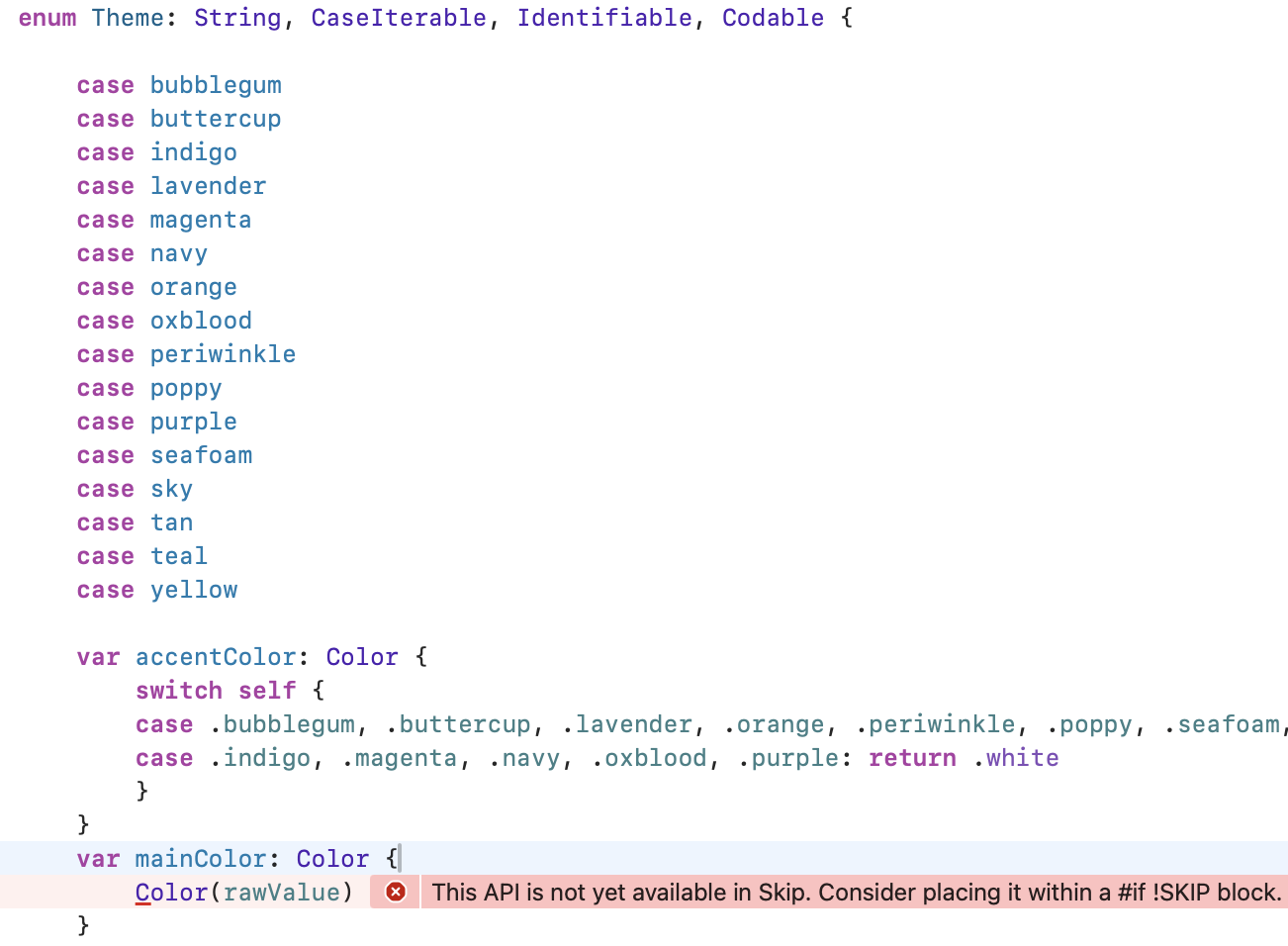
Almost immediately, you’ll get an API unavailable error like this one:

Xcode API unavailable error from Skip

This is our first hint that migrating an existing iOS codebase to Android is not trivial, even with Skip. Starting a new app with Skip can be a lot of fun, because it’s relatively easy to avoid problematic patterns and APIs, and you can tackle any issues one at a time as they appear. But when you take on an existing codebase, you get hit with everything at once. Even if Skip perfectly translates 95+% of your original Swift source and API calls - code that was certainly never intended to be cross-platform - that can leave dozens or even hundreds of errors to deal with!

It’s important to remember, though, that while fixing that remaining 5% can be a slog, it is still 20 times less work than a 100% Android rewrite! And once you’ve worked through the errors, you’ll have a wonderfully maintainable, unified Swift and SwiftUI codebase moving forward. So let’s roll up our sleeves and get started, beginning with the error above.

The pictured error message says that the Color(_ name:) constructor isn’t available in Skip. Each of Skip’s major frameworks includes a listing you can consult of the API that is supported on Android. These listings are constantly expanding as we port additional functionality. For example, here is the table of supported SwiftUI.

When an API is unsupported, that does not mean you can’t use it in your app! Skip never forces you to compromise your iOS app. Rather, it means that you have to find a solution for your Android version. That could mean contributing an implementation for the missing API, but more often you’ll just want to take a different Android code path. To keep your iOS code intact but create an alternate Android code path, use #if SKIP (or #if !SKIP) compiler directives. The Skip documentation covers compiler directives and other platform customization techniques in detail. Let’s update the problematic code in Theme.swift to use named colors on iOS, but fall back to a constant color on Android until we implement a solution:

Change:

var mainColor: Color {
Color(rawValue)
}

To:

var mainColor: Color {
#if !SKIP
Color(rawValue)
#else
// TODO
Color.yellow
#endif
}

This technique works for SwiftUI modifiers as well. For example, while Skip is able to translate many of SwiftUI’s accessibility modifiers for Android (in fact Skip’s native-UI approach excels in accessibility), it doesn’t have a translation for the .accessibilityElement(children:) modifier. So, update from this:

HStack {
Label("Length", systemImage: "clock")
Spacer()
Text("\(scrum.lengthInMinutes) minutes")
}
.accessibilityElement(children: .combine)

To this:

HStack {
Label("Length", systemImage: "clock")
Spacer()
Text("\(scrum.lengthInMinutes) minutes")
}
#if !SKIP
.accessibilityElement(children: .combine)
#endif

The iOS version of the app is unaffected, and the Android build can proceed without the unsupported modifier.

Getting Scrumskipper to successfully build as an iOS and Android app is a repetition of the process we began above:

  1. Hit the Run button.
  2. View the next batch of Xcode errors from the transpiler or the Kotlin compiler.
  3. Use compiler directives to exclude the source causing the error from the Android build.

If you see this process through as we did, you’ll end up using #if SKIP and #if !SKIP approximately 25 times in the ~1,500 lines of Scrumdinger’s Swift and SwiftUI source. In addition to the aforementioned Color(_ name:) and .accessibilityElement(children:) APIs, here is a full accounting of Scrumdinger code that causes errors:

  • The Speech and AVFoundation frameworks used in Scrumdinger are not supported. While Skip does have a minimal AVFoundation implementation for Android, it is not complete as of this writing. These are examples of cases where you would likely use Skip’s dependency support to integrate Android-specific libraries for the missing functionality.
  • Timer.tolerance is not supported.
  • .ultraThinMaterial is not supported.
  • ListFormatter is not supported. We replaced ListFormatter.localizedString(byJoining: attendees.map { $0.name }) with attendees.map { $0.name }.joined(separator: ", ").
  • SwiftUI’s ProgressViewStyle is not yet supported.
  • SwiftUI’s LabelStyle is not yet supported.
  • The Theme enum’s name property causes an error because all Kotlin enums inherit a built-in, non-overridable name property already. We changed the property to themeName.

You can view the final result in the source of our skipapp-scrumskipper sample app.

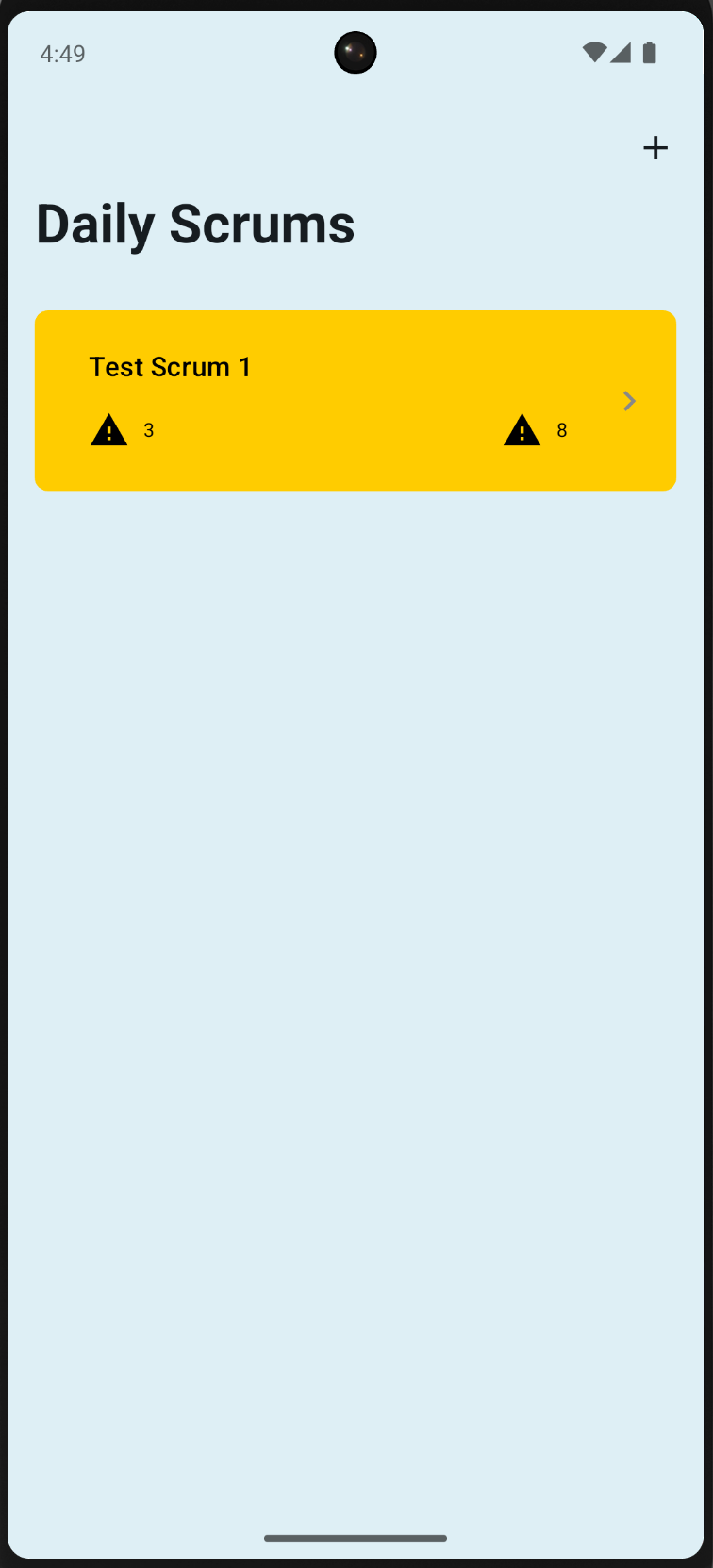
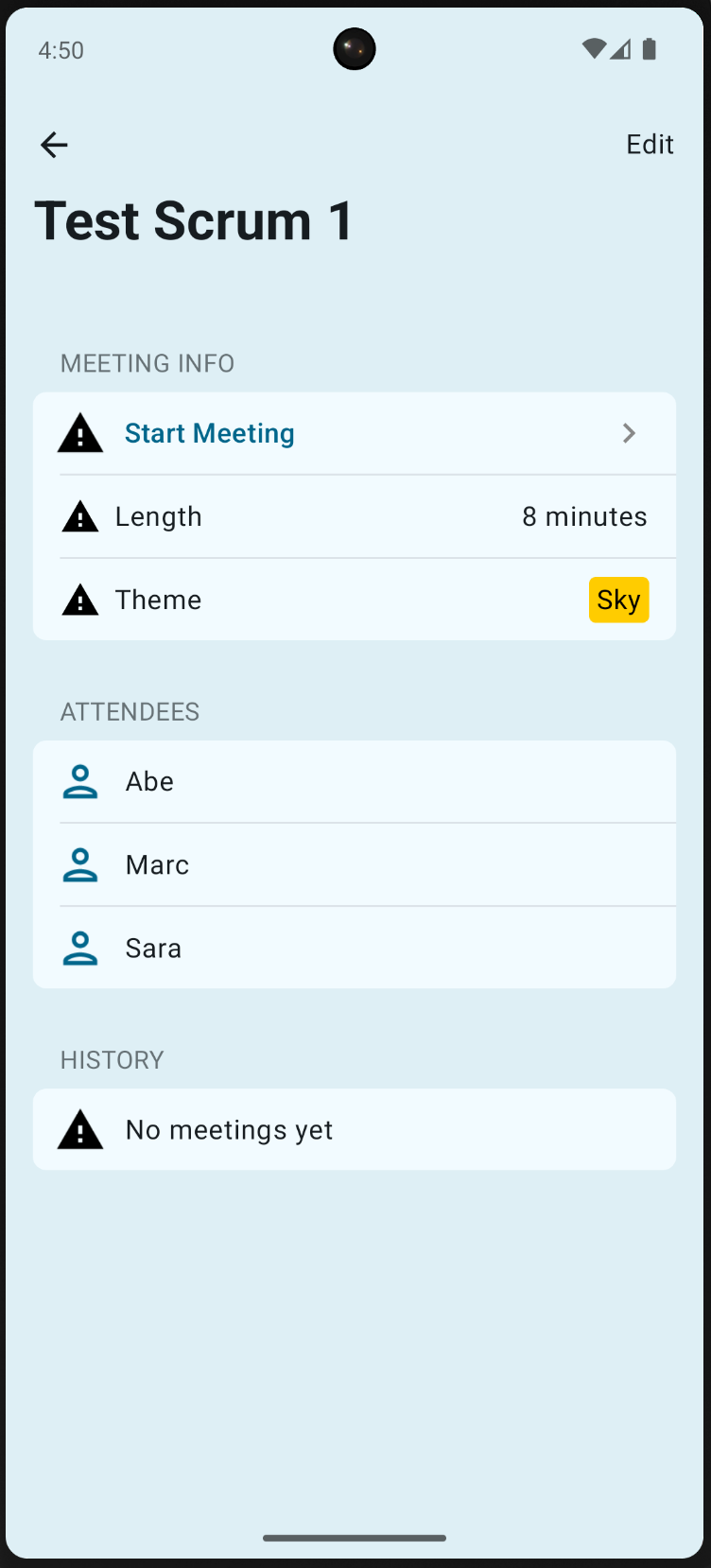
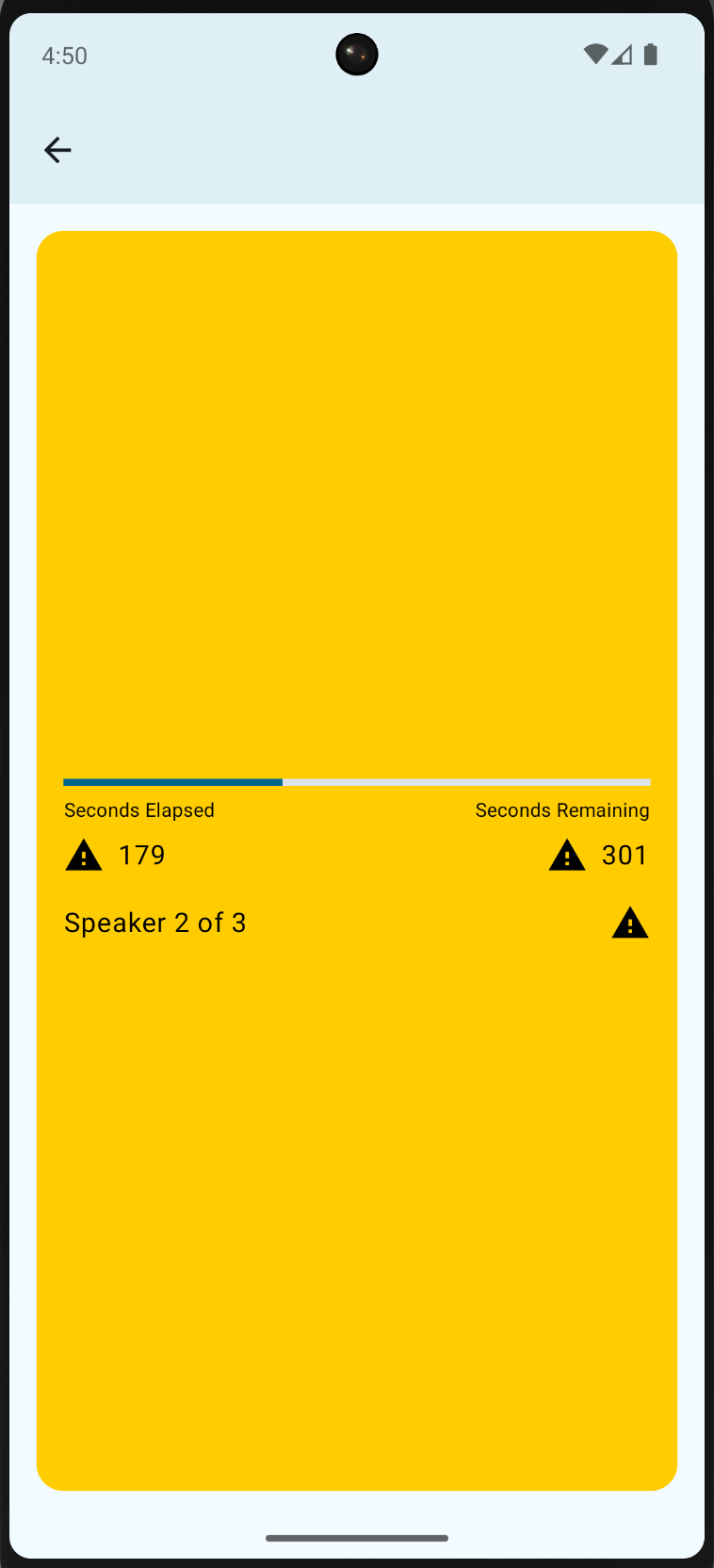
After using compiler directives to work around these errors, we have liftoff! Scrumskipper launches on both the iOS Simulator and Android Emulator. Clearly, however, it needs additional work.

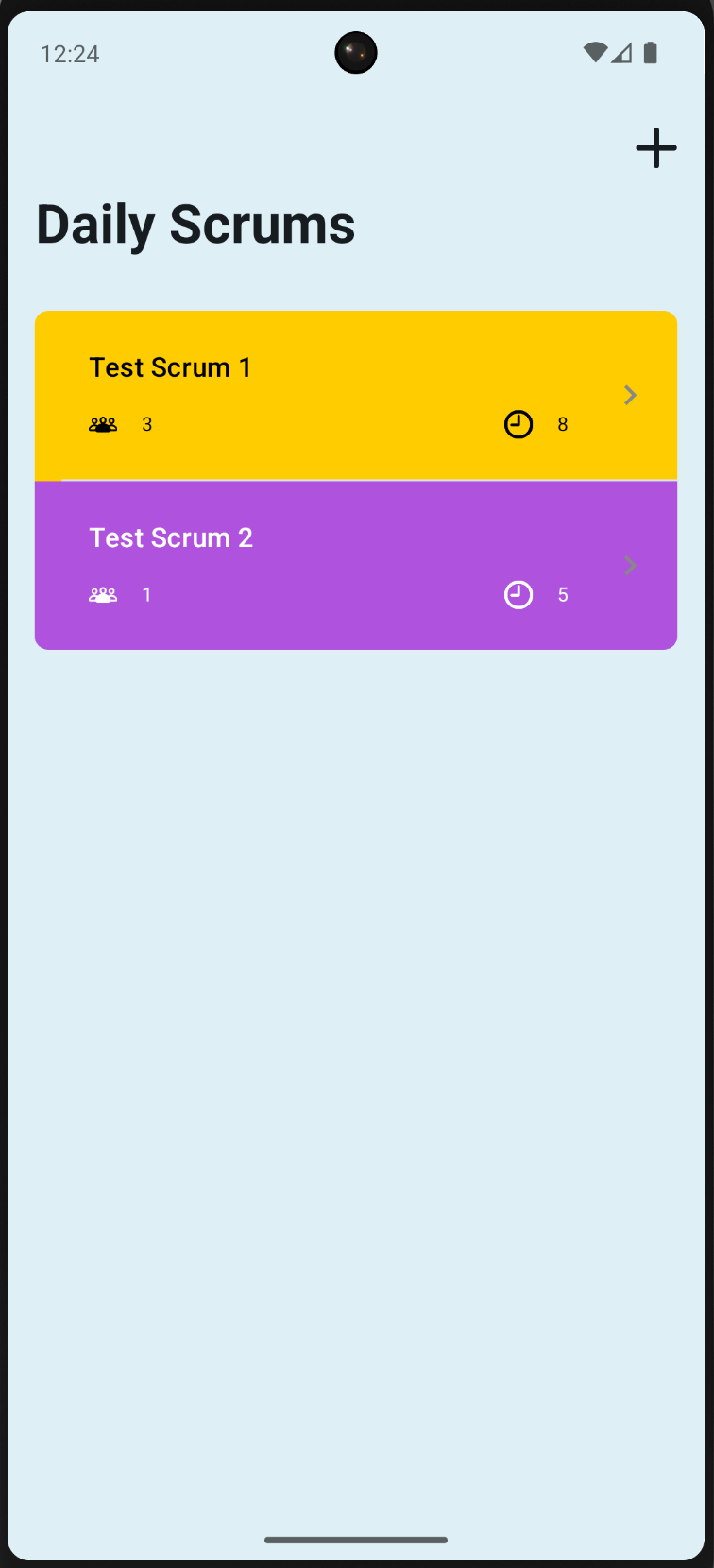
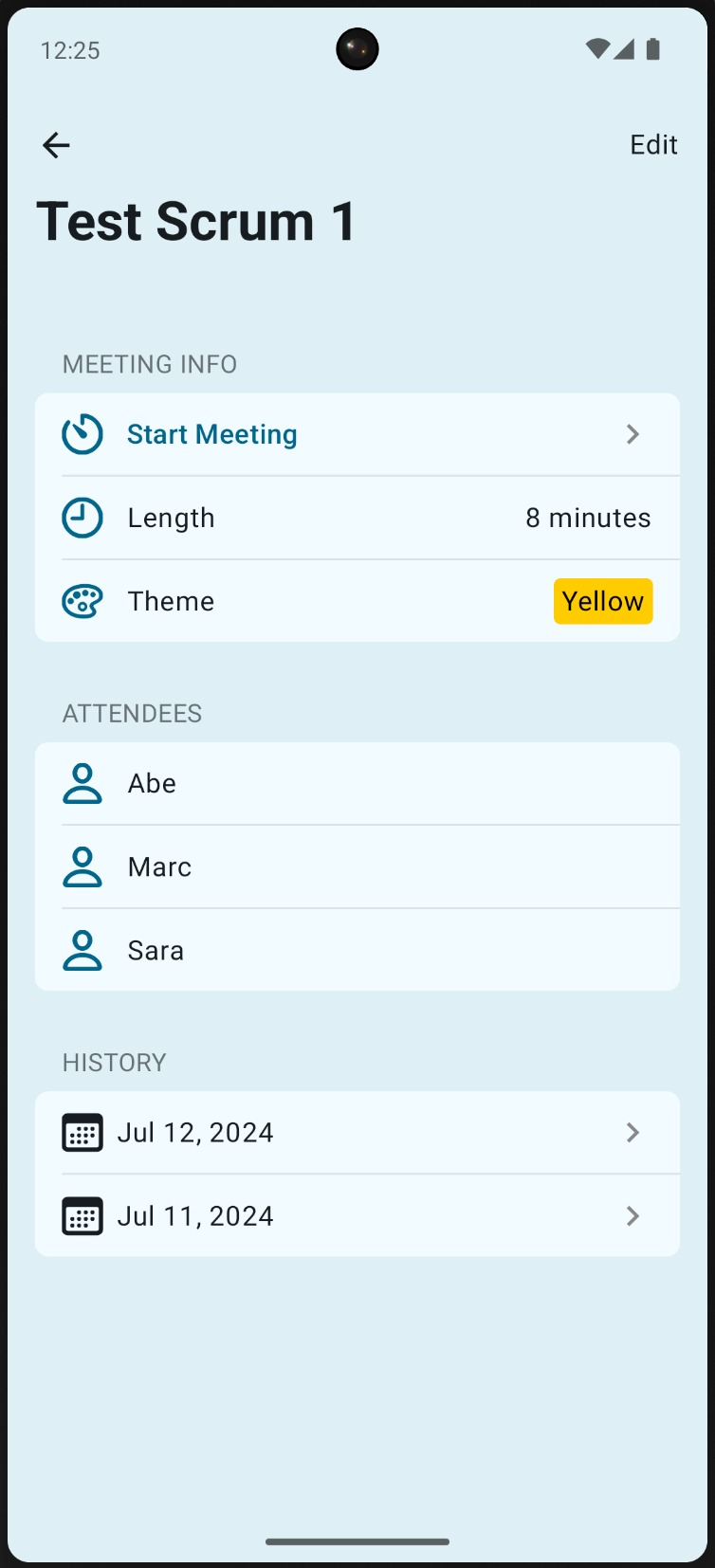
Screenshot of the Android app's scrum list Screenshot of the Android app's scrum detail Screenshot of the Android app's meeting view

As you explore the app, you’ll find many things that are missing or broken. Fortunately, it turns out that the problems are all easily fixed. View our sample app to see the completed code. We give a brief description of each issue below.

Copying over Scrumdinger’s source code wasn’t quite enough. We forgot to copy its ding.wav resource and more importantly, the Info.plist keys that give the app permission to use the microphone and speech recognition. Without these keys, the iOS app will crash when you attempt to start a meeting.

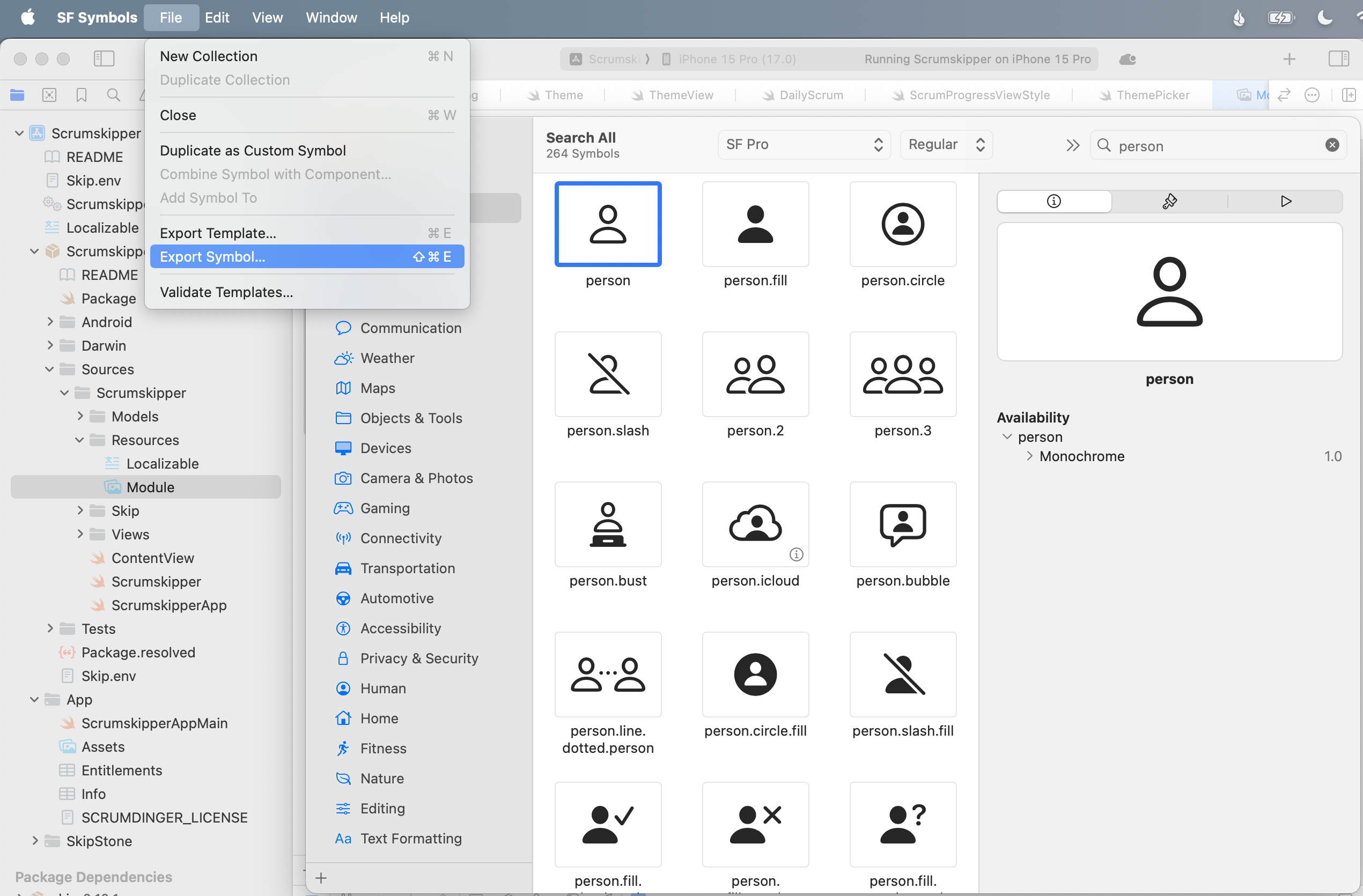
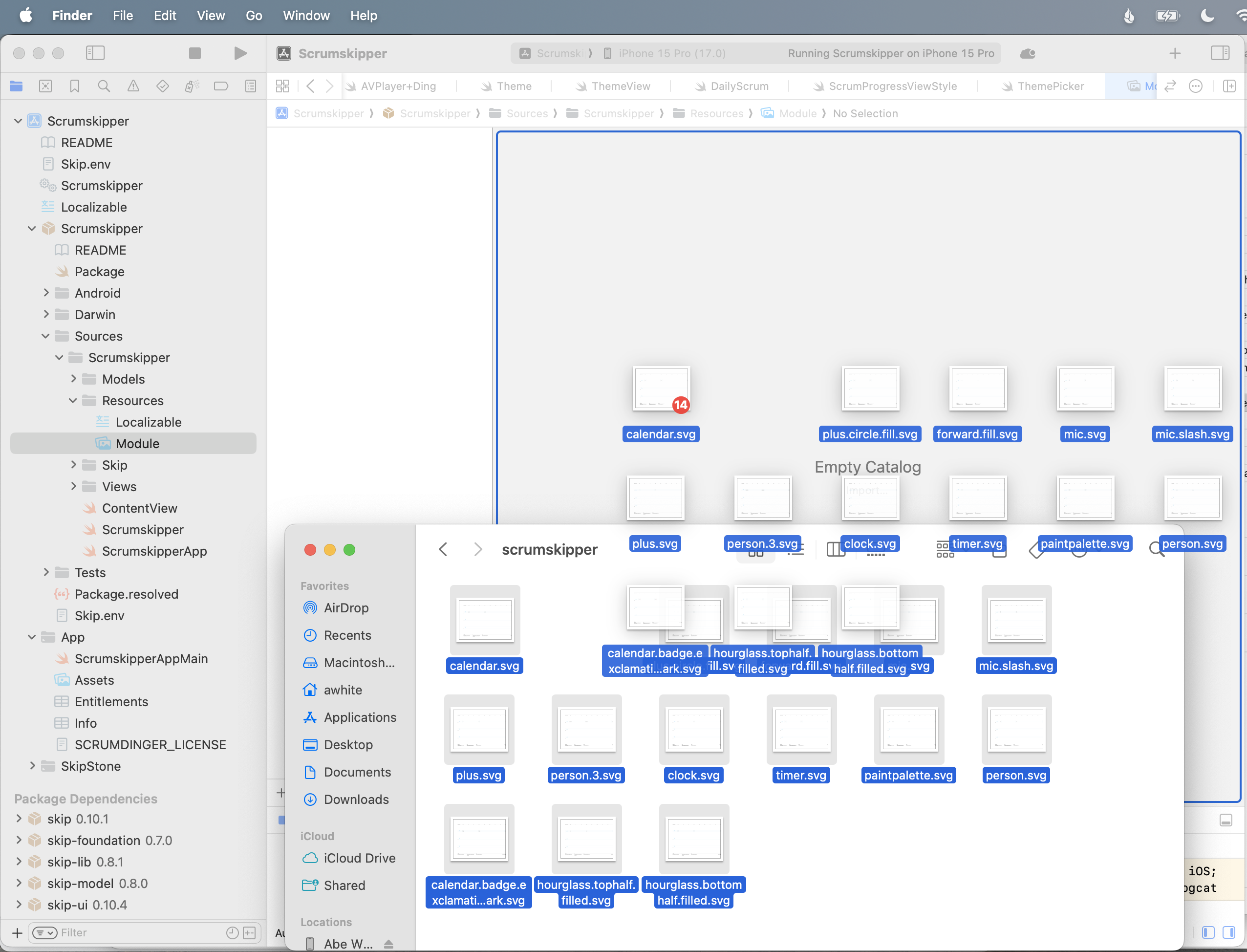
Scrumdinger uses SF Symbols for all of its in-app images. Android obviously doesn’t include these out of the box, but Skip allows you to easily add symbols to your app. Just place vector images with the desired symbol names in your Module asset catalog, as described here. For the purposes of this demo, we exported the symbols from Apple’s SF Symbols app.

Exporting a SF Symbol Copying SF Symbols to Scrumskipper

We made two additional tweaks to MeetingView. First, the custom MeetingTimerView was not rendering at all on Android. Layout issues like this are rare, but they do occur. Second, we didn’t want the Android navigation bar background to be visible. We added a couple of #if SKIP blocks to the view body to correct these issues:

var body: some View {
ZStack {
...
VStack {
MeetingHeaderView(...)
MeetingTimerView(...)
#if SKIP
.frame(maxWidth: .infinity, maxHeight: .infinity)
#endif
MeetingFooterView(...)
}
}
...
#if SKIP
.toolbarBackground(.hidden, for: .navigationBar)
#endif
}

Scrums were not being saved and restored in the Android version of the app. It turns out that Scrumdinger saved its state on transition to ScenePhase.inactive, but Android doesn’t use this phase! Android apps transition directly from active to background and back. The following simple change fixed the issue:

struct ScrumsView: View {
@Environment(\.scenePhase) private var scenePhase
...
var body: some View {
NavigationStack {
...
}
.onChange(of: scenePhase) { phase in
#if !SKIP
if phase == .inactive { saveAction() }
#else
if phase == .background { saveAction() }
#endif
}
}
}

Remember how we were going to circle back to the Theme enum’s named colors on Android? We decided to forgo the asset catalog colors altogether and just define each color programmatically with RGB values.

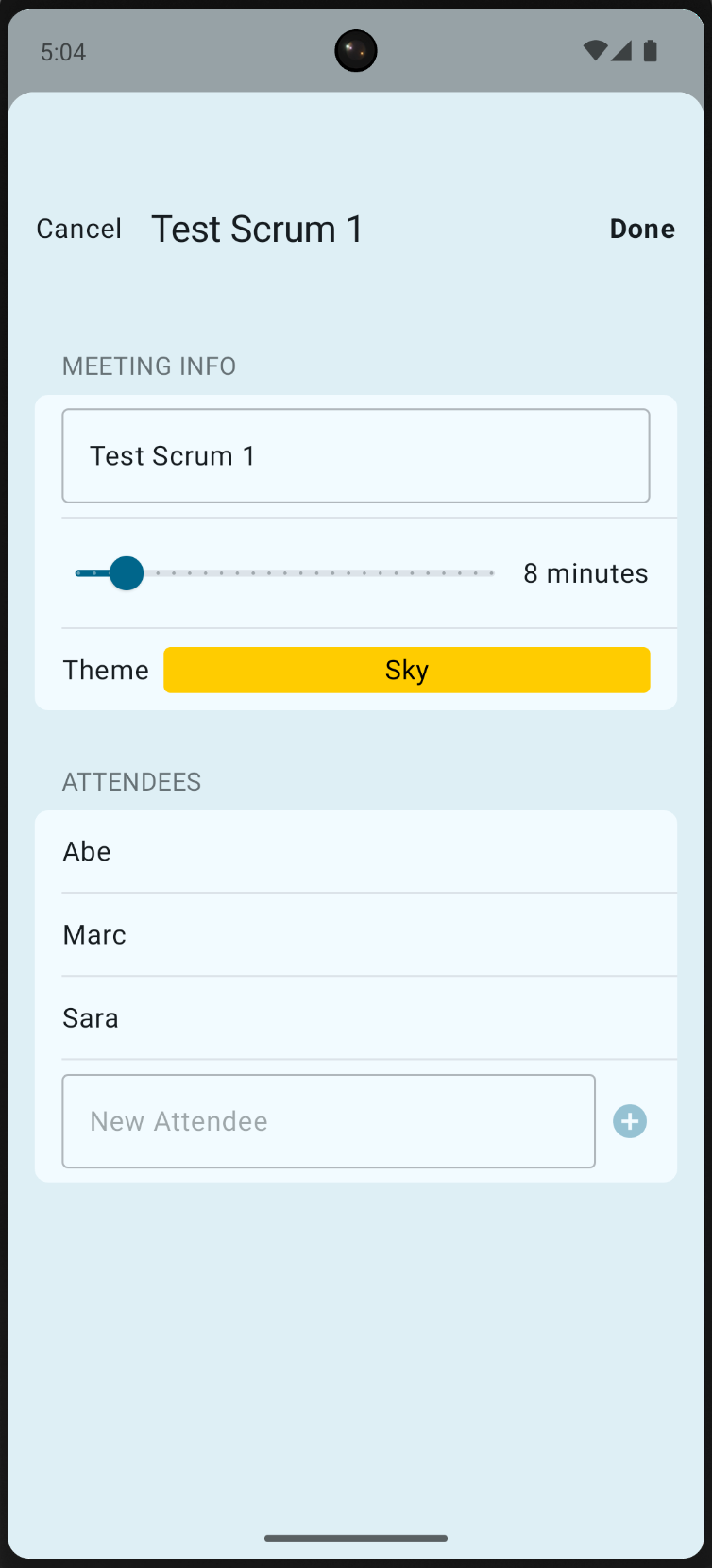
The completed native Android app actually looks a lot like its iOS counterpart:

Screenshot of the Android app's scrum list Screenshot of the Android app's scrum detail Screenshot of the Android app's edit view Screenshot of the Android app's meeting view

Take a moment to reflect on how amazing it is that Apple’s canonical SwiftUI iPhone sample now runs as a fully native Android app. Though Skip excels at new development and the process for bringing Scrumdinger’s existing code to Android wasn’t trivial, it was still an order of magnitude faster than a re-write and did not risk regressions to the iOS version. Moreover, future maintenance and improvements will be extremely efficient thanks to having a single shared Swift and SwiftUI codebase.

The Android version doesn’t yet have all the features of the iOS one, but additional Android functionality can be added over time. Skip never forces you to compromise your iOS app, provides a fast path to a native Android version using your existing code, and has excellent integration abilities to enhance and specialize your Android app when the effort warrants it.

Skip and Kotlin Multiplatform

  • Table of contents {:toc}

Kotlin Multiplatform (KMP) is a technology that enables Kotlin to be compiled natively and used in non-Java environments. Google recommends using KMP for sharing business logic between Android and iOS platforms1.

In many ways, Skip and KMP are inverses of each other, in that:

  • Skip brings your Swift/iOS codebase to Android.
  • KMP brings your Kotlin/Android codebase to iOS.

The mechanics powering these transformations are different – Skip uses source transpilation to convert Swift into idiomatic Kotlin, whereas KMP compiles Kotlin into native code that presents an Objective-C interface – but the high-level benefits are the same: you can maintain a single codebase for both your iOS and Android app.

Skip or KMP {: style=“text-align: center; width: 50%; margin: auto;”}

We think that Skip is the right way to tackle the challenge of creating genuinely native dual-platform apps. Skip gives you an uncompromised iOS-first development approach: your code is used as-is on iOS devices, with zero bridging and no added runtime or garbage collector2. Our SkipUI adaptor framework – which takes your SwiftUI and converts it into Jetpack Compose – allows you to create genuinely native user interfaces for both platforms. And while the Compose Multiplatform3 project adds cross-platform Compose support to KMP, it eschews native components on iOS by default. It utilizes a Flutter-like strategy instead, painting interface elements onto a Skia canvas. This can result in a sub-par experience for iOS users in terms of aesthetics, performance, accessibility, and feel, not to mention limitations on native component integration (something Skip excels at). We believe that a premium, no-compromises user experience requires embracing the platform’s native UI toolkit.

If we put the UI layer aside, however, using KMP for logic and model code does have some great benefits. With KMP, you can target not just Android and iOS, but also the web, desktop, and server-side environments, whereas Skip is focused squarely on mobile app development. You can also write and build KMP code on a variety of platforms: macOS, Windows, and Linux. Finally, some organizations might already be heavily invested in the Kotlin/Java ecosystem.

Skip and KMP {: style=“text-align: center; width: 50%; margin: auto;”}

And so it may be the case that you have business logic in one or more KMP modules that you want to use in a cross-platform Android and iOS app. The trend among organizations that have adopted KMP has been to build separate native apps for each platform – using Jetpack Compose (or Views) on Android and SwiftUI (or UIKit) on iOS – and then import their KMP business logic module into those apps. This is much the same as writing two separate apps, but with the benefit that some of the business logic can use a shared codebase.

This happens to be a perfect fit for Skip. With Skip/KMP integration, you can build the UI of your app from a single Swift codebase, and at the same time use the KMP module from both the Swift and (transpiled) Kotlin sides of the app. You get all the benefits of a genuinely native user interface, and can still leverage any existing investment in a shared Kotlin codebase. The remainder of this post will outline the details of integrating and accessing a KMP module from a Skip app project.

When viewed from the Android side, a KMP module is simply a traditional Kotlin/Gradle project dependency: you add it to your build.gradle.kts and import the Kotlin packages in the same way as you use any other Kotlin package. The KMP module has no knowledge of, or dependency on, any Skip libraries or tools.

The iOS side is a bit more involved: the KMP project must be compiled and exported as a native library4 that can be imported into the iOS project. This is done by compiling the KMP project to native code and then exporting it to an xcframework, which is a multi-platform binary framework bundle that is supported by Xcode and SwiftPM.

The resulting project and dependency layout will look like this:

Skip KMP Diagram {: .diagram-vector }

Adding a KMP dependency to a Skip Framework

Section titled “Adding a KMP dependency to a Skip Framework”

In the Package.swift file for the skip-kmp-sample library, we have the Skip-enabled “SkipKMPSample” target with a dependency on a binary target specifying the location and checksum of the compiled xcframework. This enables us to access the Objective-C compiled interface for the KMP library, which is in the separate kmp-library-sample repository containing the Kotlin and Gradle project that builds the library.

5.9
import PackageDescription
let package = Package(
name: "skip-kmp-sample",
defaultLocalization: "en",
platforms: [.iOS(.v16), .macOS(.v13), .tvOS(.v16), .watchOS(.v9), .macCatalyst(.v16)],
products: [
.library(name: "SkipKMPSample", targets: ["SkipKMPSample"]),
],
dependencies: [
.package(url: "https://github.com/skiptools/skip.git", from: "0.8.55"),
.package(url: "https://github.com/skiptools/skip-foundation.git", from: "0.6.12")
],
targets: [
.target(name: "SkipKMPSample", dependencies: [
.product(name: "SkipFoundation", package: "skip-foundation"),
"MultiPlatformLibrary"
], resources: [.process("Resources")], plugins: [.plugin(name: "skipstone", package: "skip")]),
.testTarget(name: "SkipKMPSampleTests", dependencies: [
"SkipKMPSample",
.product(name: "SkipTest", package: "skip")
], resources: [.process("Resources")], plugins: [.plugin(name: "skipstone", package: "skip")]),
.binaryTarget(name: "MultiPlatformLibrary",
url: "https://github.com/skiptools/kmp-library-sample/releases/download/1.0.4 /MultiPlatformLibrary.xcframework.zip",
checksum: "65e97edcdeadade0f10ef0253d0200bce0009fe11f9826dc11ad6d56b6436369")
]
)

For the transpiled Kotlin side of the Skip framework, we add a Gradle source dependency5 to that same repository. This is accomplished by using the module’s skip.yml file to add the dependency on the same tagged version as the published xcframework:

settings:
contents:
- block: 'sourceControl'
contents:
- block: 'gitRepository(java.net.URI.create("https://github.com/skiptools/kmp-library-sample.git"))'
contents:
- 'producesModule("kmp-library-sample:multi-platform-library")'
build:
contents:
- block: 'dependencies'
contents:
- 'implementation("kmp-library-sample:multi-platform-library:1.0.4")'

The result is that the Kotlin side of the Skip project will depend on the Kotlin library, and the Swift side of the Skip project will access the natively-compiled xcframework of the KMP library via its exported Objective-C interface.

Using KMP code from a Skip app is generally the same as using KMP from any other app. As already mentioned, on the Android side, the KMP module is included directly as Kotlin code, and compiled to JVM bytecode along with the rest of your app. On the iOS side, the code is compiled natively to each of the supported architectures (ARM iOS, ARM/X86 iOS Simulator, and ARM/X86 macOS) and bundled into an xcframework. As part of this packaging the KMP compiler generates an Objective-C interface to the native code. This interface can then be used from your Swift through the automatic Objective-C bridging provided by the Swift language.

A simple example can be illustrated using the following Kotlin class:

class SampleClass(var stringField: String, var intField: Int, val doubleField: Double) {
fun addNumbers() : Double {
return intField + doubleField
}
suspend fun asyncFunction(duration: Long) {
delay(duration)
}
@Throws(Exception::class)
fun throwingFunction() {
throw Exception("This function always throws")
}
}

The Objective-C header created by the Kotlin/Native compiler for this class will look like this:

__attribute__((objc_subclassing_restricted))
__attribute__((swift_name("SampleClass")))
@interface MPLSampleClass : MPLBase
@property (readonly) double doubleField __attribute__((swift_name("doubleField")));
@property int32_t intField __attribute__((swift_name("intField")));
@property NSString *stringField __attribute__((swift_name("stringField")));
- (instancetype)initWithStringField:(NSString *)stringField intField:(int32_t)intField doubleField:(double)doubleField __attribute__((swift_name("init(stringField:intField:doubleField:)"))) __attribute__((objc_designated_initializer));
- (double)addNumbers __attribute__((swift_name("addNumbers()")));
/**
* @note This method converts instances of CancellationException to errors.
* Other uncaught Kotlin exceptions are fatal.
*/
- (void)asyncFunctionDuration:(int64_t)duration completionHandler:(void (^)(NSError * _Nullable))completionHandler __attribute__((swift_name("asyncFunction(duration:completionHandler:)")));
/**
* @note This method converts instances of Exception to errors.
* Other uncaught Kotlin exceptions are fatal.
*/
- (BOOL)throwingFunctionAndReturnError:(NSError * _Nullable * _Nullable)error __attribute__((swift_name("throwingFunction()")));
@end

When viewed as Swift, the Objective-C interface will be represented as:

public class SampleClass: NSObject {
public var stringField: String { get set }
public var intField: Int32 { get set }
public var doubleField: Double { get }
public init(stringField: String, intField: Int32, doubleField: Double)
public func addNumbers() -> Double
public func asyncFunction(duration: Int64) async throws
public func throwingFunction() throws
}

This Swift interface derived from the generated Objective-C is idiomatic, much in the same way that Skip’s transpiled code is idiomatic Kotlin. This results in code that can be used from both sides of your dual-platform Swift project using the same interface. For example, this Swift code will work on both sides of a Skip project, where the Swift code instantiates the Objective-C class, and the transpiled Kotlin code instantiates the Java class.

func performAdd() -> Double {
let instance = SampleClass(stringField: "XYZ", intField: Int32(123), doubleField: 12.23)
return instance.addNumbers()
}

The type mapping section of the Interoperability with Swift/Objective-C documentation goes over the automatic conversion of various Kotlin types into their closest Objective-C equivalents. This, in turn, will affect how the Swift types are represented.

These type mappings will typically be the same as the type mappings used by Skip to represent Swift types in Kotlin (such as a Kotlin Short being represented by a Swift Int16), but they don’t always line up exactly. In these cases, there may need to be some manual coercion of types inside an #if SKIP block to get both the Swift and transpiled Kotlin to behave the same.

Kotlin doesn’t have functions that declare that they might throw an exception (like Swift and Java), but if you add the @Throws annotation to a function, the Kotlin/Native compiler will generate Objective-C that accepts a trailing NSError pointer argument, which is, in turn, represented in Swift as a throwing function. For example, the following Kotlin:

@Throws(IllegalArgumentException::class)
public func someThrowingFunction() {
}

will be represented in Swift as:

func someThrowingFunction() throws {
}

In the same way that Skip transforms Swift async functions into Kotlin coroutines, the Kotlin/Native compiler will generate Objective-C with a trailing completionHandler parameter that will be represented in Swift as an async throwing function.

For example, the Kotlin function:

suspend fun someAsyncFunction(argument: String): String {
}

will be represented in Swift as:

func someAsyncFunction(argument: String) async throws {
}

Considering that Skip was not designed with KMP integration in mind – nor vice-versa – it is remarkable how well they work together out of the box. Classes, functions, async, throwable: all work without any special consideration by the Skip transpiler.

That being said, the integration is not perfect. You may encounter some of the following issues:

  • Primitive Boxing: KMP will box primitives when wrapping in collection types like arrays. For example, a Kotlin function that returns an [Int] will be represented in Objective-C as an NSArray<MPLInt *>, where MPLInt is an NSNumber type. And while the automatic Objective-C bridging will handle converting the NSArray into a Swift Array, it will not know enough about MPLInt to convert it into a Swift Int32, so that sort of conversion will need to be handled manually.
  • Static Functions: KMP doesn’t map object functions to Objective-C static functions in the way that Skip assumes, but rather handles a Kotlin object as a singleton instance of the type accessible through a shared property.

More can be read about platform-specific behavior in the Kotlin/Native iOS integration docs.

To experiment with your own Skip/KMP integrations, we recommend starting with our pair of example repositories:

  • kmp-library-sample: a basic KMP project that presents a source Kotlin dependency, and whose releases publish a binary xcframework artifact.
  • skip-kmp-sample: a basic Skip project that depends on the kmp-library-sample’s published xcframework on the Swift side, and has a source dependency on the kmp-library-sample gradle project on the Kotlin side. The test cases in this project utilize Skip’s parity testing to ensure that the tests pass on each supported architecture: macOS and Robolectric for local testing, as well as iOS and Android for connected testing.

These two projects work together to provide a minimal working example of Skip’s KMP integration, and can be used as the basis for further development.

Skip presents an iOS-first, full-stack approach to writing apps for iOS and Android. From the low-level logic layers to the high-level user interface, Skip provides a vertically integrated stack of frameworks that enable the creation of best-in-class apps using the native UI toolkits for both of the dominant mobile platforms.

Kotlin Multiplatform has benefits too: KMP modules can be written and tested on multiple platforms, and they can target platforms beyond mobile. For this reason, KMP can be a compelling option for people who want to share their mobile app code with the web, desktop, or server-side applications.

KMP code fits nicely with Skip projects, because its idiomatic native Objective-C representation means that, for the most part, it can be used seamlessly from both the source Swift and transpiled Kotlin sides of a project. Whether you are creating KMP modules because you are invested in the Kotlin/Java ecosystem, or because you are starting to migrate away from an Android-centric app infrastructure, Skip provides the ideal complement to your existing KMP code. You can have the genuinely native user interface for both platforms that Skip provides, while at the same time utilizing the Kotlin code that you may have built up over time. It is truly the best of both worlds!

  1. “We use Kotlin Multiplatform within Google and recommend using KMP for sharing business logic between Android and iOS platforms.” – https://developer.android.com/kotlin/multiplatform. The mobile-specific form of KMP had been known as KMM, or “Kotlin Multiplatform Mobile”, until they recently deprecated the term.

  2. KMP embeds a garbage collector into its compiled iOS framework. Kotlin/Native’s GC algorithm is a stop-the-world mark and concurrent sweep collector that does not separate the heap into generations. https://kotlinlang.org/docs/native-memory-manager.html#garbage-collector

  3. “Develop stunning shared UIs for Android, iOS, desktop, and web” – https://www.jetbrains.com/lp/compose-multiplatform

  4. Details about how a KMP project can be used to create an xcframework can be found at https://kotlinlang.org/docs/apple-framework.html, and you can reference our kmp-library-sample project for a concrete example. This is another interesting reversal of the normal way of doing things, where the Swift side of an app typically has source dependencies on other SwiftPM packages and the Kotlin side typically has binary dependencies on jar/aar artifacts published to a Maven repository. When depending on a KMP project, this is reversed: the Swift side has a binary dependency on the xcframework built from the KMP project, and the Kotlin side has a source dependency on the KMP project’s Kotlin/Gradle project.

  5. Note that we could have alternatively depended on a compiled .aar published as a pom to a Maven repository, but for expedience we find that using source dependencies are the easiest way to link directly to another git repository.

Negative Padding in Compose

Skip’s open-source SkipUI library implements the SwiftUI API for Android. To do so, SkipUI leverages Compose, Android’s own modern, declarative UI framework.

The parallels between SwiftUI and Compose are striking, especially when it comes to layout. SwiftUI uses HStack, VStack, and ZStack for basic layout, with modifiers like offset and padding to shift or pad the resulting placement. Compose uses Row, Column, and Box for basic layout, and it too has offset and padding modifiers. Compose has one odd omission, however: it doesn’t support negative padding! Supplying a negative value will throw an IllegalArgumentException.

SkipUI must support whatever SwiftUI supports, so internally we’ve replaced the standard Compose padding modifier with our own custom layout that works for both positive and negative values. We present that layout below, in case you find it useful in your own Compose work.

Notes:

  1. SkipUI’s implementation is tied to SwiftUI internals, so this is an untested and simplified port of the actual code.
  2. Important: If you plan to use this in pure Compose code, expose it as a custom modifier for a more fluent API.
@Composable fun PaddingLayout(modifier: Modifier, top: Dp = 0.dp, leading: Dp = 0.dp, bottom: Dp = 0.dp, trailing: Dp = 0.dp, content: @Composable () -> Unit) {
val density = LocalDensity.current
val topPx = with(density) { top.roundToPx() }
val bottomPx = with(density) { bottom.roundToPx() }
val leadingPx = with(density) { leading.roundToPx() }
val trailingPx = with(density) { trailing.roundToPx() }
Layout(modifier = modifier, content = {
// Compose content
content()
}) { measurables, constraints ->
if (measurables.isEmpty()) {
return layout(width: 0, height: 0) {}
}
// Subtract the padding from the available size the content can use
val updatedConstraints = constraints.copy(
minWidth = constraint(constraints.minWidth, subtracting = leadingPx + trailingPx),
minHeight = constraint(constraints.minHeight, subtracting = topPx + bottomPx),
maxWidth = constraint(constraints.maxWidth, subtracting = leadingPx + trailingPx),
maxHeight = constraint(constraints.maxHeight, subtracting = topPx + bottomPx)
)
val contentPlaceables = measurables.map { it.measure(updatedConstraints) }
// Layout within the padded size
layout(width = contentPlaceables[0].width + leadingPx + trailingPx, height = contentPlaceables[0].height + topPx + bottomPx) {
// Offset the content position by the leading and top padding
for (contentPlaceable in contentPlaceables) {
contentPlaceable.placeRelative(x = leadingPx, y = topPx)
}
}
}
}
// Subtract the given amount from a size constraint value, honoring Int.MAX_VALUE and preventing illegal negative constraints.
private fun constraint(value: Int, subtracting: Int): Int {
if (value == Int.MAX_VALUE) {
return value
}
return max(0, value - subtracting)
}

We hope that you find this useful! If you have questions or suggestions for improvements, please reach out to us on Mastodon @skiptools@mas.to, via chat skiptools.slack.com, or in our discussion forums.

The Flutter Kerfuffle

News recently broke that Google is laying off members of the Dart and Flutter teams. At the same time that Microsoft is ending Xamarin support, many Flutter users are left wondering about the future of the technology stack on which they’ve built their apps.

For what it’s worth, we don’t buy into the speculation that Flutter is about the be killed off. While we believe that Skip has the correct approach to cross-platform mobile development, Flutter is an excellent product with a devoted community. A recent post by an insider notes that the Google layoffs were broad and didn’t single out the Flutter and Dart teams. Nevertheless, this episode emphasizes the need to always consider the ejectability of the core technologies you use.

“And every one who hears these sayings of Mine and does not do them will be likened to a foolish man who built his house on the sand.”

A software framework is said to be ejectable if you can remove it without completely breaking your app. Ejectability is not binary: having to remove a given framework might only require you to excise certain features, and some frameworks are easier to replace in our apps than others.

Unfortunately, most cross-platform development tools are not ejectable to any degree. If official Flutter support were end-of-lifed, there would not be any path for Flutter codebases to migrate to another technology stack. Dart is a nice language and Widgets are cool, but Apple is not about to transition from Swift and SwiftUI, nor Android from Kotlin and Jetpack Compose. Languages like Dart and Javascript will forever be “alien” on both iOS and Android, just as Swift and Kotlin will be the primary, supported, and vendor-recommended languages for the foreseeable future.

Flutter apps would continue to work, and the community would likely maintain the Flutter engine and libraries for quite some time. But the pace of integration with the latest Android and iOS features would slow, and businesses who care about the long-term prospects for their apps would look to move on. Unfortunately, their only option would be something seasoned developers avoid for good reason: a complete re-write.

To be clear, we do not believe that Flutter support is going to end any time soon, and the same goes for other popular cross-platform solutions like React Native. But you should also not take the decision to use these frameworks lightly, because they are not ejectable. If support unexpectedly ends - or if a new Apple or Android platform or feature arrives that these non-native frameworks are not able to integrate with - you have no off-ramp.

Skip’s approach to cross-platform development is fundamentally different. You work in a single codebase, but Skip creates fully native apps for each platform: Swift and SwiftUI on iOS, and Kotlin and Compose on Android. This is in keeping with the plainly-stated, unambiguous advice from the platform vendors themselves:

SwiftUI is the preferred app-builder technology -Apple

Jetpack Compose is Android’s recommended modern toolkit -Google

A cross-platform Skip app is a modern iOS app. Your shared code is written in Xcode using Swift and SwiftUI. For example, here is a simple weather model:

import Foundation
struct Weather : Decodable {
let latitude: Double
let longitude: Double
let time: Double
let timezone: String
}
extension Weather {
/// Fetches the weather from the open-meteo API
static func fetch(latitude: Double, longitude: Double) async throws -> Weather {
let url = URL(string: "https://api.open-meteo.com/v1/forecast?latitude=\(latitude)&longitude=\(longitude)&current_weather=true")!
var request = URLRequest(url: url)
let (data, response) = try await URLSession.shared.data(for: request)
return try JSONDecoder().decode(Weather.self, from: data)
}
}

At build time, the Skip tool integrates with Xcode to transpile your iOS codebase into a native Android app written in Kotlin.

As you can see in the sample above, your Swift code does not require any dependencies on Skip. Even integrating Android customization into your app is accomplished without Skip libraries. If you remove all traces of Skip, your iOS app will continue to build and run in Xcode exactly as before.

On the Android side, the Kotlin source code and artifacts that Skip generates are yours, regardless of whether you continue to use Skip. Unlike the iOS app, the translated Android app does rely on Skip libraries to mirror the Foundation, SwiftUI and other Apple APIs that your iOS code likely uses. These libraries, however, are free and open source. Critically, they are not a “runtime” or “engine”. You can continue to use them - or not - without hampering your ability to expand the app and integrate new Android features.

Here is the Kotlin that Skip generates from the sample weather model above. It is not significantly different than Kotlin you’d write by hand. It is longer than the source Swift only because Kotlin does not have built-in JSON decoding, so Skip must add it. (SwiftUI code translated to Skip’s Compose-based UI library for Android is much less idiomatic. If you stopped using Skip you’d likely want to migrate to pure Compose over time, but there would be no immediate need to do so.)

import skip.foundation.*
internal class Weather: Decodable {
internal val latitude: Double
internal val longitude: Double
internal val time: Double
internal val timezone: String
constructor(latitude: Double, longitude: Double, time: Double, timezone: String) {
this.latitude = latitude
this.longitude = longitude
this.time = time
this.timezone = timezone
}
constructor(from: Decoder) {
val container = from.container(keyedBy = CodingKeys::class)
this.latitude = container.decode(Double::class, forKey = CodingKeys.latitude)
this.longitude = container.decode(Double::class, forKey = CodingKeys.longitude)
this.time = container.decode(Double::class, forKey = CodingKeys.time)
this.timezone = container.decode(String::class, forKey = CodingKeys.timezone)
}
companion object: DecodableCompanion<Weather> {
/// Fetches the weather from the open-meteo API
internal suspend fun fetch(latitude: Double, longitude: Double): Weather = Async.run l@{
val url = URL(string = "https://api.open-meteo.com/v1/forecast?latitude=${latitude}&longitude=${longitude}&current_weather=true")
var request = URLRequest(url = url)
val (data, response) = URLSession.shared.data(for_ = request)
return@l JSONDecoder().decode(Weather::class, from = data)
}
override fun init(from: Decoder): Weather = Weather(from = from)
private fun CodingKeys(rawValue: String): CodingKeys? {
return when (rawValue) {
"latitude" -> CodingKeys.latitude
"longitude" -> CodingKeys.longitude
"time" -> CodingKeys.time
"timezone" -> CodingKeys.timezone
else -> null
}
}
}
private enum class CodingKeys(override val rawValue: String, @Suppress("UNUSED_PARAMETER") unusedp: Nothing? = null): CodingKey, RawRepresentable<String> {
latitude("latitude"),
longitude("longitude"),
time("time"),
timezone("timezone");
}
}

(Skip is not a cloud-based tool, but there is an online playground where you can experiment with Swift-to-Kotlin transpilation.)

Skip is fully ejectable. When you eject Skip, you are left with a native iOS app and a native Android app, both using their respective platform vendor-recommended technologies. You can immediately continue to iterate on these apps, with no rewrites and no pause in your ability to integrate new platform features.

We believe that Flutter’s future is secure, despite what some commentary has speculated. You should, however, carefully consider ejectability alongside the many other factors that go into choosing the cross-platform framework that’s right for your business needs.

Bringing Swift and SwiftUI to Android

Swift and SwiftUI are Apple’s recommended technologies for app development, and with good reason. Their emphasis on safety, efficiency, and expressiveness have made it easier than ever to build fast, polished, and robust apps for the Apple ecosystem.

Recent stories about Swift on Windows, Swift on the Playdate, and a SwiftUI-like library for Gnome highlight developers’ desire to take advantage of Swift and SwiftUI in other environments too, and advances in Swift tooling have facilitated the porting process. We’re excited to share how Skip combines several Swift platform technologies to bring Swift and SwiftUI development to Android.

Cross-platform development in Xcode

There are multiple paths to supporting Swift on Android, and - like everything in engineering - each comes with its own set of tradeoffs. We chose transpilation as our primary mechanism. Transpiling your Swift source to Android’s native Kotlin language maximizes interoperability, allowing you to call Kotlin and Java APIs directly from Swift - a key concern when you want to take advantage of Android-specific features in your apps.

Our Swift-to-Kotlin transpiler is powered by SwiftSyntax, and we use use Swift Package Manager to both invoke the transpiler as part of the build process, and to integrate our suite of open source Android libraries.

Diagram of Skip's Swift-on-Android build process

The result is a workflow in which you work in Xcode, writing standard Swift and SwiftUI. Our build plugin leaves your source code untouched, but generates, packages, and builds the equivalent Kotlin and Jetpack Compose alongside it. One Swift and SwiftUI codebase, two fully native apps.

Let’s take a closer look at the Swift platform technologies that make this possible.

SwiftSyntax is an open source Swift library by Apple that provides powerful tools for parsing and transforming Swift source code. SwiftSyntax has existed for some time, but it has only recently risen to prominence as the library powering Swift macros.

Our transpiler uses SwiftSyntax to parse your Swift code into a highly detailed syntax tree. Once we have this tree, we’re able to analyze it and translate it into an equivalent syntax tree for Kotlin, the modern JVM-based language used in Android development. The fidelity that SwiftSyntax provides not only allows us to perfectly capture the semantics of the Swift source, but even to preserve your comments and formatting. The Kotlin we output is often indistinguishable from hand-written code.

Example Swift:
protocol Action {
associatedtype R
var name: String { get }
func perform() throws -> R
}
/// Action to add two integers
struct AddAction: Action, Equatable {
let lhs: Int // Left hand side
let rhs: Int // Right hand side
var name: String {
return "Add"
}
func perform() -> Int {
return lhs + rhs
}
}
Transpiles to:
internal interface Action<R> {
val name: String
fun perform(): R
}
/// Action to add two integers
internal class AddAction: Action<Int> {
internal val lhs: Int // Left hand side
internal val rhs: Int // Right hand side
override val name: String
get() = "Add"
override fun perform(): Int = lhs + rhs
constructor(lhs: Int, rhs: Int) {
this.lhs = lhs
this.rhs = rhs
}
override fun equals(other: Any?): Boolean {
if (other !is AddAction) return false
return lhs == other.lhs && rhs == other.rhs
}
}

ViewBuilders - a special case of Swift’s ResultBuilders - lie at the heart of SwiftUI’s easy-to-use syntax. SwiftSyntax is able to perfectly parse these as well, but this is one area where our output does not look hand-written. Kotlin doesn’t support the expressive ViewBuilder syntax, and Jetpack Compose - Android’s modern UI framework - is based on nested function calls instead. The transpilation from ViewBuilders to function calls is effective, but it results in mechanical-looking code.

You can see all of this in action using our online Swift-to-Kotlin transpiler playground. While it doesn’t replicate the integrated Xcode experience of the real thing, it is fun to experiment with, and it demonstrates the speed and sophistication of SwiftSyntax.

Translating Swift into Kotlin is interesting, but a complete cross-platform solution must also integrate with your development workflow, support the Swift and SwiftUI APIs you’re accustomed to using, and scale to multi-module projects. For these needs, we leverage Swift Package Manager.

Swift Package Manager (SwiftPM) is the standard dependency management tool for Swift projects, and it has become an integral part of the Swift ecosystem. We use SwiftPM’s plugin support, dependency resolution, and module system.

Swift Package Manager Plugins are a way to extend the functionality of SwiftPM. They allow developers to securely add custom commands or behaviors to the package manager. Parts of the plugin API are specifically designed for reading source code and generating additional source code, and we utilizes these capabilities to invoke our transpiler. Thanks to Xcode’s seamless SwiftPM integration, this happens transparently on every build, and any transpilation errors are surfaced right inline.

We maintain a suite of open source libraries to mirror standard frameworks like Foundation, Observation, and SwiftUI for Android. SwiftPM allows you to easily integrate these libraries into your project, keep them up to date, and manage their transitive dependencies. Because SwiftPM’s Package.swift files have all the capabilities of Swift, we can add logic allowing you to exclude these Android libraries when performing Apple platform release builds, keeping your Apple releases free from any dependencies on Skip.

As the size of a project grows, so does the importance of modularization. SwiftPM makes it as easy as possible to break up your code into modules that you can test and iterate on independently. Compartmentalizing your codebase can also significantly improve compilation speeds, as modules that haven’t changed don’t need to be recompiled. We’re able to use this optimization as well, avoiding re-transpiling and recompiling for Android when a module hasn’t been modified.

Unit testing is critical for verifying functionality and ensuring that what worked yesterday will still work tomorrow. This is doubly important for code that runs on multiple platforms.

XCTest is Apple’s native framework for writing and running unit tests in Swift. Through our open source SkipUnit library, we support the XCTest API on top of JUnit, the venerable Java unit testing framework.

Diagram of Skip's XCTest-on-Android test process

Being able to run a unified set of Swift unit tests across your Apple and Android targets is a critical aspect of any Swift-on-Android solution. In fact the Skip modules themselves rely heavily on this testing support: we use GitHub actions to run our suite of Swift unit tests across both iOS and Android on every commit to prevent regressions.

While Swift and SwiftUI are often associated with development for Apple devices, their principles and paradigms are universal, and their use across platforms is spreading. Advances in the Swift ecosystem have unlocked powerful integration possibilities. We leverage these advances to bring Swift and SwiftUI to Android with Skip, allowing you to create fully native cross-platform libraries and apps from a single Swift and SwiftUI codebase.

Sharing C code between Swift and Kotlin for iPhone and Android apps

Swift — true to its name — is a fast language. It is just about as close-to-the-metal as any higher level programming language can be. Stack-allocated value types make efficient use of resources, and the lack of garbage collection means that memory allocation and deallocation is predictable, with controllable memory watermarks and minimal overhead from reference counting. Swift code is compiled down to architecture-specific machine instructions before being packaged into the app.ipa archive that is ultimately distributed to end users for installation on their iPhone.

Java (and, therefore, Kotlin) is not quite as fast or as efficient with memory as Swift. When a Kotlin Android app is built using gradle or an IDE, it processes the source code into Java bytecode, which is an intermediate representation of the program’s instructions. Next, the Java bytecode is re-processed into Dalvik Executable (DEX) bytecode for packaging into an app.apk for distribution to Android devices. Finally, when a user installs the app, the DEX is converted on the device into architecture-specific instructions, which is what is ultimately run during the program’s execution. The app’s code is run within Android’s managed runtime (ART), which provides automatic memory management using garbage collection (GC).

Skip is a tool that transpiles Swift into Kotlin, enabling the creation of SwiftUI apps for both iOS and Android. The transpiled Kotlin code maintains Swift’s semantics and behavior. But since Java lacks true value types, Swift struct and enumeration types can only be translated into Kotlin classes; this means that they will always be allocated on the heap and subject to indeterministic garbage collection, just like any other Java object. These, and other factors, contribute to the difference in performance and efficiency between the two languages.

Despite the difference in performance characteristics, both these languages are generally “fast enough” for app development. Day-to-day app development in the real world1 typically involves building and tweaking screens of controls and implementing designs, shuffling data between local storage and network services, and generally managing the interaction between a human user and some backend business logic. Rarely do language-level performance limitations become a consideration to a developer who is building an app at this level.

There are, however, many cases where the absolute optimal performance is critical for the app experience to be acceptable. Compression and encryption algorithms, database and format encoders and decoders, and anything to do with real-time video or audio: these are the sorts of things that need the barest-of-metal, lowest-level language there is: C. Nothing, short of hand-written assembly, beats C in terms of capacity for raw performance. And so it is the choice for nearly all the low-level components that are used in mobile operating systems today: the embedded SQLite database, the cryptography libraries, video and audio processing, are all implemented in C on both Android and iOS. Higher-lever wrappers are then built around these C interfaces to make them easy to consume by framework and app developers.

Swift integrates wonderfully with C. Many popular Swift projects use this C integration to great effect, such as the Yams parser embedding the libYAML C library, and the swift-cmark parser wrapping the cmark C library. Parsing YAML and markdown from Swift is so blazing fast because it isn’t implemented in Swift.

Adding your own C code to a Swift project is simple2. Add a new LibCLibrary Swift module and add a Sources/LibCLibrary/include/demo.h header file:

double demo_compute(int n, double a, double b);

and a Sources/LibCLibrary/src/demo.c source file:

#include "demo.h"
double demo_compute(int n, double a, double b) {
double result = 0.0;
for (int i = 0; i < n; i++) {
result += (a * b) / (a + b + i);
}
return result;
}

then add a Sources/LibCLibrary/CMakeLists.txt3 file to bring it all together:

cmake_minimum_required(VERSION 3.1)
project(cproject, LANGUAGES C)
file(GLOB SOURCES src/*.c)
add_library(clibrary SHARED ${SOURCES})
include_directories(clibrary PUBLIC include)

And you now have a C project that can be built with the Swift Package manager.

Next link to the library from a SkipCDemo Swift module, and you can call the C code directly from your Swift code, such as this test case:

XCTAssertEqual(105.95723590826853, demo_compute(n: 1_000_000, a: 2.5, b: 3.5))

Voilà! You’ve now unlocked the full potential for high-performance C libraries on the Swift side of your app. More information on Swift’s C integration can be found at https://developer.apple.com/documentation/swift/using-imported-c-functions-in-swift.

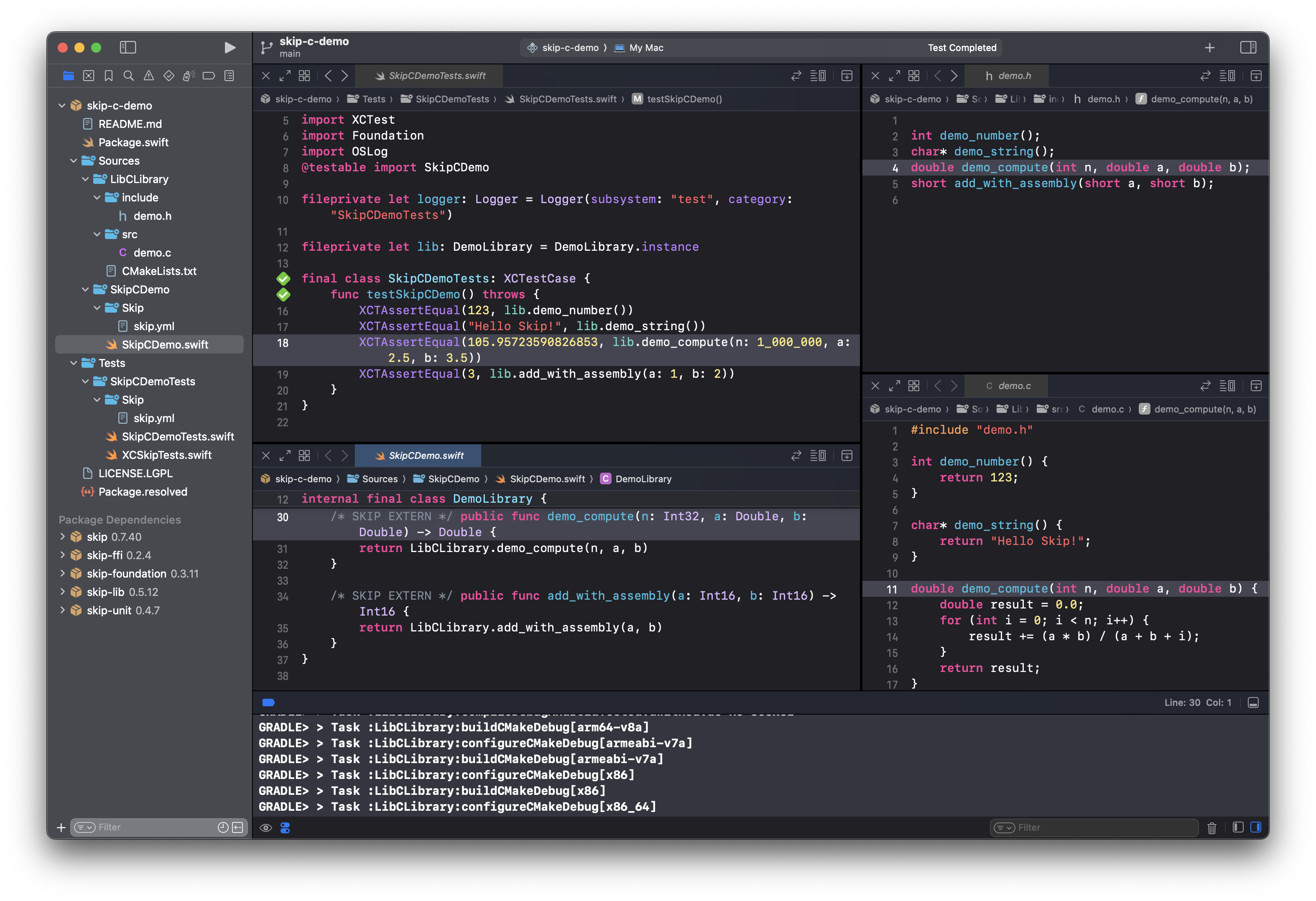
Xcode has built-in support for C. It provides syntax highlighting, auto-completion of function and type names, doc-comment lookup, and inline error reporting. If you are comfortable writing in a memory-unsafe language, Xcode is a productive way to develop cross-platform C code. And developing it alongside a higher-level Swift wrapper with fast unit testing cycles is an effective way to iterate on library development.

Screenshot of Xcode with C project

Smooth Swift/C interoperability is all well and good, but Skip is a tool for making dual-platform apps for both iOS and Android. What of the Kotlin/Java side? Swift’s automatic C interoperability is obviously never going to just work from Java-derived bytecode in the same way as it does from compiled Swift.

However, with runtime support from the SkipFFI framework, the C interface that developers enjoy from the Swift side can be — with some caveats — automatically converted into Kotlin code that interfaces the same way with the native C libraries on Android. It gets close to Swift-level C integration by leveraging the Java Native Access library (JNA), which is a venerable open-source Java library that enables C integration using foreign-function interface (FFI) techniques4. JNA runs atop the standard Java Native Interface (JNI) that provide the ability to pass data and invoke functions between Java and native-compiled languages.

The SkipFFI package uses JNA to provide support for creating native-aware wrapper libraries. The sample project’s wrapper SkipCDemo.swift looks like this:

import Foundation
import SkipFFI
#if !SKIP
import LibCLibrary
#endif
/// `DemoLibrary` is a Swift encapsulation of the embedded C library's functions and structures.
internal final class DemoLibrary {
/* SKIP EXTERN */ public func demo_compute(n: Int32, a: Double, b: Double) -> Double {
return LibCLibrary.demo_compute(n, a, b)
}
/// Singleton library instance
static let instance = registerNatives(DemoLibrary(), frameworkName: "SkipCDemo", libraryName: "clibrary")
}

On the Swift side the DemoLibrary functions are merely passed directly through to the same-named C functions. For the Kotlin side, Skip sees the /* SKIP EXTERN */ statements, and elides the function bodies from the transpiled Kotlin, resulting in a SkipCDemo.kt like:

package skip.cdemo
import skip.lib.*
import skip.foundation.*
import skip.ffi.*
/// `DemoLibrary` is a Swift encapsulation of the embedded C library's functions and structures.
internal class DemoLibrary {
external fun demo_compute(n: Int, a: Double, b: Double): Double
companion object {
/// Singleton library instance
internal val instance = registerNatives(DemoLibrary(), frameworkName = "SkipCDemo", libraryName = "clibrary")
}
}

These extern functions (which need to be public) are what JNA uses to match the functions with the corresponding C functions that it loads from the compiled dynamic library. The result is that the same interface is presented to both the Swift and Kotlin sides of your apps, using identical calling conventions.

In addition to handling the expected primitives arguments and return types, JNA also handles converting between C strings and Java strings. Since Swift strings are treated as Kotlin strings by Skip, and since Kotlin strings are just aliases to Java strings, string arguments and return types generally work transparently when zero-terminated C string conventions are followed.

On top of all this, the SkipFFI package provides some stand-in mappings for the Swift C interoperability types. For example, the Swift.OpaquePointer5 type will be represented by a typealias to the com.sun.jna.Pointer6 type. This is generally enough to create a portable Swift wrapper around a C type that is represented by a pointer.

Beyond functions, JNA has support for mapping structs and union types, as well as working with low-level shared memory. These are not yet directly supported by Skip (see “Future Work” below), but they can all be overcome by embedding Kotlin directly in #if SKIP / #endif blocks.

SkipFFI is how the the SkipSQL framework interfaces with the vendored SQLite API on Android and iOS. It is also how SkipScript works with JavaScriptCore, which is included with iOS but needs to be shipped as an additional library with Android apps. Regardless of whether the dependent library is included with the operating system or shipped separately, the mechanism for interacting with it will be the same. So If you already have pre-built native libraries for iOS and/or Android that you can include in your project, then SkipFFI is all you need to be able to access them from the Kotlin side.

However, if you want to include C code directly in your project, you’ll need to build that code for the Android side and package it in a way that makes it accessible at runtime, in the same way as SwiftPM handles building and packing it for iOS.

Compiling C into Android apps with the NDK

Section titled “Compiling C into Android apps with the NDK”

As of release 0.7.44, the Skip transpiler will generate a gradle project that will cross-compile your C project to each of the four Android native architectures and embed it in the resulting app.apk. Skip detects native support by checking for the following declaration in the target module:

cSettings: [.define("SKIP_BUILD_NDK")]

This causes Skip to create a build.gradle.kts project that uses the externalNativeBuild clause, directing it to use the CMakeLists.txt to build the native libraries for each of the supported Android NDK targets.

The generated build.gradle.kts project will look something like this:

plugins {
id("com.android.library") version "8.1.0"
}
android {
namespace = group as String
compileSdk = 34
defaultConfig {
minSdk = 29
}
externalNativeBuild {
cmake {
path = file("ext/CMakeLists.txt")
}
}
}

When building and testing the project, the Gradle project will be generated for the native library, which will instruct gradle to build the project with each of the four separate Android Native Development Kit (NDK) toolchains. The first time you do this, the toolchains will be automatically downloaded and installed as part of the build process, so you should expect the initial build to take a much longer time than subsequent builds.

As you can see in the Xcode Console area, when running the skip-c-demo test cases (and thereby running the transpiled Kotlin tests via gradle), the native compilation steps look like:

GRADLE> > Task :LibCLibrary:buildCMakeDebug[arm64-v8a]
GRADLE> > Task :LibCLibrary:buildCMakeDebug[armeabi-v7a]
GRADLE> > Task :LibCLibrary:buildCMakeDebug[x86]
GRADLE> > Task :LibCLibrary:buildCMakeDebug[x86_64]
GRADLE> > Task :LibCLibrary:mergeDebugJniLibFolders

The intermediate LibCLibrary.aar archive will correspondingly contain the embedded compiled shared object files:

classes.dex
lib/arm64-v8a/libclibrary.so
lib/armeabi-v7a/libclibrary.so
lib/x86/libclibrary.so
lib/x86_64/libclibrary.so
AndroidManifest.xml
resources.arsc

Each of these shared object files will be distributed as part of the final app.apk, although note that if you distribute your app as part of the an Android Bundle, then the app storefront may be able to thin out unused architectures before it delivers your app bundle to the end user for installation.

At runtime, the SkipFFI library will handle loading the shared object file that you specify by name in your wrapper class, and you’ll be able to interact with the C library via the wrapper. JNA will link up the function names (or throw an exception for any external functions that cannot be found), and the library will thus be ready for consumption by the Kotlin side of the calling code.

The ability to invoke C directly from both the iOS and Android side enables the prospect of unbeatably-fast dual-platform libraries that can be consumed by app and framework developers alike. We’ve only scratched the surface of what is possible, but to delve deeper, start with the https://github.com/skiptools/skip-c-demo sample repository and the SkipFFI documentation. The SkipTidy repository shows a non-trivial example of an existing C library being embedded in a dual-platform Swift framework in source form. And for examples of using SkipFFI with pre-compiled libraries (either included with the OS or bundled with the app), see the SkipSQL and SkipScript frameworks. The SkipFFI test cases also show some examples of integrating with OS-embedded libraries like zlib and libxml, as well as manually mapping C structures to Swift types.

We’re very excited to see the capabilities that will be unlocked by developers using this feature! If you have questions or suggestions for improvements, please reach out to us on Mastodon @skiptools@mas.to, via chat skiptools.slack.com, or in our discussion forums.


  • structs: automatic C integration using SkipFFI only works for function invocations. C structs, which are nicely mapped to Swift structs, do not benefit from any automatic conversion on the Kotlin side. It is possible to manually implement them using the JNA Structure interface, but it is currently cumbersome. For an example, see the ZlibLibrary test case in the SkipFFI tests.
  • C++: Swift recently gained the ability to integrate with C++ code. SkipFFI and JNA lack any understanding of C++, so while you can build and embed your C libraries using SwiftPM and gradle, you’ll need to interface with it through a C API.
  • JNA Overhead: while there is essentially zero overhead when calling into C from Swift the side, on the Kotlin side the JNA layer does introduce some overhead. When a JNA wrapper class is first instantiated, the runtime needs to do some work to load the correct shared libraries and match up the extern functions with their corresponding C functions. This mostly affects the initial load time, and single a library wrapper instance is likely to be a shared singleton for an application, this overhead is usually tolerable.
  • Size overhead: the SkipFFI depends on the JNA library, which itself includes some native shared object files to facilitate the C side of the bridge. This adds about 1.2 MB to the size of the compiled app.apk, but note that the resulting app size delivered to end users might be smaller if the app storefront is able to thin out unused architectures.
  • Unsigned types: Neither the Java language nor the Java bytecode specification have any support for unsigned types. Kotlin’s support for unsigned types (e.g., UInt8) are wrappers around the equivalent signed type (e.g., Int8), and are not understood or handled by JNA. Attempting to map a function parameter or return type to an unsigned data type will raise a runtime error. In order to work around this limitation, unsigned types must be manually marshalled and unmarshalled, which can be cumbersome.
  • Project Panama: this recent project aims to ease the interaction between Java and foreign APIs written in C and C++. It is presented as an alternative for JNI and JNA, and eliminated most of the bridging overhead, making it the most high-performance call interface from Java into native code. However, Project Panama is an OpenJDK project, and is unlikely to make it into Android’s Java runtime (ART) anytime soon.
  • Mach-O/ELF: You may be wondering what the difference between the libSkipCDemo.dylib and arm64-v8a/libclibrary.so are. If you’re building on an ARM macOS machine, the architecture for both these files should be arm64-v8a, right? Yes, but they are not the same format. Darwin-based operating systems like iOS and macOS use the “Mach-O” executable format7, whereas Linux-based operating systems like Android use the “ELF” format8. You can see this after running swift test in the sample project from the Terminal:
skiptools/skip-c-demo % file ./.build/arm64-apple-macosx/debug/libSkipCDemo.dylib ./.build/plugins/outputs/skip-c-demo/LibCLibrary/skipstone/LibCLibrary/.build/SkipCDemo/intermediates/merged_native_libs/debug/out/lib/*/*.so
…/libSkipCDemo.dylib: Mach-O 64-bit dynamically linked shared library arm64
…/arm64-v8a/libclibrary.so: ELF 64-bit LSB shared object, ARM aarch64, version 1 (SYSV), dynamically linked
…/armeabi-v7a/libclibrary.so: ELF 32-bit LSB shared object, ARM, EABI5 version 1 (SYSV), dynamically linked
…/x86/libclibrary.so: ELF 32-bit LSB shared object, Intel 80386, version 1 (SYSV), dynamically linked
…/x86_64/libclibrary.so: ELF 64-bit LSB shared object, x86-64, version 1 (SYSV), dynamically linked
  1. Non-game development, that is.

  2. More information on Swift’s C integration can be found at https://developer.apple.com/documentation/swift/using-imported-c-functions-in-swift.

  3. The CMakeLists.txt is used by the cmake tool (https://cmake.org), a flexible and popular native build tool that is used by both Swift Package Manager and the Gradle Android plugin (see https://developer.android.com/ndk/guides/cmake) for integration with native build systems.

  4. The details of how this works can be found at the JNA project’s homepage at https://github.com/java-native-access/jna. JNA adds about 1.1 MB to the side of your app.apk, which is why it is included in a separate SkipFFI package rather than included directly with SkipLib or SkipFoundation.

  5. Swift C interoperability types5 (https://developer.apple.com/documentation/swift/c-interoperability) 2

  6. Javadoc for com.sun.jna.Pointer: https://java-native-access.github.io/jna/5.14.0/javadoc/com/sun/jna/Pointer.html

  7. Mach-O file format: https://en.wikipedia.org/wiki/Mach-O

  8. Executable and Linkable Format (ELF): https://en.wikipedia.org/wiki/Executable_and_Linkable_Format

Nested Dropdown Menus in Compose

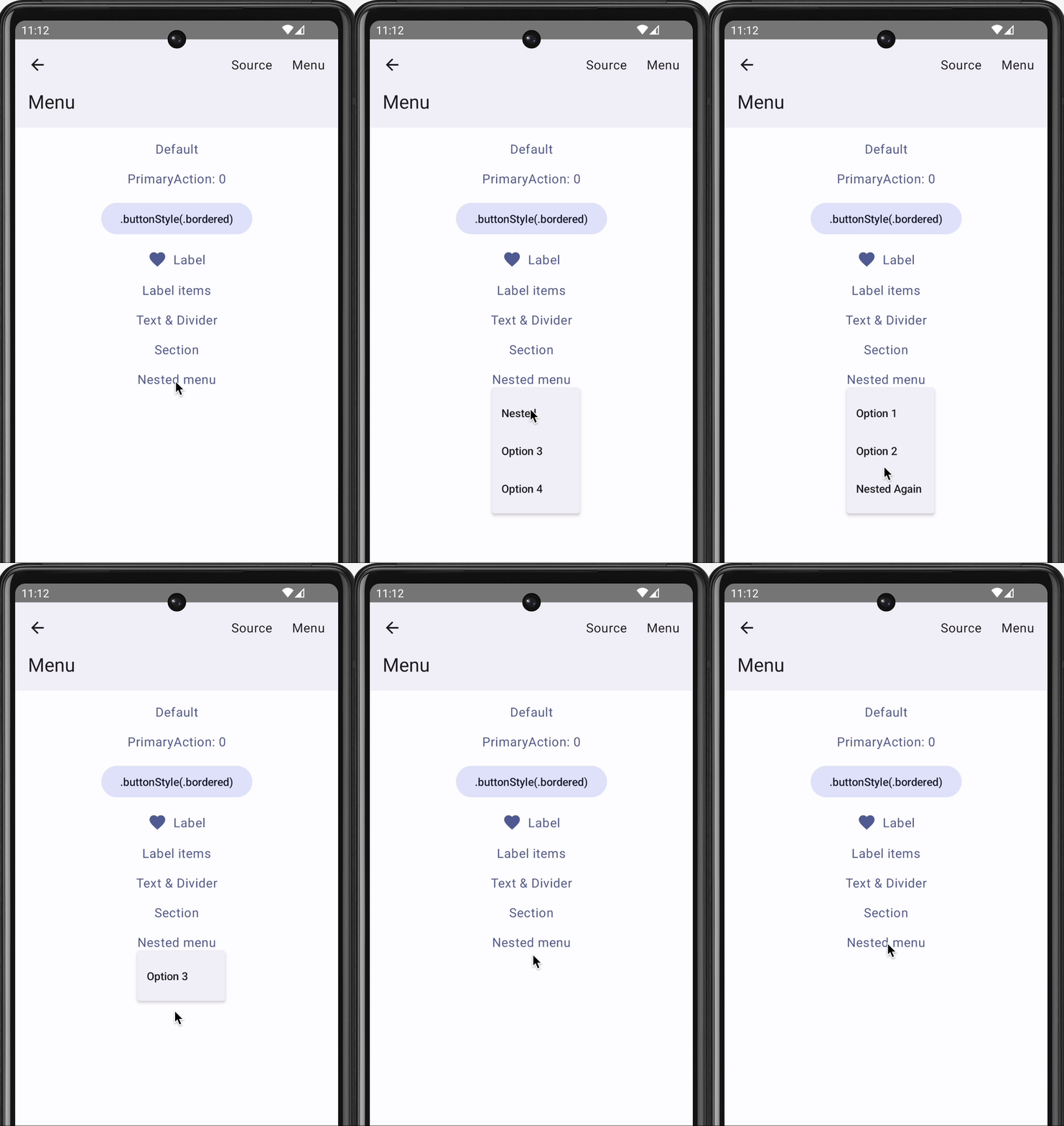
Skip’s open-source SkipUI library implements the SwiftUI API for Android. To do so, SkipUI leverages Compose, Android’s own modern, declarative UI framework.

While implementing SwiftUI’s Menu, we discovered that Compose doesn’t build in support for nested dropdown menus. Googling revealed that we weren’t the only devs wondering how to present a sub-menu from a Compose menu item, but the answers we found didn’t meet our needs. The code below represents our own simple, general solution to nested dropdown menus in Compose.

Note: SkipUI’s implementation is tied to SwiftUI internals, so this is an untested and simplified port of the actual code.

// Simple menu model. You could expand this for icons, section
// headings, dividers, etc
class MenuModel(title: String, val items: List<MenuItem>): MenuItem(title, {})
open class MenuItem(val title: String, val action: () -> Unit)
// Display a menu model, whose items can include nested menu models
@Composable fun DropdownMenu(menu: MenuModel) {
val isMenuExpanded = remember { mutableStateOf(false) }
val nestedMenu = remember { mutableStateOf<MenuModel?>(null) }
val coroutineScope = rememberCoroutineScope()
// Action to replace the currently-displayed menu with the
// given one on item selection. The hardcoded delays are
// unfortunate but improve the user experience
val replaceMenu: (MenuModel?) -> Unit = { menu ->
coroutineScope.launch {
// Allow selection animation before dismiss
delay(200)
isMenuExpanded.value = false
// Prevent flash of primary menu on nested dismiss
delay(100)
nestedMenu.value = null
if (menu != null) {
nestedMenu.value = menu
isMenuExpanded.value = true
}
}
}
DropdownMenu(expanded = isMenuExpanded.value, onDismissRequest = {
isMenuExpanded.value = false
coroutineScope.launch {
// Prevent flash of primary menu on nested dismiss
delay(100)
nestedMenu.value = null
}
}) {
for (item in menu.items) {
DropdownMenuItem(text = { Text(item.title) }, onClick = {
item.action()
replaceMenu(item as? MenuModel)
})
}
}
}

You can see this in action in the Skip Showcase app’s menu playground:

Nested dropdown menus in the Skip Showcase app

We hope that you find this useful! If you have questions or suggestions for improvements, please reach out to us on Mastodon @skiptools@mas.to, via chat skiptools.slack.com, or in our discussion forums.

Skip 2024 Roadmap

Skip enables you to build the best possible apps, for the widest possible audience, using a single codebase. Our goal with Skip is to enable individuals and small teams to create apps for both the iPhone and Android using the native first-party toolkits for those platforms: SwiftUI and Jetpack Compose. We believe this is the best possible experience for users of iPhone and Android devices.

We spent 2023 building the underlying technology to enable this project. The SkipStone transpiler takes your code written in Swift for iOS and converts it into Kotlin for Android. The open-source SkipStack frameworks provide runtime support: they transparently bridge the various Darwin and iOS software layers into their Android equivalents. This includes SkipUI, which takes your SwiftUI interface and turns it into the equivalent Jetpack Compose code, as well as SkipFoundation, which bridges the low-level Foundation framework to the Java APIs used by Android apps. Bringing it all together is the Skip Xcode plugin that automatically runs the transpiler when you build your project and converts your entire Swift package into a buildable Android gradle project.

The end result is a magical development experience: you develop in Xcode and run your SwiftUI app in the iOS Simulator, and Skip seamlessly transpiles and launches your Compose app in the Android emulator. Change some code and re-run, and within seconds both your iOS app and Android app are rebuilt and run side-by-side, ready for testing. The Skip Tour video provides a taste of this process.

In 2024 we will be expanding our ecosystems of Skip frameworks beyond SwiftUI and Foundation. Aside from user interface widgets and operating system integration, a modern mobile app needs a variety of capabilities: graphics and animation, SQL databases, push notifications, media players, cloud storage, payment integrations, parsers for common data formats, cryptography, game technologies, et cetera.

There are many existing libraries, both 1st and 3rd party, for both Android and iOS that fulfill these needs. Our goal is not to re-invent them, but rather to build common abstractions atop them. For example, the new SkipAV framework for playing music and videos is not created from scratch, but is rather implemented on top of iOS’s AVKit and Android’s ExoPlayer. This enables Skip apps to take advantage of each platform’s best-in-class libraries that have matured over the years, while at the same time maintaining a single dual-platform API for developer convenience.

These frameworks are all free and open-source software that Android and iOS app developers can use in their apps. We sell the Skip transpiler itself, but the ecosystem of Skip frameworks can be used – independently of the Skip transpiler – whether or not you are a customer. We choose to make them free software not merely as a value-add for our own customers, but also to grant you, the developer, the confidence that anything you build with Skip will remain under your purview, and that you retain the agency to continue to iterate on your app, with or without the Skip transpiler.

The realization of genuinely native apps for both major mobile platforms, created from a single codebase in a single language, has been a dream for a long time. 2024 will be an exciting year.