Skip to content

skip-fuse

2 posts with the tag “skip-fuse”

Skip 2025 Retrospective and 2026 Roadmap

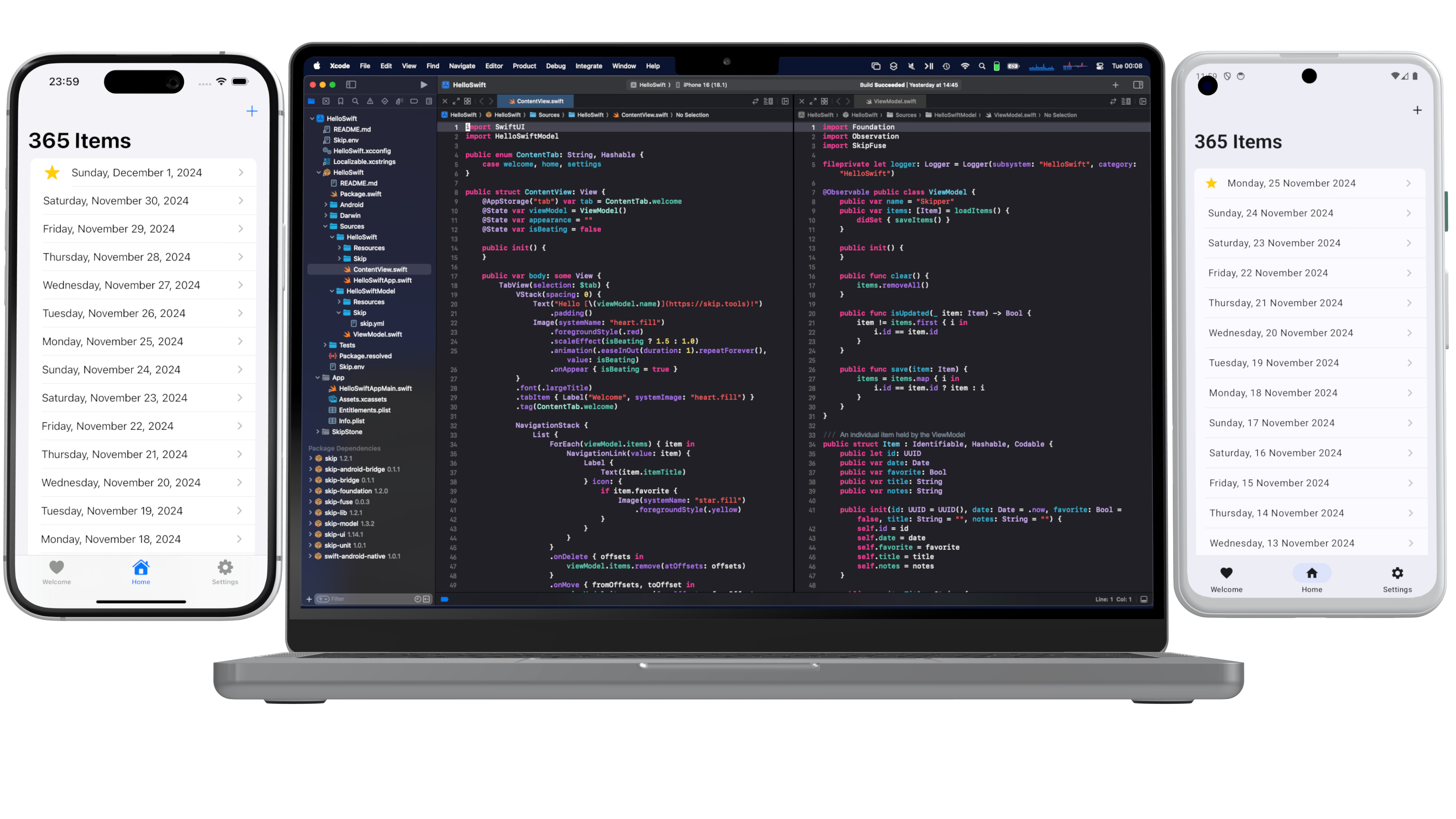
As 2025 comes to a close, we’ve been reflecting on how far Skip has advanced this year. What began nearly three years ago with a simple desire to enable cross-platform app development with Swift and SwiftUI has grown into a thriving ecosystem, a strong community of developers and contributors, and a platform powering real production apps across iOS and Android.

This year wasn’t just about growth in numbers. It was about expanding depth and breadth: deeper integrations, stronger foundations, and a clearer vision for the future of native Swift across the dominant mobile platforms.

Native Swift on Android Becomes Officially Supported

Section titled “Native Swift on Android Becomes Officially Supported”

The highlight of 2025 by far was the official release of the Swift SDK for Android on swift.org, along with Skip’s support in the form of Skip Fuse. Prior to the advent of Skip Fuse, Skip operated solely in transpiled mode (now called “Skip Lite”), which converts Swift source code to Kotlin. Skip Fuse, on the other hand, builds natively-compiled Swift targeting the Android platform, which both eliminates the limitations imposed by source transpilation, as well as unlocks the universe of thousands of native Swift packages that are compatible with the Android platform.

Interest in the Swift SDK for Android has exploded since the initial announcement and follow-up blog posts on swift.org. We at Skip are proud to be founding members of the Swift Android workgroup, and we are committed to the platform’s enduring stability and support. And where the scope of the workgroup ends, we complete the picture by providing the tooling, libraries, and support needed to build universal apps from a single Swift codebase.

Liquid Glass and the Wisdom of Staying Native

Section titled “Liquid Glass and the Wisdom of Staying Native”

The launch of iOS 26 and the emergence of Liquid Glass as the new interface style was a pivotal moment for the cross-platform app development technosphere, as well as a powerful validation of Skip’s core philosophy. From day one, Skip has avoided intermediating or re-implementing SwiftUI on iOS or other Apple platforms. By staying fully native, Skip was able to support Liquid Glass on Day 1, automatically benefiting every Skip-based app without rewrites or workarounds (see our blog post on the topic).

In contrast, other cross-platform toolkits — such as Flutter and Compose Multiplatform — have found themselves stranded, incapable of adopting Liquid Glass and stuck on the previous UI generation with their mimicked faux-native components. For iOS users, that means outdated interfaces and an exacerbation of an already uncanny-valley non-native experience. For developers, it means frustration, limitation, and an inability to achieve the highest-quality app experience that their businesses demand.

Skip’s belief is that by embracing native platforms wholly — not abstracting them away — is the best path forward, both for users and developers. SkipUI maps un-intermediated SwiftUI on iOS to native Jetpack Compose on Android, guaranteeing that the user experience is always performant and familiar to users of the respective platforms.

A stock Skip app has just a few core dependencies: SkipUI, which provides a bridge from the SwiftUI API to a native Compose UI on Android, along with SkipFoundation, SkipModel, and SkipLib. But Skip also facilitates a thriving ecosystem of optional libraries, providing features and integrations that unlock the vast capabilities of third-party libraries and services and provide a unified dual-platform API surface.

Throughout 2025, Skip’s library ecosystem has matured and expanded dramatically. The community and core team introduced a wide range of new dual-platform frameworks designed to solve real-world problems without compromise. Some of our most popular integrations, like SQLite, Bluetooth, Firebase, Supabase, and WebView, have improved greatly through the help of outside contributions. These APIs were refined, edge cases were resolved, documentation improved, and real production feedback shaped work on of these frameworks.

In addition, we have some newer entrants to the Skip ecosystem, including:

  • SkipNFC and SkipDevice for unlocking low-level hardware capabilities
  • SkipStripe for Stripe for payments and subscriptions
  • SkipPostHog for analytics and product insights
  • SkipAuth0 for authentication and identity
  • SkipSocketIO for real-time communication through the Socket.IO libraries

These integration frameworks aren’t always just simple wrappers; they are designed to feel idiomatic in Swift, be composable with SwiftUI, and act faithfully with each platform’s underlying capabilities. And all of these platforms work equally with with transpiled Skip Lite as well as compiled Skip Fuse. A partial list of these Skip modules can be found at the Skip Module Index.

As exciting as 2025 was, we’re even more energized by what’s ahead. Our roadmap for 2026 includes:

  • A growing catalog of integration frameworks for popular libraries, services, and backend platforms
  • Continued expansion and refinement of SkipFuse and Swift-on-Android tooling
  • Performance improvements, better diagnostics, and enhanced developer ergonomics
  • Enhanced IDE integration, both with our existing Xcode support as well as emerging alternatives for iOS development
  • A new series of deep-dive blog posts exploring real-world Skip architectures, advanced SwiftUI patterns, and platform-specific best practices

Most importantly, we’ll continue building Skip in close collaboration with the community that made this year possible. If you haven’t yet tried Skip, there’s no better time than now to sign up for your free evaluation and start creating universal mobile apps that are free from compromises.

As always, Happy Skipping, and Happy New Year!
Native Swift on Android, Part 2: Your First Swift Android App

Native Swift on Android, Part 2: Your First Swift Android App

Swift is Apple’s recommended language for app development, and with good reason. Its safety, efficiency, and expressiveness have made it easier than ever to build fast, polished, and robust apps for the Apple ecosystem. Recent stories about Swift on Windows and Swift on the Playdate highlight developers’ desire to take advantage of Swift on other platforms too. In this series, we explore writing native Swift apps for Android with Skip.

Since its 1.0 release earlier this year, Skip has allowed developers to create cross-platform iOS and Android apps in Swift and SwiftUI by transpiling your Swift to Android’s native Kotlin language. Now, the Skip team is thrilled to give you the ability to use native, compiled Swift for cross-platform development as well.

Part 1 of this series described bringing a native Swift toolchain to Android. Being able to compile Swift on Android, however, is only the first small step towards real-world applications. In this and other installments, we introduce the other pieces necessary to go from printing “Hello World” on the console to shipping real apps on the Play Store:

  • Integration of Swift functionality like logging and networking with the Android operating system.
  • Bridging technology for using Android’s Kotlin/Java API from Swift, and for using Swift API from Kotlin/Java.
  • The ability to power Jetpack Compose and shared SwiftUI user interfaces with native Swift @Observables.
  • Xcode integration and tooling to build and deploy across both iOS and Android.

The best way to learn is often by example. This post introduces you to native Swift apps on Android by exploring the “Hello Swift” app. This is the starter app that Skip generates when you initialize a new project, and it provides a fully-configured launch point for your own cross-platform Swift app development.

Before we can explore the sample, though, we have to install the tools necessary to create it - including Swift for Android!

First, ensure that you are on a macOS 14+ machine with Xcode 16, Android Studio, and Homebrew installed.

Next, open Terminal and type the following commands to install Skip and the native Android toolchain.

brew install skiptools/skip/skip
skip android sdk install

Finally, verify that everything is working with an additional Terminal command:

skip checkup --native

If everything passes successfully, you can now create your first cross-platform native Swift app with the command:

skip init --native-model --open-xcode --appid=com.xyz.HelloSwift hello-swift HelloSwift HelloSwiftModel

That’s a long one! This tells Skip to initialize a new native Swift starter app and open it in Xcode. The app will use the hello-swift project folder, and it will be divided into two modules: a HelloSwift UI layer and a HelloSwiftModel model layer.

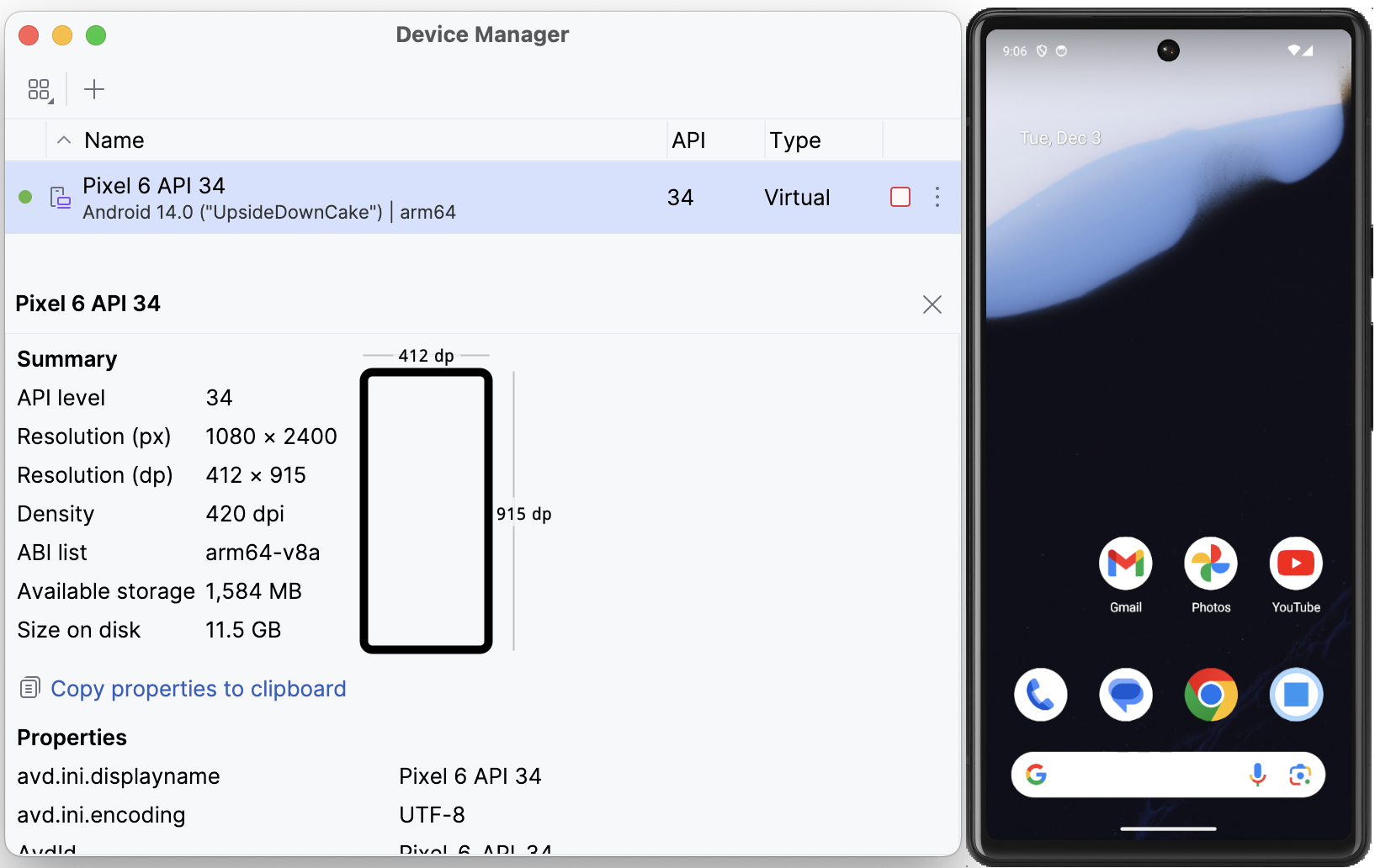
When you enter this command, Skip will generate the project, perform some checks, and then the app will open in Xcode. Before running it, though, you must first launch the Android emulator by opening Android Studio.app and selecting the Virtual Device Manager from the ellipsis menu of the Welcome dialog. From there, use the plus toolbar button to Create Device (e.g., “Pixel 6”) and then Launch the emulator.

Screenshot of the Android Studio Device Manager

Finally, select your desired iOS simulator in Xcode, then build and run the “HelloSwift” target.

The first build will take some time to compile the Skip libraries, and you may be prompted with a dialog to affirm that you trust the Skip plugin. Once the build and run action completes, the app will open in the selected iOS simulator, and at the same time the generated Android app will launch in the currently-running Android emulator.

Screenshot of the Hello Swift native app

“Hello Swift” is a very simple CRUD app that contains a list of dated items. You can browse the full source code in Xcode, or online in its GitHub repository. At a high level, the Xcode project embeds a Swift Package Manager package called “HelloSwift”, which contains two targets:

  1. The HelloSwift module contains the SwiftUI for the app’s user interface. It will run natively on iOS and be transpiled by Skip’s “SkipStone” build plugin into Kotlin and Jetpack Compose for Android.
  2. HelloSwiftModel is a pure Swift module that contains an @Observable ViewModel class. It will be compiled natively for both iOS and Android using the Swift toolchain for each platform.

The app allows you to add new items with the plus button, and items can be deleted and re-arranged by swiping and dragging. Tapping an item navigates to a form with editable fields for the various properties: title, date, a favorites toggle, and notes. HelloSwiftModel defines an item as:

public struct Item : Identifiable, Hashable, Codable {
public let id: UUID
public var date: Date
public var favorite: Bool
public var title: String
public var notes: String
}

These items are held by an @Observable ViewModel class:

@Observable public class ViewModel {
public var items: [Item] = loadItems() {
didSet { saveItems() }
}
}

And in the HelloSwift SwiftUI layer, the notes are managed by a SwiftUI List within a NavigationStack:

public struct ContentView: View {
@State var viewModel = ViewModel()
public var body: some View {
NavigationStack {
List {
ForEach(viewModel.items) { item in
NavigationLink(value: item) {
Label {
Text(item.itemTitle)
} icon: {
if item.favorite {
Image(systemName: "star.fill")
.foregroundStyle(.yellow)
}
}
}
}
.onDelete { offsets in
viewModel.items.remove(atOffsets: offsets)
}
.onMove { fromOffsets, toOffset in
viewModel.items.move(fromOffsets: fromOffsets, toOffset: toOffset)
}
}
.navigationTitle(Text("\(viewModel.items.count) Items"))
.navigationDestination(for: Item.self) { item in
ItemView(item: item, viewModel: $viewModel)
.navigationTitle(item.itemTitle)
}
.toolbar {
ToolbarItemGroup {
Button {
withAnimation {
viewModel.items.insert(Item(), at: 0)
}
} label: {
Label("Add", systemImage: "plus")
}
}
}
}
}
}

On iOS, both the HelloSwift and HelloSwiftModel targets are native Swift, so communication between the two layers is seamlessly handled by the Swift dependency. On Android, however, recall that the HelloSwift module’s SwiftUI is transpiled to Kotlin. That Kotlin needs to be able to interact with the HelloSwiftModel module’s compiled Swift, which involves bridging the two languages and runtimes.

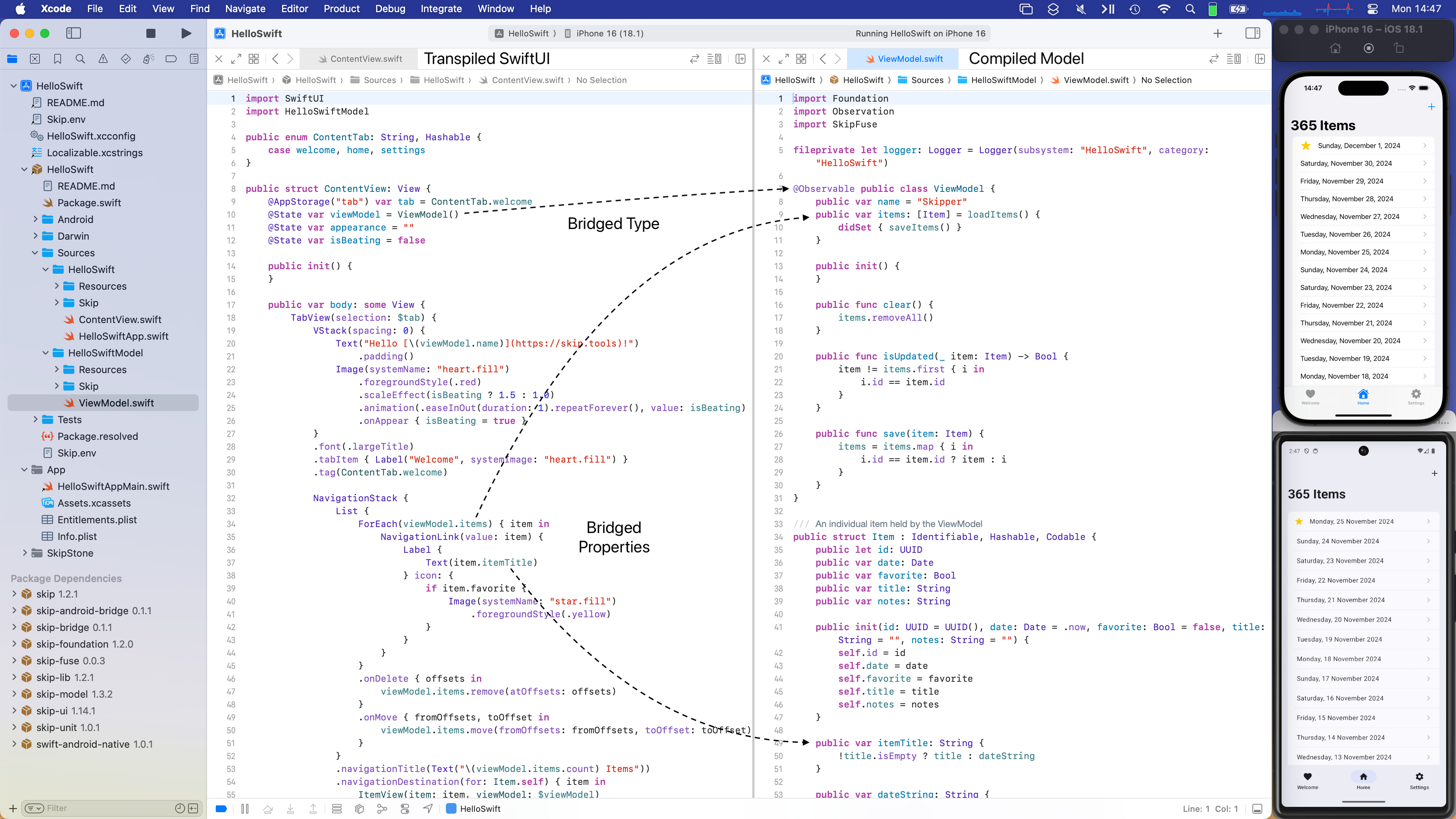
Skip’s bridging solution is called “SkipFuse”. Using the SkipStone build plugin, SkipFuse automatically generates bridging code that enables transparent communication between the two layers. This is modeled in the following diagram, which illustrates how the two modules are combined into final iOS and Android app packages:

Skip Native Diagram {: .diagram-vector }

The details of Skip’s bridging are discussed in the documentation. To summarize, the bridging system parses the public types, properties, and functions of your Swift module and exposes them to the transpiled Kotlin layer of your user interface. It supports the Observation framework, so you can use @Observable classes to manage application state in a way that is tracked by your UI, ensuring that your data and user interface are always in sync.

The following screenshot shows a split view between the HelloSwift module’s ContentView.swift and the HelloSwiftModel module’s ViewModel.swift. It demonstrates how the user interface layer communicates with the model layer in exactly the same way on both iOS and Android, although the latter is crossing a language boundary:

Screenshot of the Hello Swift native app

Skip integrates with the Xcode and Swift Package Manager build systems using the SkipStone Xcode plugin. This plugin transpiles your non-native modules from Swift to Kotlin, and it generates the needed bridging code for communication between your native Swift modules and Kotlin or Java.

The skip init command you used to create the “Hello Swift” app also adds a build script to the generated Xcode project. This build script launches Android’s Gradle build tool to compile and package the plugin’s output into an Android APK. When your project has native modules, this includes compiling the native code using the Android toolchain described in Part 1.

But how does Skip know which modules to transpile and which are native? Every Skip module must include a Skip/skip.yml configuration file in its source folder. Here is the configuration for a native Swift module whose public API is bridged to Kotlin:

skip:
mode: 'native'
bridging: true

Once you have specified that a module is bridging, the entire process is automatic. You can iterate on both your native and transpiled code and re-launch the app, and the bridging code will be updated without needing to run an external tool or perform any other manual process.

Now that you’ve created your first native Swift Android app, what’s next? Well, remember that this is just a starter app designed to get you up and running. It is meant to be torn apart and modified, so feel free to experiment by changing the model and UI in Xcode!

If you’d like to learn much more about SkipFuse, bridging, and native Swift on Android, consider reading our Native Swift Tech Preview documentation. Many of the topics it covers are the subjects of additional posts in this series. For example, while we saw “Hello Swift” bridge its native Swift model layer to its transpiled Kotlin user interface, we haven’t discussed bridging Kotlin API for use by native Swift at all. The documentation covers this in depth.

You may also be interested in the nascent swift-java project, which is designed to facilitate communication between server-side Swift and Java libraries. While that is a very different environment than Android apps interacting with modern Kotlin APIs, they do overlap, and you might find swift-java's bridging approach useful. We anticipate that as it matures, this bridge and Skip’s native bridging will begin to align more closely in their techniques and implementation details.

Additional posts in the native Swift on Android series:

Swift’s safety, efficiency, and expressiveness make it an excellent development language, and its use across platforms is spreading. This series focuses on sharing native Swift code between iOS and Android with Skip. Part 1 introduced the native Swift toolchain for Android. Now in Part 2, you’ve created your first cross-platform Swift app. There is a lot of interesting territory that we haven’t yet explored, so check out Part 3 and beyond!