
Official Android support in Swift 6.3
With this week’s release of Swift 6.3 ↗, support for the Android platform is now official. The Swift SDK for Android ships alongside the Static Linux and WebAssembly SDKs as a first-class, officially maintained target. For the first time, Swift runs on every major consumer operating system: macOS, iOS, Windows, Linux, and now Android.
For us at Skip, this moment is the culmination of years of work. We have been building on the Swift Android toolchain since its earliest preview builds, and we co-founded the Swift on Android Working Group ↗ that helped shepherd it from prototype to production. Today, the technology that has been powering Skip Fuse apps in the real world is officially part of the Swift project.
What Android support actually means
Section titled “What Android support actually means”When Swift first shipped Linux support, it had immediate broad use cases: command-line tools, server applications with frameworks like Vapor, even some desktop GUI work. Android is a different story: it is a consumer-facing, app-oriented platform. You could push a CLI binary to a device via adb (as the swift.org getting started guide ↗ describes), or write a background service library, but the real opportunity is the same one that makes Swift shine on iOS: building user-facing apps.
The Swift Android Workgroup is focused on the low-level support for the Android platform, and intentionally does not try to cover higher-level technologies that facilitate application development. That is left for projects like Skip to create, building on the foundational language support.
Swift is an outstanding app-building language. The language has the performance and low-level control you would expect from a systems language, the safety and approachability of a modern managed language, and the expressiveness of a functional language with elegant features that empower the natural and intuitive API offered by SwiftUI .
These qualities all translate directly to Android. And with Swift 6.3, the toolchain that makes this possible is now maintained, tested, and released by the Swift project itself.
The road here
Section titled “The road here”The Swift on Android story did not start with 6.3. Community developers have been experimenting with Swift cross-compilation for Android for years. At Skip, we adopted an unofficial preview build of the Android toolchain in 2024 to power our native Skip Fuse mode. This gave us a head start, but it also meant we were building on a foundation that had evolved somewhat haphazardly over the years and lacked official backing.
That changed in February 2025, when we joined together with other developers and companies to found the Swift on Android Community Working Group ↗. The goal was to coordinate the scattered efforts and make the toolchain good enough for official release. A few months later, the Swift Platform Steering Group blessed the group as an official workgroup ↗, which marked a turning point: Swift on Android was no longer a niche interest; it had the institutional support of the Swift project.
What followed was months of hard work: cleanup, bug fixes, CI infrastructure, packaging, quality control, and harmonization with the structure of other Swift SDKs. We wrote about the initial nightly SDK announcement ↗ and the broader implications for Skip in our post on an official Swift SDK for Android. The 6.3 release is where all of that work landed.
What this means for Skip
Section titled “What this means for Skip”When we launched Skip in 2023, the idea of writing your entire mobile app in Swift for both iOS and Android was considered audacious. Potential adopters, especially enterprises making long-term architecture decisions, had a natural concern: what if Swift on Android never becomes officially supported? How could a small team guarantee the durability of a technology that the platform vendor had not endorsed?
The 6.3 release answers that question definitively. Swift on Android is here to stay. It is maintained by the Swift project, backed by the Android Working Group, and released on the same cadence as every other Swift platform. Even if Skip as a technology were to somehow disappear, any investment made in Swift for Android development would remain on solid, officially supported ground.
This is not a small thing. It removes the single largest concern we have heard from enterprises evaluating Skip for cross-platform development. We have always said that Skip does not lock you in, and now the official SDK makes that promise concrete: your Swift code, your Swift packages, and your Swift skills all work on Android now, with or without Skip. Skip simply makes it dramatically easier to build complete, polished apps with them.
Skip Fuse on the official SDK
Section titled “Skip Fuse on the official SDK”We have already transitioned Skip’s native Fuse mode to the final 6.3 SDK, and the Skip Showcase ↗ app built on this toolchain has been published to both the Google Play Store and the Apple App Store.
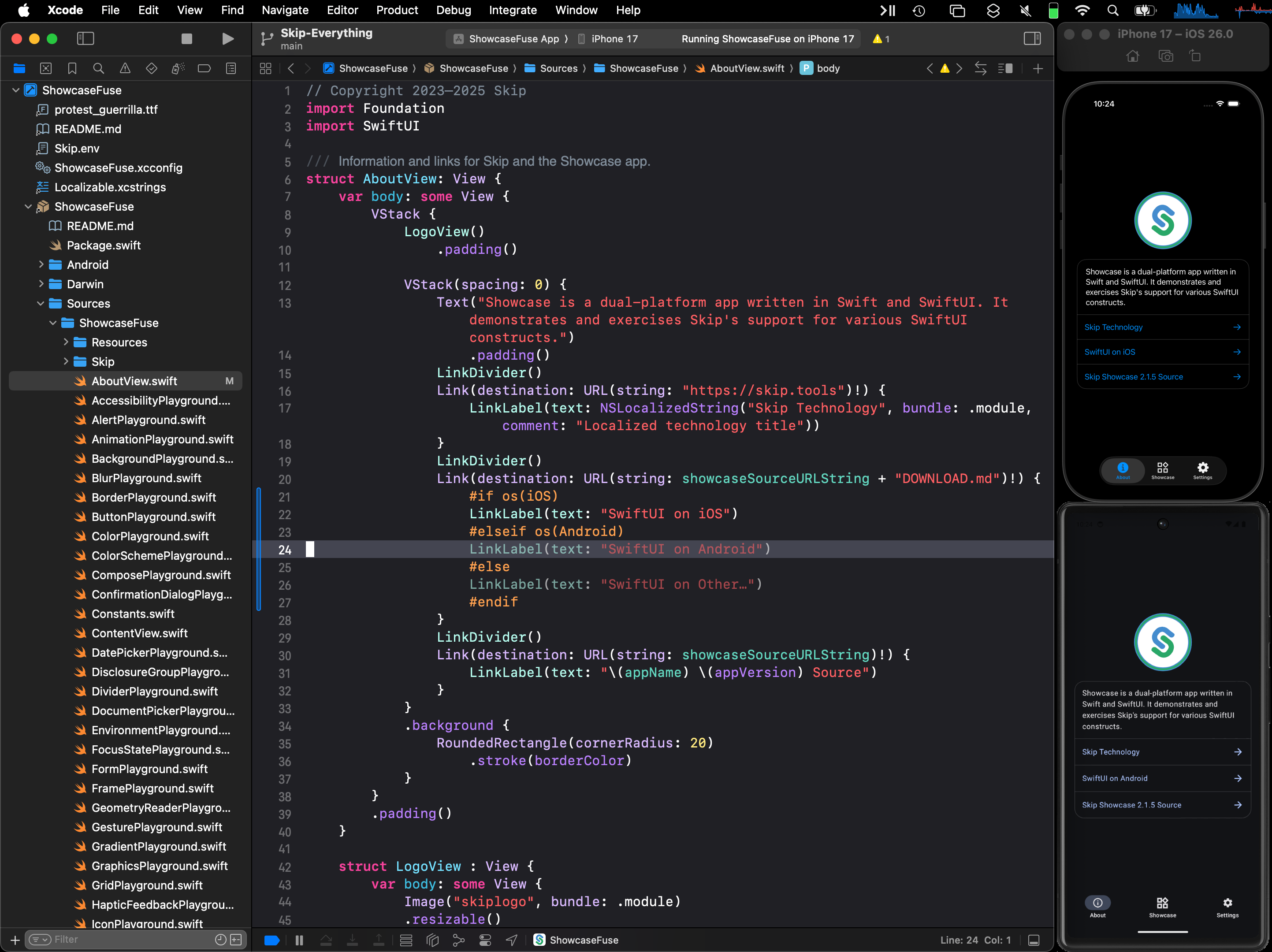


For existing Skip Fuse users, the transition from the preview toolchain is seamless. Our Skip 1.8 release upgrades the default installed Android SDK to install and use the official Swift SDK for Android, and the new skip android sdk upgrade command will automatically upgrade to newer versions when they are released.
As a quick recap of how it all works: Skip Fuse compiles your Swift natively for Android using the official SDK, giving you the full Swift language on both platforms. On the UI side, SkipFuseUI bridges your SwiftUI declarations to Jetpack Compose, producing a genuinely native Android user experience. When your Swift code updates an @Observable, that change propagates transparently into Compose’s reactive system. Your @State, @Binding, and @Environment work identically on both platforms.
For finer-grained integration between Swift the Java or Kotlin libraries, Skip offers multiple avenues: AnyDynamicObject lets you invoke Kotlin and Java APIs from compiled Swift with no code generation, and ComposeView lets you embed custom Jetpack Compose views directly in your SwiftUI hierarchy. And #if SKIP blocks let you write Kotlin inline in your Swift files, with automatic transpilation and bridging. We covered these capabilities in detail in our posts on fully native Swift apps and bringing Swift packages to Android.
The native Swift on Android ecosystem story is also advancing. Over 2,200 Swift packages already build successfully for Android, tracked at the Swift Package Index’s Android platform status ↗. Popular libraries like Alamofire, SwiftSoup, swift-protobuf, and flatbuffers work out of the box. And because Skip can also call Kotlin and Java APIs, your app has access to both ecosystems simultaneously.
A new option for cross-platform development
Section titled “A new option for cross-platform development”For years, the conventional wisdom has been that the best mobile apps require separate Swift and Kotlin codebases. That approach delivers great results, but it is expensive. You are paying two teams, maintaining two implementations of the same business logic, and coordinating releases across two platforms. Even with the assistance of LLM coding agents, maintaining two parallel application codebases is cumbersome and rife with peril. The alternative has traditionally been to adopt a cross-platform framework like React Native or Flutter, which means leaving your native language behind and accepting tradeoffs in performance and platform fidelity.
Swift 6.3 opens a third path. You can now write your app in Swift and ship it natively on both platforms. If you are an iOS developer, the skills, the language, the frameworks, and the packages all transfer. The learning curve is not Kotlin or Dart or JavaScript. It is the Android platform itself, and Skip handles most of that translation for you.
There are two main ways to adopt this:
- Shared business logic: Use the Swift SDK directly to cross-compile your model layer for Android, and keep the UI native on each platform. This may be the most realistic path for “brownfield” projects, where you need to incrementally begin adopting Swift in an existing Android app. It is the technique that was adopted by Naturitas and other platforms, as discussed in the excellent “Android Doesn’t Deserve Swift—But We Did It Anyway!” ↗ talk.
- Full app development with Skip: Write your entire app in Swift and SwiftUI, and let Skip produce the Android version with Jetpack Compose. This is where Skip really shines: the entire app is a single Swift codebase, with shared metadata, resources, and abstractions of common conventions. This option is generally a good fit for greenfield projects, and is our recommended way to started with Skip.
Whichever path you choose, getting started takes minutes. Install Skip, run skip create, and you will have a working dual-platform app building in Xcode and launching on both an iOS simulator and an Android emulator. The template includes a TabView, navigation, data persistence, and a custom Compose view to show how the pieces fit together. Our getting started guide walks through the full setup.
Looking ahead
Section titled “Looking ahead”The remaining challenges for Swift on Android are engineering problems, not existential ones. Binary size (currently around 60 MB for the Swift runtime and Foundation) will shrink as the toolchain matures. Build times will improve. Debugging support will get better. The foundation is now solid and official; the rest is iteration.
The Swift on Android Working Group, which we co-founded and actively contribute to, meets regularly to coordinate SDK development, triage issues, and plan the roadmap. This is not a one-time release. It is the start of an ongoing, community-driven effort with official backing from the Swift project.
For Skip, the 6.3 release energizes our roadmap. We are expanding SkipUI and SkipFuseUI coverage, improving build times, and working with the community to grow the list of Android-compatible Swift packages. The official endorsement of Swift on Android gives us and our users enormous confidence in the path forward.
Cross-platform Swift and SwiftUI have been a dream of ours since we launched Skip three years ago. With Swift 6.3, that dream has official support from the Swift project itself. We are excited about what comes next, and we cannot wait to see what you build.