
Zum Inhalt springen
Skip

Blog

May Skip Newsletter

Welcome to the May edition of the Skip.tools newsletter! This month we will showcase some of the notable improvements to the Skip transpiler and the ecosystem of free and open-source frameworks that power the dual-platform apps that Skip enables.

Early Adopter Pricing Ending Soon

Skip 1.0 is on the horizon, which means that we will be winding down our Early Adopter Program at the end of the month. So now is the time to take advantage of the massive early adopter discount from https://skip.tools/pricing , as Skip will be switching to full pricing next month.

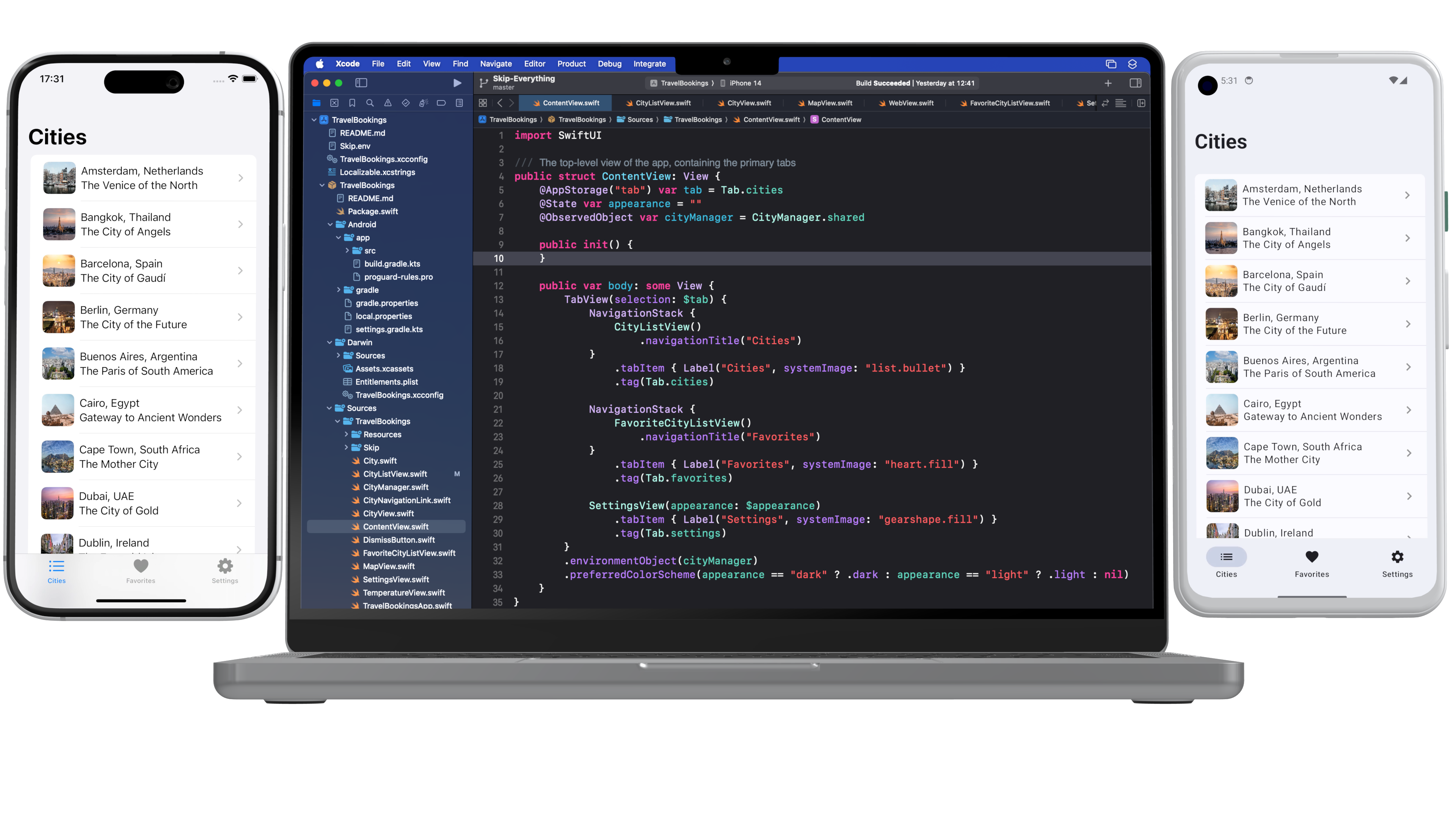
New Sample App: Travel Bookings

We've released a whole new sample application that shows off how Skip can make gorgeous apps for both iOS and Android. The Travel Bookings app demonstrates navigation, tabs, images, persistence, maps, weather, networking, and a whole lot more. Check it out at /docs/samples/skipapp-bookings .
skip-splash-poster.png

Symbols and Images in Asset Catalogs

Images and icons are an essential part of any modern application. Skip has had good support for SwiftUI's AsyncImage for a while now, but we recently also added support for asset catalogs, enabling you to bundle static images and exported symbols directly in your app. And we support many of the common variants for assets, such as light and dark variants for images, as well as different weights for symbols. Read more about the new asset catalog support at /docs/modules/skip-ui/#images .

Major Performance Enhancements

We are delighted to report that we’ve reduced the number of re-compositions SkipUI performs on Android, resulting in a huge performance boost to some common operations like navigation. If your tabs or navigation bar was feeling a bit sluggish, run File / Packages / Update to Latest Package Versions on your project to grab skip-ui 0.9.1 and enjoy the speed boost!

Tip: Embedding Kotlin Calls Directly in Swift

Unlike other cross-platform app development frameworks, custom native integration in Skip is a breeze. Rather than requiring cumbersome bridging infrastructure or platform channels, with Skip you merely add your Kotlin calls in an `#if SKIP` block, and it will be executed directly on the transpiled side. And since Skip does not intrude into the iOS side of your app, you'll continue to be able to integrate with any of the Darwin platform APIs directly, including UIKit and other Objective-C frameworks (as well as C and C++). Read more about the platform customization options at /docs/platformcustomization .

Accessibility Improvements

May 16th was Global Accessibility Awareness Day. Skip celebrated by adding support for many additional SwiftUI accessibility modifiers. Being a truly universal app means not just reaching all the devices that people have, but also making those apps usable by everyone. Skip is proud to enable you to build uncompromisingly excellent apps that can reach the entire world: every device, every language, and every ability.

Take Our Survey!

Our Skip Developer Survey is a great way to provide feedback and help us define Skip's direction in the coming weeks and months. It only takes a few minutes, and will help define Skip's focus and features: https://skip.tools/survey .

Edge-to-edge Mode

In the "Improve the Experience of your Android App" session at Google I/O, the Android team promoted the use of the new edge-to-edge support APIs in Jetpack Compose, saying that “users significantly prefer edge-to-edge screens to non-edge-to-edge screens, and users feel these screens are more satisfying and premium.”

We agree, and so Skip now enables Android edge-to-edge mode by default in all new projects. Use the SwiftUI safe area APIs to control how your content renders under system bars. And you can enable edge-to-edge in existing projects with only a couple lines of code: /docs/modules/skip-ui/#enabling-or-disabling-edge-to-edge .

Skip Webinar Series

Sign up for our Skip webinar to see a hands-on tour of how Skip can help you build apps that reach the entire mobile marketplace. We take questions and answers throughout, so this is a great opportunity to get some direct interaction with the Skip engineers. Sign up at https://skip.tools/webinar/ or watch a past webinar at /tour/ .

Get Your Project Featured

We are assembling a list of Skip projects to feature on our web site. If you have built – or are currently building – an interesting app using Skip, send us an email at support@skip.tools and we may promote it on our customers page! And, as always, we are seeking testimonials from happy Skip users that we can share with the rest of the community.

That's All Folks!

You can follow us on Mastodon at https://mas.to/@skiptools , and join in the Skip discussions at http://forums.skip.dev/ . The Skip FAQ at /docs/faq/ is there to answer any questions, and be sure to check out the video tours at /tour/ .

Happy Skipping!

Negative Padding in Compose

Skip’s open-source SkipUI library implements the SwiftUI API for Android. To do so, SkipUI leverages Compose, Android’s own modern, declarative UI framework.

The parallels between SwiftUI and Compose are striking, especially when it comes to layout. SwiftUI uses HStack, VStack, and ZStack for basic layout, with modifiers like offset and padding to shift or pad the resulting placement. Compose uses Row, Column, and Box for basic layout, and it too has offset and padding modifiers. Compose has one odd omission, however: it doesn’t support negative padding! Supplying a negative value will throw an IllegalArgumentException.

SkipUI must support whatever SwiftUI supports, so internally we’ve replaced the standard Compose padding modifier with our own custom layout that works for both positive and negative values. We present that layout below, in case you find it useful in your own Compose work.

Notes:

  1. SkipUI’s implementation is tied to SwiftUI internals, so this is an untested and simplified port of the actual code.
  2. Important: If you plan to use this in pure Compose code, expose it as a custom modifier for a more fluent API.
@Composable fun PaddingLayout(modifier: Modifier, top: Dp = 0.dp, leading: Dp = 0.dp, bottom: Dp = 0.dp, trailing: Dp = 0.dp, content: @Composable () -> Unit) {
val density = LocalDensity.current
val topPx = with(density) { top.roundToPx() }
val bottomPx = with(density) { bottom.roundToPx() }
val leadingPx = with(density) { leading.roundToPx() }
val trailingPx = with(density) { trailing.roundToPx() }
Layout(modifier = modifier, content = {
// Compose content
content()
}) { measurables, constraints ->
if (measurables.isEmpty()) {
return layout(width: 0, height: 0) {}
}
// Subtract the padding from the available size the content can use
val updatedConstraints = constraints.copy(
minWidth = constraint(constraints.minWidth, subtracting = leadingPx + trailingPx),
minHeight = constraint(constraints.minHeight, subtracting = topPx + bottomPx),
maxWidth = constraint(constraints.maxWidth, subtracting = leadingPx + trailingPx),
maxHeight = constraint(constraints.maxHeight, subtracting = topPx + bottomPx)
)
val contentPlaceables = measurables.map { it.measure(updatedConstraints) }
// Layout within the padded size
layout(width = contentPlaceables[0].width + leadingPx + trailingPx, height = contentPlaceables[0].height + topPx + bottomPx) {
// Offset the content position by the leading and top padding
for (contentPlaceable in contentPlaceables) {
contentPlaceable.placeRelative(x = leadingPx, y = topPx)
}
}
}
}
// Subtract the given amount from a size constraint value, honoring Int.MAX_VALUE and preventing illegal negative constraints.
private fun constraint(value: Int, subtracting: Int): Int {
if (value == Int.MAX_VALUE) {
return value
}
return max(0, value - subtracting)
}

We hope that you find this useful! If you have questions or suggestions for improvements, please reach out to us on Mastodon @skiptools@mas.to, via chat skiptools.slack.com, or in our discussion forums.

The Flutter Kerfuffle

News recently broke that Google is laying off members of the Dart and Flutter teams. At the same time that Microsoft is ending Xamarin support, many Flutter users are left wondering about the future of the technology stack on which they’ve built their apps.

For what it’s worth, we don’t buy into the speculation that Flutter is about the be killed off. While we believe that Skip has the correct approach to cross-platform mobile development, Flutter is an excellent product with a devoted community. A recent post by an insider notes that the Google layoffs were broad and didn’t single out the Flutter and Dart teams. Nevertheless, this episode emphasizes the need to always consider the ejectability of the core technologies you use.

“And every one who hears these sayings of Mine and does not do them will be likened to a foolish man who built his house on the sand.”

A software framework is said to be ejectable if you can remove it without completely breaking your app. Ejectability is not binary: having to remove a given framework might only require you to excise certain features, and some frameworks are easier to replace in our apps than others.

Unfortunately, most cross-platform development tools are not ejectable to any degree. If official Flutter support were end-of-lifed, there would not be any path for Flutter codebases to migrate to another technology stack. Dart is a nice language and Widgets are cool, but Apple is not about to transition from Swift and SwiftUI, nor Android from Kotlin and Jetpack Compose. Languages like Dart and Javascript will forever be “alien” on both iOS and Android, just as Swift and Kotlin will be the primary, supported, and vendor-recommended languages for the foreseeable future.

Flutter apps would continue to work, and the community would likely maintain the Flutter engine and libraries for quite some time. But the pace of integration with the latest Android and iOS features would slow, and businesses who care about the long-term prospects for their apps would look to move on. Unfortunately, their only option would be something seasoned developers avoid for good reason: a complete re-write.

To be clear, we do not believe that Flutter support is going to end any time soon, and the same goes for other popular cross-platform solutions like React Native. But you should also not take the decision to use these frameworks lightly, because they are not ejectable. If support unexpectedly ends - or if a new Apple or Android platform or feature arrives that these non-native frameworks are not able to integrate with - you have no off-ramp.

Skip’s approach to cross-platform development is fundamentally different. You work in a single codebase, but Skip creates fully native apps for each platform: Swift and SwiftUI on iOS, and Kotlin and Compose on Android. This is in keeping with the plainly-stated, unambiguous advice from the platform vendors themselves:

SwiftUI is the preferred app-builder technology -Apple

Jetpack Compose is Android’s recommended modern toolkit -Google

A cross-platform Skip app is a modern iOS app. Your shared code is written in Xcode using Swift and SwiftUI. For example, here is a simple weather model:

import Foundation
struct Weather : Decodable {
let latitude: Double
let longitude: Double
let time: Double
let timezone: String
}
extension Weather {
/// Fetches the weather from the open-meteo API
static func fetch(latitude: Double, longitude: Double) async throws -> Weather {
let url = URL(string: "https://api.open-meteo.com/v1/forecast?latitude=\(latitude)&longitude=\(longitude)&current_weather=true")!
var request = URLRequest(url: url)
let (data, response) = try await URLSession.shared.data(for: request)
return try JSONDecoder().decode(Weather.self, from: data)
}
}

At build time, the Skip tool integrates with Xcode to transpile your iOS codebase into a native Android app written in Kotlin.

As you can see in the sample above, your Swift code does not require any dependencies on Skip. Even integrating Android customization into your app is accomplished without Skip libraries. If you remove all traces of Skip, your iOS app will continue to build and run in Xcode exactly as before.

On the Android side, the Kotlin source code and artifacts that Skip generates are yours, regardless of whether you continue to use Skip. Unlike the iOS app, the translated Android app does rely on Skip libraries to mirror the Foundation, SwiftUI and other Apple APIs that your iOS code likely uses. These libraries, however, are free and open source. Critically, they are not a “runtime” or “engine”. You can continue to use them - or not - without hampering your ability to expand the app and integrate new Android features.

Here is the Kotlin that Skip generates from the sample weather model above. It is not significantly different than Kotlin you’d write by hand. It is longer than the source Swift only because Kotlin does not have built-in JSON decoding, so Skip must add it. (SwiftUI code translated to Skip’s Compose-based UI library for Android is much less idiomatic. If you stopped using Skip you’d likely want to migrate to pure Compose over time, but there would be no immediate need to do so.)

import skip.foundation.*
internal class Weather: Decodable {
internal val latitude: Double
internal val longitude: Double
internal val time: Double
internal val timezone: String
constructor(latitude: Double, longitude: Double, time: Double, timezone: String) {
this.latitude = latitude
this.longitude = longitude
this.time = time
this.timezone = timezone
}
constructor(from: Decoder) {
val container = from.container(keyedBy = CodingKeys::class)
this.latitude = container.decode(Double::class, forKey = CodingKeys.latitude)
this.longitude = container.decode(Double::class, forKey = CodingKeys.longitude)
this.time = container.decode(Double::class, forKey = CodingKeys.time)
this.timezone = container.decode(String::class, forKey = CodingKeys.timezone)
}
companion object: DecodableCompanion<Weather> {
/// Fetches the weather from the open-meteo API
internal suspend fun fetch(latitude: Double, longitude: Double): Weather = Async.run l@{
val url = URL(string = "https://api.open-meteo.com/v1/forecast?latitude=${latitude}&longitude=${longitude}&current_weather=true")
var request = URLRequest(url = url)
val (data, response) = URLSession.shared.data(for_ = request)
return@l JSONDecoder().decode(Weather::class, from = data)
}
override fun init(from: Decoder): Weather = Weather(from = from)
private fun CodingKeys(rawValue: String): CodingKeys? {
return when (rawValue) {
"latitude" -> CodingKeys.latitude
"longitude" -> CodingKeys.longitude
"time" -> CodingKeys.time
"timezone" -> CodingKeys.timezone
else -> null
}
}
}
private enum class CodingKeys(override val rawValue: String, @Suppress("UNUSED_PARAMETER") unusedp: Nothing? = null): CodingKey, RawRepresentable<String> {
latitude("latitude"),
longitude("longitude"),
time("time"),
timezone("timezone");
}
}

You can see more examples of the Swift-to-Kotlin translation in our Transpilation Reference.

Skip is fully ejectable. When you eject Skip, you are left with a native iOS app and a native Android app, both using their respective platform vendor-recommended technologies. You can immediately continue to iterate on these apps, with no rewrites and no pause in your ability to integrate new platform features.

We believe that Flutter’s future is secure, despite what some commentary has speculated. You should, however, carefully consider ejectability alongside the many other factors that go into choosing the cross-platform framework that’s right for your business needs.

Scrolling like it's 2008

Back in 2008 when Abe and I were working on our first iPhone app Stanza, there was a very influential blog post by Loren Brichter, the developer of a popular Twitter client app (back when such things were not only permitted, but encouraged), titled: ”Fast Scrolling in Tweetie1”, which opened with:

Scrolling is the primary method of interaction on the iPhone. It has to be fast. It has to be fast.

This is as true in 2024 as it was in 2008. Which makes it all the more surprising that people are still shipping apps that exhibit scrolling issues. Animation jank, muddy inertia, and dropped frames are among the most common issues that plague applications that were built with frameworks that eschew the platform-native list controls and decide to re-invent the wheel. Scrolling is one of the most commonly cited examples of these apps feeling to users like they are in the “uncanny valley” – that oft-indescribable sense that an app feels not quite right.

Back in 2008, making a high-performance list control for iOS could be quite an involved chore. Anyone who recalls fighting with UIKit’s UITableView and all its warts will remember with a shudder just how persnickety the control could be, and how painful coordinating the mess of Objective-C data sources and delegates would invariably become.

Thankfully, the emergence of SwiftUI in 2019 meant that creating a buttery-smooth list control with thousands of elements is as simple as 5 lines:

List {
ForEach(1..<1_000) { i in
NavigationLink("Item \(i)", value: i)
}
}
This example is lifted directly out of the project generated by skip init, as shown in the getting started guide. Run this on your iPhone and fling-scroll the list to your heart's content: never a stutter or pause to be found, and the physics of the interaction feel perfectly correct for the device. This is because SwiftUI's List doesn't re-invent the underlying UIKit list components, but rather it manages them for you. All the complexity and error-prone bookkeeping of the underlying UIKit controls are automatically taken care of.

On the Android side, the equivalent Jetpack Compose list control is a LazyColumn. Compose names are different from SwiftUI, but the effect is the same – you can create a silky-smooth list control with just this 5-line snippet:

LazyColumn {
items(List(1000) { it }) { item ->
Text(text = "Item ${item}")
}
}

And in the same way as SwiftUI’s List wraps and manages the underlying UIKit family of Objective-C classes, Compose’s Kotlin LazyColumn sidesteps having to use the Java RecyclerView and LinearLayoutManager classes from the older Android SDK and manages all the complexity of displaying a high-performance list of items. When coming from the old-school imperative APIs, creating user interfaces with the modern declarative style is a breath of fresh air.

The fact that these vendor-supported toolkits – SwiftUI and Compose – are built atop the platform-native scrolling mechanics stands in contrast with some of the other cross-platform frameworks created in “alien” languages like Dart and JavaScript, that instead attempt to implement all this complexity on their own.

Back in 2012, Benjamin Sandofsky wrote about “The Framework Tax2”:

For native apps, performance is critical to a great user experience. Users notice jerky scrolling, and performance can make or break a feature

Back then, the popular solutions purporting to simplify cross-platform app development were simple WebView-based wrappers designed to make JavaScript and HTML look and feel like a real app. These particular attempts have fallen out of fashion and have been replaced by newer offerings like Flutter, React Native, and Xamarin that use Dart, JavaScript, and C# (respectively) to attempt to abstract away the platform-native frameworks and provide their own homogeneous API for developers to create their apps with.

But what hasn’t changed is that each of these attempts still adds a layer of indirection and overhead to the app, as has been analyzed and confirmed by academic research3. They all require writing your app in a separate language and IDE, and then bundling the distributed app with a separate garbage-collected runtime layer, as well as often including a graphics engine that performs the low-level drawing. All of these frameworks introduce overhead: battery-killing inefficiencies4, pauses from garbage-collection, animation jank from the graphics technology5, or friction resulting from bridging between an alien language and the platform’s native language. For an overview of these issues, see our Skip comparison page.

And that’s the difference with Skip: when you create your app using Skip, you are coding directly to Apple’s SwiftUI – in Swift – on iOS, and transpiling directly Google’s Jetpack Compose – in Kotlin – on Android. These are the official, vendor-recommended languages and toolkits for creating modern apps. They are as fast as they can conceivably be, and they will continue to be supported by the platform vendors in perpetuity. By transpiling your Swift into Kotlin, Skip avoids the overhead of abstracting the platform from an alien language, but instead embraces each platforms’s strengths and performance potential.

That’s why we are convinced that Skip is the right approach for creating mobile apps while still retaining the benefit of a single codebase. Quite simply, it enables your app to be the uncompromisingly best experience it can possibly be. So go ahead: scroll like it’s 2008, when the mobile world was new, apps were fast, and Tweetie was all the rage!

After writing this, Abe informed me that not only did he, while at Twitter, architect the transition from Loren Brichter’s CoreGraphics-based drawing to UIKit Views in the Twitter app, but he also happened to be working with Benjamin Sandofsky at the time as well. I had no idea. Small world! {: style=“font-size: 0.8em;”}

  1. Archive of “Fast Scrolling in Tweetie”: https://web.archive.org/web/20111201182613/http://blog.atebits.com/2008/12/fast-scrolling-in-tweetie-with-uitableview

  2. “Shell Apps and Silver Bullets” by Benjamin Sandofsky: https://www.sandofsky.com/cross-platform/

  3. Jozef Goetz and Yan Li. “Evaluation of Cross-Platform Frameworks for Mobile Applications.” In: International Conference on Engineering and Applied Science https://www.researchgate.net/publication/327719390_Evaluation_of_Cross-Platform_Frameworks_for_Mobile_Applications

  4. Thomas Dorfer, Lukas Demetz, and Stefan Huber. “Impact of mobile cross-platform development on CPU, memory and battery of mobile devices when using common mobile app features.” https://www.sciencedirect.com/science/article/pii/S1877050920317099

  5. Damian Białkowski and Jakub Smołka. “Evaluation of Flutter framework time efficiency in context of user interface tasks.” In: Journal of Computer Sciences Institute 25 https://ph.pollub.pl/index.php/jcsi/article/view/3007

April Skip Newsletter

Welcome to the April edition of the Skip.Tools Developer Program newsletter!

Skip is the first tool that enables you to build a genuinely native app for both iPhone and Android with a single Swift codebase. This month we have some exciting news, new features and frameworks, and some brand new content for app developers. Let's dive right in!

Early Adopter Discount

First off, we are pleased to announce that the Skip Early Adopter program, which we unveiled last month, is in full swing. For a limited time, the Skip Professional developer program is 50% off, and the Skip Small Business program is 100% off! That's right, if you are a qualifying small business or non-profit, Skip is completely free for the first year.

Take our Developer Survey

We're looking for feedback on the technologies that people are using to build their apps and what features are most important to them. The survey is quick and fun, and lets you have a direct influence over the Skip roadmap during our Early Adopter phase: https://skip.tools/survey

Skip on the Compile Swift Podcast

Abe and Marc were delighted to be invited back to Peter Witham's excellent Compile Swift podcast, where they discussed the present and future directions for Skip, and dove into some interesting technical details of Skip's inner workings, including the secrets to the unbeatable performance of apps that are built using Skip. Check it out at: /blog/skip-on-compile-swift-podcast

Updated Comparison Table

We truly believe Skip is the best way to build mobile applications that reach the entire marketplace. No other solution offers the same level of user interface polish, raw performance, and seamless integration with the native platform interfaces. We've updated our comparison table to highlight some of the benefits of Skip over alternatives like Flutter, React, and other legacy solutions: /compare

Skip Module Updates

Skip is more than just a transpiler – it is also an ecosystem of modular frameworks that work identically on both iOS and Android. The open-source frameworks that are maintained by the Skip team are all located at https://github.com/skiptools . Here's a small sample of some of the recent updates to some of our core frameworks:

  • Lottie animations The updated SkipMotion packages enables you to include Lottie animations directly in both your iOS and Android apps. With its impeccably smooth rendering, Lottie has become the de-facto solution for adding whimsy and delight to mobile apps. Discover more about the module at  /docs/modules/skip-motion  and see the sample application at  /docs/samples/skipapp-lottiedemo
  • Firebase Firestore Firebase is one of the most popular solutions for storing and synchronizing your data between your devices and the cloud. Our SkipFirestore module is the first part of a comprehensive SkipFirebase package, and sits atop the official Kotlin and Swift Firebase libraries maintained by Google. Read more about the package at  /docs/modules/skip-firebase  and take a look at the "FireSide" sample app at  /docs/samples/skipapp-fireside
  • Native SQL The SkipSQL package was recently updated to facilitate using either the vendor-provided sqlite libraries (thereby keeping your app size low), or embedding a full native SQLPlus build, which enables many of the great sqlite extensions that the community has provided over the years: full-text search, encryption, and advanced JSON functions. Read the full documentation at  /docs/modules/skip-sql  and check out the "Data Bake" sample app at  /docs/samples/skipapp-databake

Get Your Project Featured

We are assembling a list of Skip projects to feature on our web site. If you have built – or are currently building – an interesting app using Skip, send us an email at support@skip.tools and we may promote it on our customer stories page! And, as always, we are seeking testimonials from happy Skip users that we can share with the rest of the community.

Evaluation Period Extended

For those of you who have signed up for the Skip eval over the past 12 months, we have great news: you can now extend your evaluation period for one additional 30-day trial period. No action is required on your part, you can simply return to https://skip.tools/eval  and request a new key for your host ID, and you will have another 30 days to try out Skip on your project.

That's All Folks!

You can follow us on Mastodon at https://mas.to/@skiptools , and join in the Skip discussions at http://forums.skip.dev . The Skip FAQ at /docs/faq  is there to answer any questions, and be sure to check out the video tours at /tour .

Happy Skipping!