
Getting Started
Esta página aún no está disponible en tu idioma.
-
Skip is installed and updated using the popular Homebrew package management tool, which can be installed from brew.sh ↗. Once Homebrew has been setup, install Skip by running the Terminal command:
Terminal window brew install skiptools/skip/skipThis will download and install the
skiptool itself, along with the Android SDK andgradlebuild tool that is necessary for building and running the Android side of your apps. -
You can ensure that the basic development prerequisites are satisfied by running:
Terminal window skip checkup[✓] Skip version 1.7.0 (= 1.7.0)[✓] macOS version 15.7.2 (> 13.5.0)[✓] macOS architecture: ARM[✓] Swift version 6.2.3 (> 5.9.0)[✓] Swiftly version 1.0.1 (> 1.0.0)[✓] Xcode version 26.2 (> 15.0.0)[✓] Xcode tools SDKs: 5[✓] Homebrew version 5.0.9 (> 4.1.0)[✓] Gradle version 9.2.1 (> 8.6.0)[✓] Java version 25.0.1 (> 17.0.0)[✓] Android Debug Bridge version 1.0.41 (> 1.0.40)[✓] Resolve dependencies (10.43s)[✓] Build hello-skip (56.08s)[✓] Test Swift (15.43s)[✓] Test Kotlin (26.19s)[✓] Check project schemes (5.65s)[✓] Archive iOS ipa (13.13s)[✓] Assemble HelloSkip-debug.ipa 175 KB[✓] Verifying HelloSkip-debug.ipa: 175 KB[✓] Assembling Android apk (61.1s)[✓] Verify HelloSkip-debug.apk: 80 MB[✓] Check Skip Updates: 1.7.0[✓] Skip checkup succeeded in 190.21sIf the installation or checkup fails, try running again with
skip checkup --verboseto get more details, and check the FAQ for common solutions or reach out to the community on Slack or the Discussion Forums ↗. -
Create a new Skip app project with:
Terminal window skip createYou will be guided through a series of questions about the app you want to create. The first two are especially important:
- App or Library? The App option creates a single Swift and SwiftUI app that uses Skip’s Xcode plugin to automatically build for Android. The Library option creates a Swift library that you can use in a unified Skip app, or use as shared business logic in separate iOS and Android apps. Neither option prevents you from using a combination of Swift and Kotlin, SwiftUI and Compose in your final application.
- Skip Fuse or Skip Lite? Information about the different modes can be found in the Native and Transpiled Modes documentation. In this example, we create a Skip Fuse app, which uses the official Swift SDK for Android ↗.
If you’re new to Skip, we recommend starting your exploration with an App project. An example session for creating a
hello-skip/HelloSkipproject (which generates a project identical to the minimal Skip Fuse sample app ↗ or Skip Lite sample app ↗) might look like:Terminal window $ skip createWelcome to Skip!Select type of project to create:1: App: mobile application for Android and iOS2: Library: library project with one or more modulesEnter selection (default: App) [1..2] 1Select the mode of the project:1: Skip Fuse: natively compiled project2: Skip Lite: transpiled projectEnter selection [1..2] 1Enter the project-name for the App: hello-skipEnter the CamelCase name of the App module: HelloSkipOptionally enter additional module names:Enter the app bundle identifier: com.example.HelloSkipCreate a free open-source project? (y/n) [n]: nInitialize git repository for the project? (y/n) [n]: nInitialize a Fastlane configuration for the project? (y/n) [y]: yPre-build the project? (y/n) [y]: yInstall the Swift Android SDK? (y/n) [y]: yOpen the Xcode project after initialization? (y/n) [y]: y[✓] Install Swift Android SDK (48.4s)[✓] Resolve dependencies (12.12s)[✓] Build hello-skip (53.35s)[✓] Check project schemes (6.12s)[✓] Archive iOS ipa (17.18s)[✓] Assemble HelloSkip-debug.ipa 1 MB[✓] Verifying HelloSkip-debug.ipa: 1 MB[✓] Assembling Android apk (78.91s)[✓] Verify HelloSkip-debug.apk: 80 MB[✓] Opening Xcode project (0.10s)[✓] Skip create succeeded in 168.63sYou can alternatively create a Skip project using the non-interactive
skip initcommand, as described in the command line reference. -
Once your app pre-builds and opens in Xcode, you are almost ready to go. One more step is needed, which is to create and launch an Android emulator (which is the Android equivalent of the iPhone Simulator and is used for local app development). The
skiptool has a command to quickly install and configure an Android emulator for your project:Terminal window skip android emulator create[✓] Configure Android SDK Manager (1.55s)[✓] Install platform-tools (0.77s)[✓] Install emulator (0.75s)[✓] Install platforms;android-34 (0.76s)[✓] Install system-images;android-34;google_apis;arm64-v8a (0.75s)[✓] Create emulator: emulator-34-medium_phone (0.76s)[✓] Create Android emulator succeeded in 5.35sOnce this command completes successfully, you will have an Android emulator installed, which you can launch and observe the logging output with:
Terminal window skip android emulator launch -
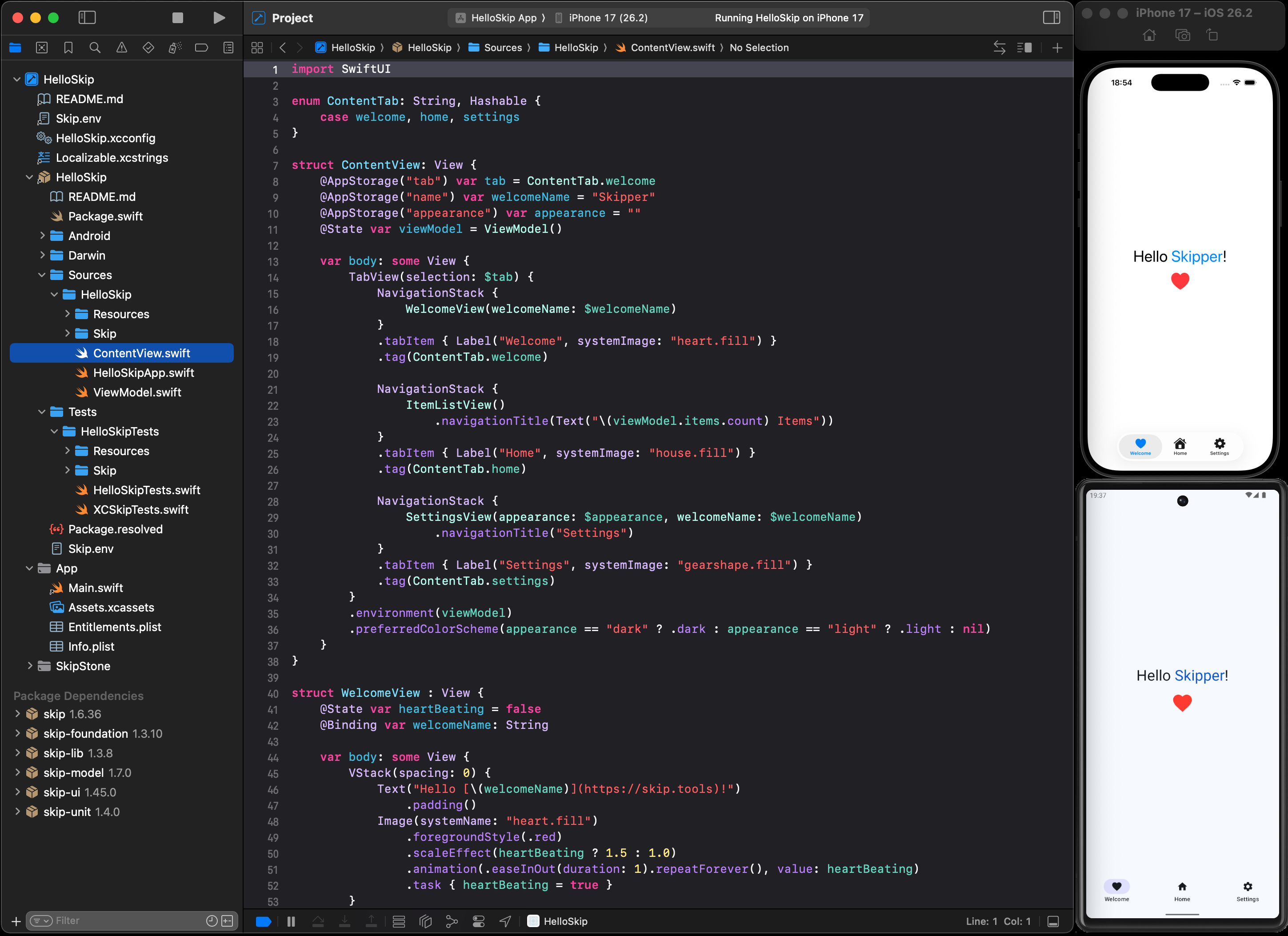
Now you should be ready to launch your new app! In Xcode, ensure the “HelloSkip App” scheme is selected along with a simulator destination (e.g., “iPhone 17”), and then Run the scheme.
You may be prompted to “Trust and Enable” the Skip plugin, and then the project will build and launch simultaneously on both the iPhone Simulator and Android Emulator.
Next Steps
Section titled “Next Steps”Congratulations! You have created and launched you first dual-platform app. At this point, you should tinker with the project, making changes and re-launching the app to get a feel for how Skip compliments your normal edit-build-run cycle for app development.
From here you should proceed to:
- Join the Skip Slack to connect with the Skip developer community.
- Peruse the Skip Sample Apps to see common design patterns and best practices.
- Check the Swift Package Index ↗ to see if your favorite Swift packages are among the thousands available for Android, and browse the various Skip Integration Frameworks to unlock additional capabilities for your dual-platform app.
- Read about the advantages of Skip over other cross-platform frameworks like Flutter and React Native in our Comparison Guide.
- Read the App Development documentation to learn about developing with Skip.
- Explore the other Project Types that can be created with Skip, including multi-module apps, transpiled apps, and sharing business logic in separate iOS and Android apps.
- Consider whether Skip Fuse or Skip Lite is the best fit for your project needs.
- Review the Glossary of Terms to familiarize yourself with some of the new and unfamiliar terminology you may encounter while using Skip for Android app development.
- If you have an existing app you want to bring into Skip, read the Migration Guide.
Updating Skip
Section titled “Updating Skip”To update the skip command line tool to the latest version:
skip upgradeTo update your Xcode project to use the latest version of the Skip plugin and libraries allowed by your Package.swift configuration, use the File -> Packages -> Update to Latest Package Versions Xcode menu option.
Additional Resources
Section titled “Additional Resources”- Use
skip helpfor a complete list ofskiptool commands, and see the command line reference. - Check the general help page for troubleshooting and contact information.
- Continue browsing this documentation to learn more about developing with Skip.